> ## Documentation Index
> Fetch the complete documentation index at: https://developer.voyado.com/llms.txt
> Use this file to discover all available pages before exploring further.
# Interactions
Interactions functionality is available for Engage customers who are using the paid add-on component Incentives.
An interaction in Engage is some happening or event that you want to save to a specific contact in Engage. For example, an interaction could be used whenever a contact:
* Writes a review
* Posts on Instagram
* Refers a friend
* Reuses or repairs something
* Marks an item as a favourite
Interactions provide an additional way to collect data that can be used to understand and engage the consumer. Interactions are intended for events that can't be collected in other ways. Things like purchases, returns, NPS and so on that already have their own pathways into Engage should not use Interactions.
## Interactions data structure
An Engage interaction is a dynamic object, meaning that the data in an interaction does not need to be set by Voyado, but instead can be customized through a schema provided by the customer. An interaction is different from an *activity* in Engage. Activities have only one data type, and are imported through XML, whereas interactions can be fully customized and use the API.
You can use the data collected through interactions in a number of ways:
**Segmentation:** Create segmentations based on the number of times or the time when an interaction was received in Engage.
**Contact card:** In the tab "Interactions" you can get an overview of which interactions a contact has received.
**Automations:** Set up an automation flow using the triggers "New Interaction" (any interaction being received for the first time) or "New specific interaction" (an interaction of a specific schema, with a specific value, being received for the first time).
Interactions are primarily meant for tracking of events connected to contacts and their interaction with the retailer. There should be a marketing or loyalty purpose with using interactions, not just data transfer and/or storage. While there are no exact limits on the amount or frequency of data, Voyado reserves the right to restrict data volume in cases of excessive use.
## Interactions API
Interactions use two dedicated endpoints.
* /interactionschemas
* /interactions
### The interactionschemas endpoint
This is used to define the interaction schemas your interactions can use:
```http Get all interaction schemas defined theme={null}
GET api/v3/interactionschemas
```
```http Add new interaction schema theme={null}
POST api/v3/interactionschemas
```
```http Delete a specific interaction schema theme={null}
DELETE api/v3/interactionschemas/{interactionSchemaId}
```
```http Get a specific interaction schema theme={null}
GET api/v3/interactionschemas/{interactionSchemaId}
```
An UPDATE does not exist for this endpoint, meaning that once it's created, an interaction schema can't be altered. However, you can delete an interaction schema and then submit a new one with the same ID. The new schema must be backward compatible with the deleted one.
Deletion of an interaction schema will lead to deletion of *all* interactions based on that schema for all contacts, even if you recreate it after using the same identifier.
Any automation triggers set up for a schema that has been deleted will result in errors/deadletters and automation flows that do not progress. But as soon as a schema with the same ID is put back in, the automation will work as before, provided the changes made are backward compatible (meaning that no properties present in the schema are removed in the updated version).
### The interactions endpoint
This endpoint concerns the individual interactions (interaction events) sent to Engage. Such an interaction is always linked to a specific contact and a specific interaction schema.
```http Get interactions for specific schema and contact theme={null}
GET api/v3/interactions
```
```http Get single interaction by ID theme={null}
GET api/v3/interactions/{interactionId}
```
```http Create interaction for specific contact and schema theme={null}
POST api/v3/interactions
```
```http Deletes specific interaction theme={null}
DELETE api/v3/interactions/{interactionId}
```
## Creating a schema
The interaction, its data and identifier, are defined in a *JSON schema*. Read more about the formatting standards [at this page](https://json-schema.org/understanding-json-schema). Once the schema is created, it must then be posted to the API, after which interactions that follow that schema can be used.
Here is an example of a schema:
```json theme={null}
{
"id": "Reuse-Spring-2023",
"displayName": "Reuse Spring Sale",
"jsonSchema": {
"$schema": "https://json-schema.org/draft/2020-12/schema",
"type": "object",
"properties": {
"price": {
"type": "integer",
"displayName": "Price",
"showInContactCard": "true",
"sortOrder": "1"
},
"purchase-timestamp": {
"type": "string",
"format": "date-time",
"displayName": "Purchase timestamp",
"showInContactCard": "true",
"sortOrder": "2"
},
"name": {
"type": "string",
"displayName": "Name",
"showInContactCard": "true",
"sortOrder": "0"
}
},
"required": [
"name"
]
}
}
```
The identifier for this schema, **must** be unique. Can only contain the characters a-z, A-Z, 0-9, underscore (\_) and dash (-). For example: "Autumn-campaign\_2023" is allowed, but "Höst-kampanj\_2023" is not.
The name that will be displayed in the Engage UI for this kind of interaction.
The body of the actual schema.
This must have the value shown.
This must be "object" as shown.
Containing the properies as objects.
Each property object defined has the following fields:
This is either "string", "number", "integer" or "boolean".
This is optional and defines which format the attribute must have. For example, the "purchase-timestamp" attribute is of type "string" with a format of "date-time", so only strings in the format "2018-11-13T20:20:39+00:00" will be allowed. [Read more here](https://json-schema.org/understanding-json-schema/reference/string.html#format) about the various formats.
What is shown in the Engage UI for this property.
This is "true" if this property is to be displayed on the contact card.
This is "true" if this property can be used in segmentation in Engage (see the section on segmentation below).
An integer which determines in which column on the contact card this property will be displayed. The leftmost column has sortOrder value of 0, the next to the right has 1, and so on.
Deeply nested JSON structures are not currently supported. Don't use more levels than shown in the example.
The schema JSON you build is then sent to this endpoint as the body of the request:
```http theme={null}
POST api/v3/interactionschemas
```
If successful, this new kind of interaction as defined by this schema is ready to use.
## Sending an interaction
Once the schema has been accepted by Engage, you can start sending that kind of interaction. Every interaction must be linked to a specific Engage contact. This interaction uses the schema defined above:
```json theme={null}
{
"contactId":"cf6d21fa-6e2b-481c-ab38-afa1012233ff",
"schemaId": "Reuse-Spring-2023",
"createdDate": "2023-05-23711:13:42.074Z",
"payload":{
"price": 100,
"type": "Jeans",
"name": "Reused Item"
}
}
```
The `createdDate` field, if not specified in the payload, will be automatically set to the current timestamp.
This is sent as the body of a request to the following endpoint:
```http theme={null}
POST api/v3/interactionschemas
```
If a property in the payload does not match the schema, that property will not be sent to Engage, but will still be saved in blob storage.
If the interaction does not follow the rules of the schema, it will be ignored.
Upon acceptance, a unique ID for this interaction will be returned. This can then be used to retrieve that specific interaction again, if that is ever needed, through the endpoint:
```http theme={null}
GET api/v3/interactions/{interactionId}
```
## The productSku property
Many customer interactions are events where a product might be involved, for example, a product review or repair. Product metadata - such as category, brand, dimensions - might be useful in these cases for personalisation in email communication or other purposes. Therefore you should always add all this data to the schema.
It is good practice to also indicate which product is the subject of the interaction with the reserved property name `productSku` since Engage might later on develop functionality around this, automatically enriching the interaction product metadata.
The `productSku` property is a string value.
## Use cases of interactions
Here are some use case examples of interactions, with example schemas.
If your customers are identified online, either via [Voyado Soft Identification](/docs/contacts/identify-contact/soft-identification) or a login, you can track their behaviour. This is especially useful if they are showing an interest in a product on your e-com site. The schema used will be something like this:
```json theme={null}
{
"id": "wishlist",
"displayName":"Wishlist",
"jsonSchema": {
"$schema": "https://json-schema.org/draft/2020-12/schema",
"type": "object",
"properties": {
"date": {
"type": "string",
"format":"date-time",
"displayName": "Date",
"showInContactCard": "true"
},
"productSku": {
"type": "string",
"displayName": "SKU",
"showInContactCard": "true"
} //Product name, product category, brand, price, eco label
}
}
}
```
If your business deals with wholesale purchases via resellers you can include post-purchase registration of that product to see what your customers have bought regardless of channel. A typical scenario could be a QR code that leads to landing page for this registration and identification for the customer, with the purchase/product data tracked to Engage as an interaction like this:
```json theme={null}
{
"id": "wholeSalePurchase",
"displayName":"Whole sale purchases",
"jsonSchema": {
"$schema": "https://json-schema.org/draft/2020-12/schema",
"type": "object",
"properties": {
"date": {
"type": "string",
"format":"date-time",
"displayName": "Date of purchase",
"showInContactCard": "true"
},
"productSku": {
"type": "string",
"displayName": "SKU",
"showInContactCard": "true"
}, //Product name, product category, brand, price, eco label, size
"pricePaid": {
"type": "number",
"displayName": "Price paid",
"showInContactCard": "true"
},
"source": {
"type": "string",
"displayName": "Source of purchase",
"showInContactCard": "true"
}
}
}
}
```
Interactions could be used to reward customers for making sustainable choices, such as repairing items. If you are tracking repairs of garments or other products in some system, you might want to give the customer some benefits from their actions.
For this, you'll need to send those events to Engage. An interaction to use might look like this:
```json theme={null}
{
"id": "repair",
"displayName":"Repair",
"jsonSchema": {
"$schema": "https://json-schema.org/draft/2020-12/schema",
"type": "object",
"properties": {
"registrationDate": {
"type": "string",
"format":"date-time",
"displayName": "Registration date",
"showInContactCard": "true"
},
"productModel": {
"type": "string",
"displayName": "Product model",
"showInContactCard": "true"
},
"brand": {
"type": "string",
"displayName": "Brand",
"showInContactCard": "true"
},
"productId": {
"type": "string",
"displayName": "Product ID",
"showInContactCard": "true"
},
"storeName": {
"type": "string",
"displayName": "Store name",
"showInContactCard": "true"
},
"storeId": {
"type": "string",
"displayName": "Store ID",
"showInContactCard": "true"
},
"isFreeRepair": {
"type": "boolean",
"displayName": "Free repair",
"showInContactCard": "true"
}
}
}
}
```
If your business involves second hand products, you could use a schema like this to track them:
```json theme={null}
{
"id": "preownedProduct",
"displayName":"Pre-owned",
"jsonSchema": {
"$schema": "https://json-schema.org/draft/2020-12/schema",
"type": "object",
"properties": {
"date": {
"type": "string",
"format":"date-time",
"displayName": "Date",
"showInContactCard": "true"
},
"productSku": {
"type": "string",
"displayName": "Product SKU",
"showInContactCard": "true"
}, //Product name, product category, brand, price, eco label
"size": {
"type": "string",
"displayName": "Size",
"showInContactCard": "true"
},
"condition": {
"type": "string",
"displayName": "Condition",
"showInContactCard": "true"
},
"storeDropOff": {
"type": "boolean",
"displayName": "Store drop off",
"showInContactCard": "true"
},
"reimbursement": {
"type": "number",
"displayName": "Reimbursement",
"showInContactCard": "true"
},
"storeName": {
"type": "string",
"displayName": "Store name",
"showInContactCard": "true"
},
"storeId": {
"type": "string",
"displayName": "Store ID",
"showInContactCard": "true"
}
}
}
}
```
If you have a system in place to recycle products, you could track the customer's recycling activity with this schema:
```json theme={null}
{
"id": "recycled",
"displayName":"Recycled",
"jsonSchema": {
"$schema": "https://json-schema.org/draft/2020-12/schema",
"type": "object",
"properties": {
"date": {
"type": "string",
"format":"date-time",
"displayName": "Date",
"showInContactCard": "true"
},
"dropOffPoint": {
"type": "string",
"displayName": "Drop off point",
"showInContactCard": "true"
},
"quantity": {
"type": "number",
"displayName": "Quantity",
"showInContactCard": "true"
},
"type": {
"type": "number",
"displayName": "Type of recycling",
"showInContactCard": "true"
}//Batteries, electronic waste, aerosol etc
}
}
}
```
You could use interactions to reward behaviors such as:
* **Reviews or surveys**: Track the number of product reviews your customers have made.
* **Referrals**: Track if you customers are making your database grow through referral recruitment.
## As a placeholder for storing objects
The interactions entity can be seen as a log of events connected to a contact. Interactions stored for a contact can't be changed once saved, although they can be deleted. The Engage interactions schema also allows a retailer to collect data on anything else that could be encoded as an interaction, for example the cars owned by a specific contact.
### Example: Subscriptions
A retailer's business might involve subscription-based services. The events involved when such a subscription starts, changes or ends can easily be expressed as interactions.
It's possible to save the active subscription to a contact as a specific interaction type and then delete it when it is no longer valid. This allows the Engage user to segment customer with a specific number of subscriptions active. All the detailed information could be put into the interaction schema as properties, either for display in the Engage contact card or for use in automations.
For targeting, however, this is somewhat limited in that Engage can’t tell how many active subscriptions a contact has at any one time.
### Example: Custom attributes
It's possible to encode objects and their properties as multiple custom attributes. This allows an easier way to deal with having different properties for each instance of an object. The contact model is given a set of fields, some of which might be empty.
For example:
1. Car1-type, Car1-brand, Car1-year
2. Car2-type, Car2-brand, Car2-year
3. Car3-type, Car3-brand, Car3-year
4. Car3-type, Car3-brand, Car3-year
A limitation here is that it becomes cumbersome to segment based on how many of an object a contact has.
## Personalizing messages
You can use individual data points from an incoming interaction to personalize your send-outs. To do this you'll need the ID of the specific interaction schema.
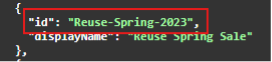 In this case, this is the string "Reuse-Spring-2023".
You'll also need the name of the property in the interaction that you'd like to insert into your send-out:
In this case, this is the string "Reuse-Spring-2023".
You'll also need the name of the property in the interaction that you'd like to insert into your send-out:
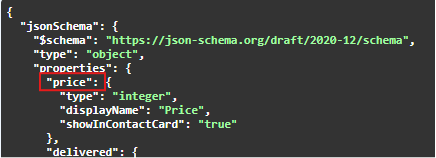 In this example, we want to insert the "price" value.
Once you know the interaction schema ID and the property name, combine them like this in the email editor (this shows the classic email editor):
In this example, we want to insert the "price" value.
Once you know the interaction schema ID and the property name, combine them like this in the email editor (this shows the classic email editor):
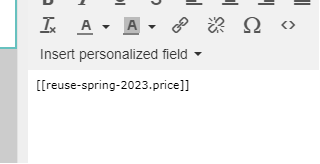 You'll need to lower-case the interaction schema ID. This was "Reuse-Spring-2023" in the interaction, but in the editor you'll write "reuse-spring-2023" as shown above.
## Interaction segmentation
The interaction Segmentation functionality described here is not yet on general release. Contact Voyado if you are interested in using it.
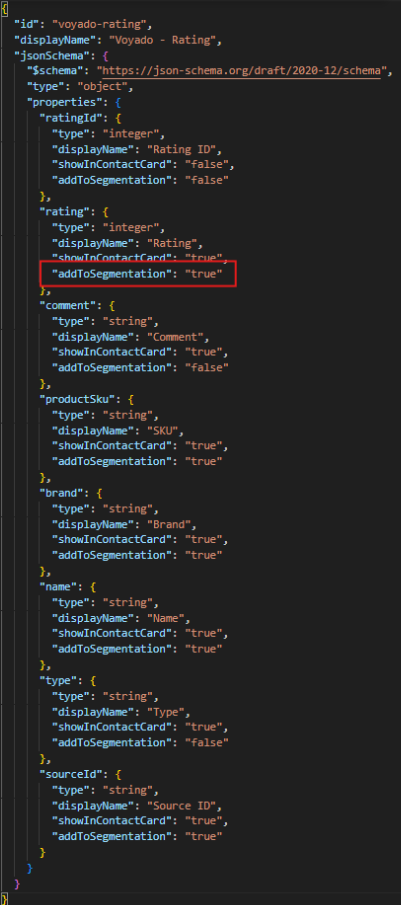
The property `addToSegmentation` can be used in interaction schemas. Adding this property to one of your schema's properties with a value of "true” makes the property show up in the filtering tool. You'll then be able to segment for contacts with a certain value of that property.
If a property is not to be segmentable, you can either include `addToSegmentation` with a value of "false" or just leave it out entirely for that property.
The types allowed for segmentable properties are:
* Boolean
* String (date is stored as a string)
* Integer
* Number
These are also the only types allowed in the schema definitions.
This is an example of using `addToSegmentation` in a schema:
You'll need to lower-case the interaction schema ID. This was "Reuse-Spring-2023" in the interaction, but in the editor you'll write "reuse-spring-2023" as shown above.
## Interaction segmentation
The interaction Segmentation functionality described here is not yet on general release. Contact Voyado if you are interested in using it.
The property `addToSegmentation` can be used in interaction schemas. Adding this property to one of your schema's properties with a value of "true” makes the property show up in the filtering tool. You'll then be able to segment for contacts with a certain value of that property.
If a property is not to be segmentable, you can either include `addToSegmentation` with a value of "false" or just leave it out entirely for that property.
The types allowed for segmentable properties are:
* Boolean
* String (date is stored as a string)
* Integer
* Number
These are also the only types allowed in the schema definitions.
This is an example of using `addToSegmentation` in a schema:
 ### Limitations
Some limitations are imposed on the use of interaction schemas with segmentable properties:
1. An Engage environment can have a maximum of 15 interaction schemas in total
2. A schema can contain a maximum of 6 segmentable propties. Validation exists to enforce this. For example, you can't have an interaction with 6 segmentable properties of type "Number", then 6 more of type "String". In the example image above, every property has `addToSegmentation` but it is only "true" for 6 of them so only these will be segmentable.
### Upgrading
There is no direct way to update an existing interaction schema to use the new `addToSegmentation` functionality while still keeping the same schema name / ID. And when an interaction schema is deleted, all interactions associated with it are also removed, as well as all data displayed in the contact card or available for segmentation. This happens automatically.
So if you want to leverage `addToSegmentation` and retain old interactions for a certain interaction schema, there are two ways:
You'll create a new schema that is identical to the existing one, the only difference being that some properties will now have the `addToSegmentation` property with a value of "true". It will need a different name, and it's good if this name is connected to the original schema's name.
For example, if the original schema is called "Repairs", create a new scheme with a name such as "Repairs-segmentable" with exactly the same structure and properties, the only difference being that some of the properties will now have the property `addToSegmentationset` to "true". Now segmentation will be possible for the new schema ("Repairs-segmentable").
The segmentation UI in Engage will display all the properties you've marked as filtering options / fields for that schema. Segmentation for the old schema ("Repairs") will just allow you to access the number of interactions received for a specified date range (which is the original behavior).
If the source system retains historical interactions OR if you are able to fetch all the interactions from Engage prior to deletion of that schema using the relevant API endpoints, you have the option to delete all interactions and re-import them into an upgraded schema.
Follow these steps:
Confirmed that the interactions have been saved somewhere.
Delete the old schema which will delete all of those interactions from Engage.
Recreate the schema you deleted using `addToSegmentation` (as "true") added to the properties you want to be able to segment on.
Save that schema with the same name as the one you deleted in step 2
Import the old interactions into the new schema, giving you a single schema that "owns" all the historical interactions as well as the new, all of which can be segmented on.
You will need to pause all automations you might have that are triggered by new interactions, so that customer who have already passed through an interaction automation won't re-enter it.
### Limitations
Some limitations are imposed on the use of interaction schemas with segmentable properties:
1. An Engage environment can have a maximum of 15 interaction schemas in total
2. A schema can contain a maximum of 6 segmentable propties. Validation exists to enforce this. For example, you can't have an interaction with 6 segmentable properties of type "Number", then 6 more of type "String". In the example image above, every property has `addToSegmentation` but it is only "true" for 6 of them so only these will be segmentable.
### Upgrading
There is no direct way to update an existing interaction schema to use the new `addToSegmentation` functionality while still keeping the same schema name / ID. And when an interaction schema is deleted, all interactions associated with it are also removed, as well as all data displayed in the contact card or available for segmentation. This happens automatically.
So if you want to leverage `addToSegmentation` and retain old interactions for a certain interaction schema, there are two ways:
You'll create a new schema that is identical to the existing one, the only difference being that some properties will now have the `addToSegmentation` property with a value of "true". It will need a different name, and it's good if this name is connected to the original schema's name.
For example, if the original schema is called "Repairs", create a new scheme with a name such as "Repairs-segmentable" with exactly the same structure and properties, the only difference being that some of the properties will now have the property `addToSegmentationset` to "true". Now segmentation will be possible for the new schema ("Repairs-segmentable").
The segmentation UI in Engage will display all the properties you've marked as filtering options / fields for that schema. Segmentation for the old schema ("Repairs") will just allow you to access the number of interactions received for a specified date range (which is the original behavior).
If the source system retains historical interactions OR if you are able to fetch all the interactions from Engage prior to deletion of that schema using the relevant API endpoints, you have the option to delete all interactions and re-import them into an upgraded schema.
Follow these steps:
Confirmed that the interactions have been saved somewhere.
Delete the old schema which will delete all of those interactions from Engage.
Recreate the schema you deleted using `addToSegmentation` (as "true") added to the properties you want to be able to segment on.
Save that schema with the same name as the one you deleted in step 2
Import the old interactions into the new schema, giving you a single schema that "owns" all the historical interactions as well as the new, all of which can be segmented on.
You will need to pause all automations you might have that are triggered by new interactions, so that customer who have already passed through an interaction automation won't re-enter it.