> ## Documentation Index
> Fetch the complete documentation index at: https://developer.voyado.com/llms.txt
> Use this file to discover all available pages before exploring further.
# Orders data structure
The orders entity can represent a purchase or a return. This is referred to as the *order type*. Each order also contains several header attributes, which apply to the order as a whole as well as to the order line items that describe the individual goods or services involved.
## Structure of an order
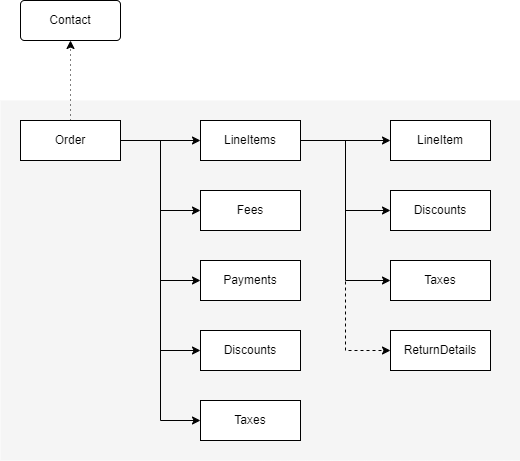
Here you can see the order entity as an overview and as a payload.
 ```json theme={null}
{
"orderId": "order-1764771379",
"contact": {
"matchKey": "john@example.com",
"matchKeyType": "Email"
},
"externalStoreId": "Ecom-Europe",
"status": "InProgress",
"externalStatus": "Picked",
"references": [
"order-123"
],
"currencyCode": "EUR",
"channel": "Ecom",
"createdAt": "2025-12-03T15:15:19+01:00",
"lastChangedAt": "2025-12-03T15:16:19+01:00",
"lineItems": {
"items": [
...
],
"subTotal": 1597
},
"payments": {
...
},
"fees": {
...
},
"discounts": {
...
},
"delivery": {
"method": "DHL",
"trackingNumber": "1234567890",
"trackingUri": "https://dhl.com/track/1234567890",
"deliveryDate": "2025-12-06T15:16:19+01:00"
},
"billingAddress": {
"title": "Mr",
"firstname": "John",
"lastname": "Doe",
"streetAddress": "Main Street 1",
"postalCode": "12345",
"city": "Springfield",
"country": "US",
"email": "john@example.com",
"phone": "+1234567890"
},
"deliveryAddress": {
"title": "Mr",
"firstname": "John",
"lastname": "Doe",
"streetAddress": "Main Street 1",
"postalCode": "12345",
"city": "Springfield",
"country": "US",
"email": "john@example.com",
"phone": "+1234567890"
},
"totalPrice": 1647,
"taxes": {
"items": [
{
"amount": 411.75,
"percent": 25,
"description": "VAT"
}
],
"totalTax": 411.75
},
"orderAction":{
"action": "ConfirmOrder",
"language": "en-US",
"data":{
"customField1": "customValue1",
"customField2": "customValue2"
}
}
}
```
### Required order attributes
Order data must include the order ID (the order's unique identifier) and some contact identifiers to connect the order to a contact. Other required attributes are the status, currency code and total price. See the following list for more information.
### The order type
The order type may be "Purchase" or "Return" but this is not somethng that is specified in by the client. Instead, it is calculated by the system based on the line item types present and the following rules:
* The order type is “Purchase” if there is at least one purchase line item in the order (even if there are also some returns)
* If there are *only* return line items, the order type will be "Return"
### Order attributes in detail
The order ID is defined by the client’s system and must be *unique*. The order ID is used to get, update and delete a previously registered order.
The contact object contains a `matchKeyType` (such as "Email") and a `matchKey` (in this case, the contact's email address).
For Engage to understand the life cycle of the order, it is required to maintain and update the status property whenever it changes. An order always has one of these three predefined statuses:
* InProgress
* Completed
* Cancelled
The external order status is optional. It represents the client’s interpretation of the order status. The external status is not restricted and completely open for the client to define for themselves. The external status will be shown in order view and can be used in segmentation.
Creating or updating an order's status or its delivery details are asynchronous processes. If an optional order action parameter (of type `EmbeddedOrderAction`) is included in the payload when creating or updating an order, that action will be applied as soon as the change specified is completed in the system. This removes the need to poll the system to check the progress of the change. This is useful when a change in an order triggers, for example, a confirmation email.
This should be the date and time the order was placed in the client’s system. If omitted, it will default to the registration time in Engage.
Using references, you can refer to another order by its order ID. This could be used, for example, to link a return order to its original purchase order.
This is mandatory and only one currency code can be given, which then applies to the whole order. The currency code should be specified according to ISO 4217.
Payments can be registered here, and if used it is mandatory to supply the correct payment method. See Swagger for the allowed payment methods
An order includes one or multiple order line items, defining the different goods or services in the order. A line item always includes the item ID (SKU), quantity and price, and it may also include information about discount, tax and article description.
The type tells you if the line item is a purchase or return (if omitted the default is "Purchase").
The amount given in `totalPrice` for a line item should be the total net amount with discounts and taxes included for that line, which means if quantity is more than one, all items are included int the total.
Return details are optional and used to describe the return reason (free text) and the return type, to allow you distinguish between normal returns, exchanges and complaints.
Discounts may be registered and this may be done on both order header level and/or line-item level. The discount type is optional. See Swagger for allowed values.
The total price paid in the currency specified in `currencyCode`.
Tax can be registered on both order header level and line-item level. See Swagger for allowed tax types.
It is possible to register fees separate from line items, such as shipping fee and administration fee.
Note the two types of order status:
* The Engage "Order status" on order level, which is either "InProgress", "Completed" or "Cancelled".
* The optional “External order status” on order level and line-item level which clients can use how they want. This status value is displayed as “Status detail” in the GUI.
## Line items data structure
An order includes one or more **line items**, representing the goods or services involved. An example of this data can be seen here:
```json theme={null}
...
{
"id": "item-1",
"type": "Purchase",
"externalStatus": "Reserved",
"quantity": 1,
"article": {
"sku": "1978-abc80-1",
"name": "ABC 80",
"description": "Advanced Basic Computer for the 1980s",
"imageUri": "https://placehold.co/600x420",
"targetUri": "https://example.com/abc80",
"color": "Beige",
"size": "Standard"
},
"discounts": {
"items": [
{
"type": "Voucher",
"description": "Reward voucher",
"amount": 100,
"code": "reward",
"percentage": 7.7
}
]
},
"pricePerUnit": 1199,
"originalPricePerUnit": 1299,
"totalPrice": 1199,
"originalTotalPrice": 1299,
"taxes": {
"items": [
{
"amount": 299.75,
"percent": 25,
"description": "VAT"
}
]
},
"group": "group-1"
},
...
```
Each line item can include the following information:
Unique identifier for the line item.
"Purchase" or "Return". Defaults to "Purchase" if this is omitted.
Status of the line item in external systems (e.g., Reserved, Picked).
Quantity of this item in the order.
Details about the item, including SKU, name, description, and optional links to images or product pages.
* `sku`: Unique stock-keeping unit identifier (required)
* `name`: Name of the item
* `description`: Description of the item
* `imageUri`: URI pointing to an image of the item
* `targetUri`: URI pointing to the item's product page
Optional discounts applied to the line item, with details like "type", "description", and "amount"
Optional details about returns for this line item, such as:
* `type`: Can be "Normal", "Complaint", or "Change" (required)
* `reason`: Free-text field with maximum length of 255 chars
Net amount per unit, discounts applied, taxes included.
Net amount per unit before discounts were applied, taxes included.
Total net amount, discounts applied, taxes included.
Total net amount before discounts were applied, taxes included.
Breakdown of taxes for the line item, including amounts, percentages, and descriptions (e.g., VAT).
Optional grouping information for categorizing line items.
The value `lineItems.subTotal` is also present and is calculated from the sum of totalPrice for all line items.
### Article data
When specifying articles on the line items of an order, only the SKU (Stock Keeping Unit) code is mandatory. The referred SKUs should be registered in advance in the article register for the segmentation based on order data to work.
The SKU normally represents the item variant level of an article, used by retailers to identify and track its inventory, or stock. A SKU is a unique code consisting of letters and numbers that identify characteristics about each product, such as manufacturer, brand, style, color, and size.
```json theme={null}
{
"orderId": "order-1764771379",
"contact": {
"matchKey": "john@example.com",
"matchKeyType": "Email"
},
"externalStoreId": "Ecom-Europe",
"status": "InProgress",
"externalStatus": "Picked",
"references": [
"order-123"
],
"currencyCode": "EUR",
"channel": "Ecom",
"createdAt": "2025-12-03T15:15:19+01:00",
"lastChangedAt": "2025-12-03T15:16:19+01:00",
"lineItems": {
"items": [
...
],
"subTotal": 1597
},
"payments": {
...
},
"fees": {
...
},
"discounts": {
...
},
"delivery": {
"method": "DHL",
"trackingNumber": "1234567890",
"trackingUri": "https://dhl.com/track/1234567890",
"deliveryDate": "2025-12-06T15:16:19+01:00"
},
"billingAddress": {
"title": "Mr",
"firstname": "John",
"lastname": "Doe",
"streetAddress": "Main Street 1",
"postalCode": "12345",
"city": "Springfield",
"country": "US",
"email": "john@example.com",
"phone": "+1234567890"
},
"deliveryAddress": {
"title": "Mr",
"firstname": "John",
"lastname": "Doe",
"streetAddress": "Main Street 1",
"postalCode": "12345",
"city": "Springfield",
"country": "US",
"email": "john@example.com",
"phone": "+1234567890"
},
"totalPrice": 1647,
"taxes": {
"items": [
{
"amount": 411.75,
"percent": 25,
"description": "VAT"
}
],
"totalTax": 411.75
},
"orderAction":{
"action": "ConfirmOrder",
"language": "en-US",
"data":{
"customField1": "customValue1",
"customField2": "customValue2"
}
}
}
```
### Required order attributes
Order data must include the order ID (the order's unique identifier) and some contact identifiers to connect the order to a contact. Other required attributes are the status, currency code and total price. See the following list for more information.
### The order type
The order type may be "Purchase" or "Return" but this is not somethng that is specified in by the client. Instead, it is calculated by the system based on the line item types present and the following rules:
* The order type is “Purchase” if there is at least one purchase line item in the order (even if there are also some returns)
* If there are *only* return line items, the order type will be "Return"
### Order attributes in detail
The order ID is defined by the client’s system and must be *unique*. The order ID is used to get, update and delete a previously registered order.
The contact object contains a `matchKeyType` (such as "Email") and a `matchKey` (in this case, the contact's email address).
For Engage to understand the life cycle of the order, it is required to maintain and update the status property whenever it changes. An order always has one of these three predefined statuses:
* InProgress
* Completed
* Cancelled
The external order status is optional. It represents the client’s interpretation of the order status. The external status is not restricted and completely open for the client to define for themselves. The external status will be shown in order view and can be used in segmentation.
Creating or updating an order's status or its delivery details are asynchronous processes. If an optional order action parameter (of type `EmbeddedOrderAction`) is included in the payload when creating or updating an order, that action will be applied as soon as the change specified is completed in the system. This removes the need to poll the system to check the progress of the change. This is useful when a change in an order triggers, for example, a confirmation email.
This should be the date and time the order was placed in the client’s system. If omitted, it will default to the registration time in Engage.
Using references, you can refer to another order by its order ID. This could be used, for example, to link a return order to its original purchase order.
This is mandatory and only one currency code can be given, which then applies to the whole order. The currency code should be specified according to ISO 4217.
Payments can be registered here, and if used it is mandatory to supply the correct payment method. See Swagger for the allowed payment methods
An order includes one or multiple order line items, defining the different goods or services in the order. A line item always includes the item ID (SKU), quantity and price, and it may also include information about discount, tax and article description.
The type tells you if the line item is a purchase or return (if omitted the default is "Purchase").
The amount given in `totalPrice` for a line item should be the total net amount with discounts and taxes included for that line, which means if quantity is more than one, all items are included int the total.
Return details are optional and used to describe the return reason (free text) and the return type, to allow you distinguish between normal returns, exchanges and complaints.
Discounts may be registered and this may be done on both order header level and/or line-item level. The discount type is optional. See Swagger for allowed values.
The total price paid in the currency specified in `currencyCode`.
Tax can be registered on both order header level and line-item level. See Swagger for allowed tax types.
It is possible to register fees separate from line items, such as shipping fee and administration fee.
Note the two types of order status:
* The Engage "Order status" on order level, which is either "InProgress", "Completed" or "Cancelled".
* The optional “External order status” on order level and line-item level which clients can use how they want. This status value is displayed as “Status detail” in the GUI.
## Line items data structure
An order includes one or more **line items**, representing the goods or services involved. An example of this data can be seen here:
```json theme={null}
...
{
"id": "item-1",
"type": "Purchase",
"externalStatus": "Reserved",
"quantity": 1,
"article": {
"sku": "1978-abc80-1",
"name": "ABC 80",
"description": "Advanced Basic Computer for the 1980s",
"imageUri": "https://placehold.co/600x420",
"targetUri": "https://example.com/abc80",
"color": "Beige",
"size": "Standard"
},
"discounts": {
"items": [
{
"type": "Voucher",
"description": "Reward voucher",
"amount": 100,
"code": "reward",
"percentage": 7.7
}
]
},
"pricePerUnit": 1199,
"originalPricePerUnit": 1299,
"totalPrice": 1199,
"originalTotalPrice": 1299,
"taxes": {
"items": [
{
"amount": 299.75,
"percent": 25,
"description": "VAT"
}
]
},
"group": "group-1"
},
...
```
Each line item can include the following information:
Unique identifier for the line item.
"Purchase" or "Return". Defaults to "Purchase" if this is omitted.
Status of the line item in external systems (e.g., Reserved, Picked).
Quantity of this item in the order.
Details about the item, including SKU, name, description, and optional links to images or product pages.
* `sku`: Unique stock-keeping unit identifier (required)
* `name`: Name of the item
* `description`: Description of the item
* `imageUri`: URI pointing to an image of the item
* `targetUri`: URI pointing to the item's product page
Optional discounts applied to the line item, with details like "type", "description", and "amount"
Optional details about returns for this line item, such as:
* `type`: Can be "Normal", "Complaint", or "Change" (required)
* `reason`: Free-text field with maximum length of 255 chars
Net amount per unit, discounts applied, taxes included.
Net amount per unit before discounts were applied, taxes included.
Total net amount, discounts applied, taxes included.
Total net amount before discounts were applied, taxes included.
Breakdown of taxes for the line item, including amounts, percentages, and descriptions (e.g., VAT).
Optional grouping information for categorizing line items.
The value `lineItems.subTotal` is also present and is calculated from the sum of totalPrice for all line items.
### Article data
When specifying articles on the line items of an order, only the SKU (Stock Keeping Unit) code is mandatory. The referred SKUs should be registered in advance in the article register for the segmentation based on order data to work.
The SKU normally represents the item variant level of an article, used by retailers to identify and track its inventory, or stock. A SKU is a unique code consisting of letters and numbers that identify characteristics about each product, such as manufacturer, brand, style, color, and size.