> ## Documentation Index
> Fetch the complete documentation index at: https://developer.voyado.com/llms.txt
> Use this file to discover all available pages before exploring further.
# Verifying and troubleshooting web tracking
> Step-by-step checks for the tracking script, cart events and product views, plus the most common implementation and identification errors.
Work through these checks before going live, and return to them when tracking data looks wrong in Engage.
## Verify the script and cookies
1. Go to your e-com site.
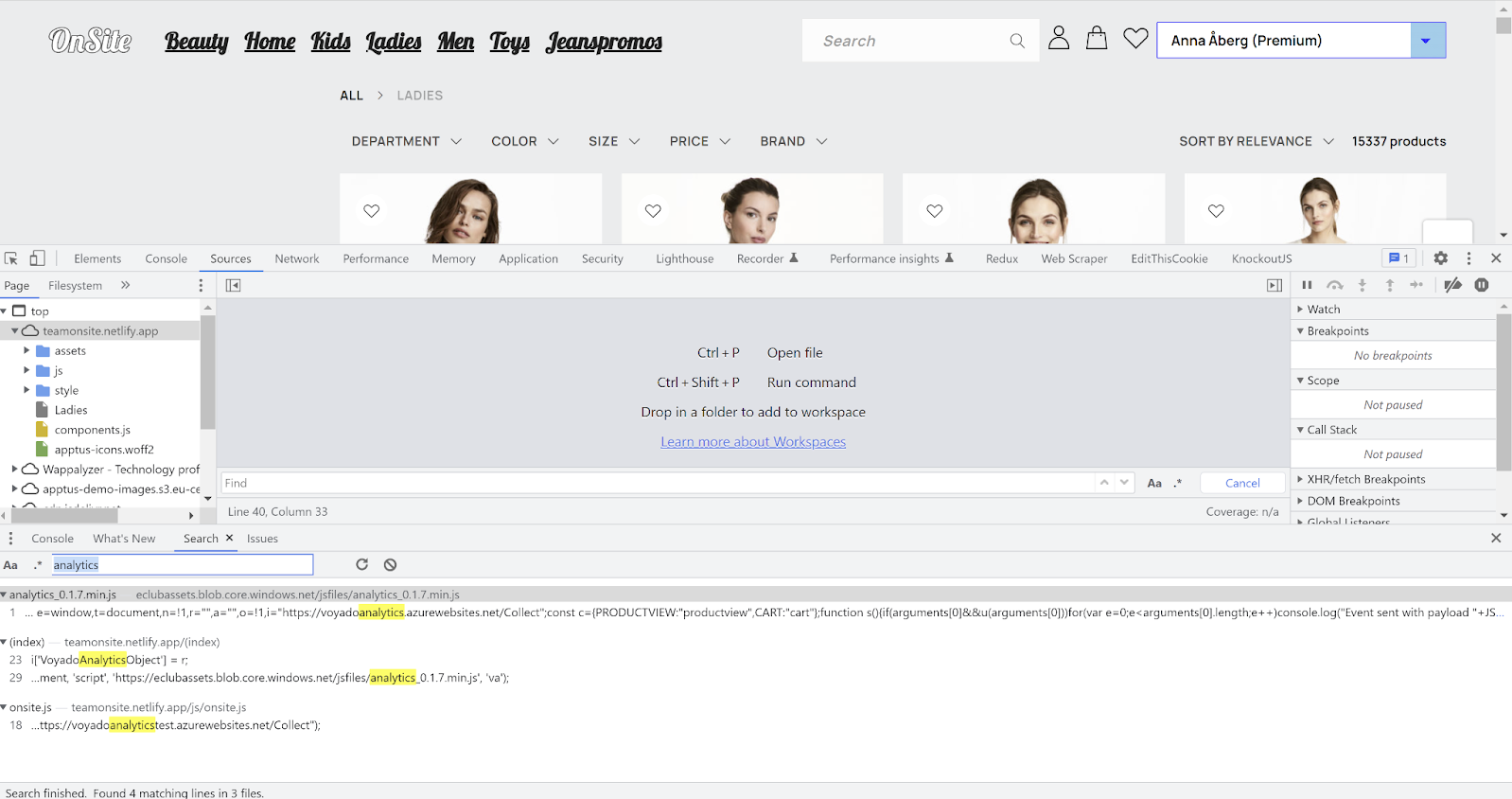
2. Open the developer console and go to **Sources**.
3. Search for `analytics` and confirm you are loading the expected script version, and the right one for your environment.
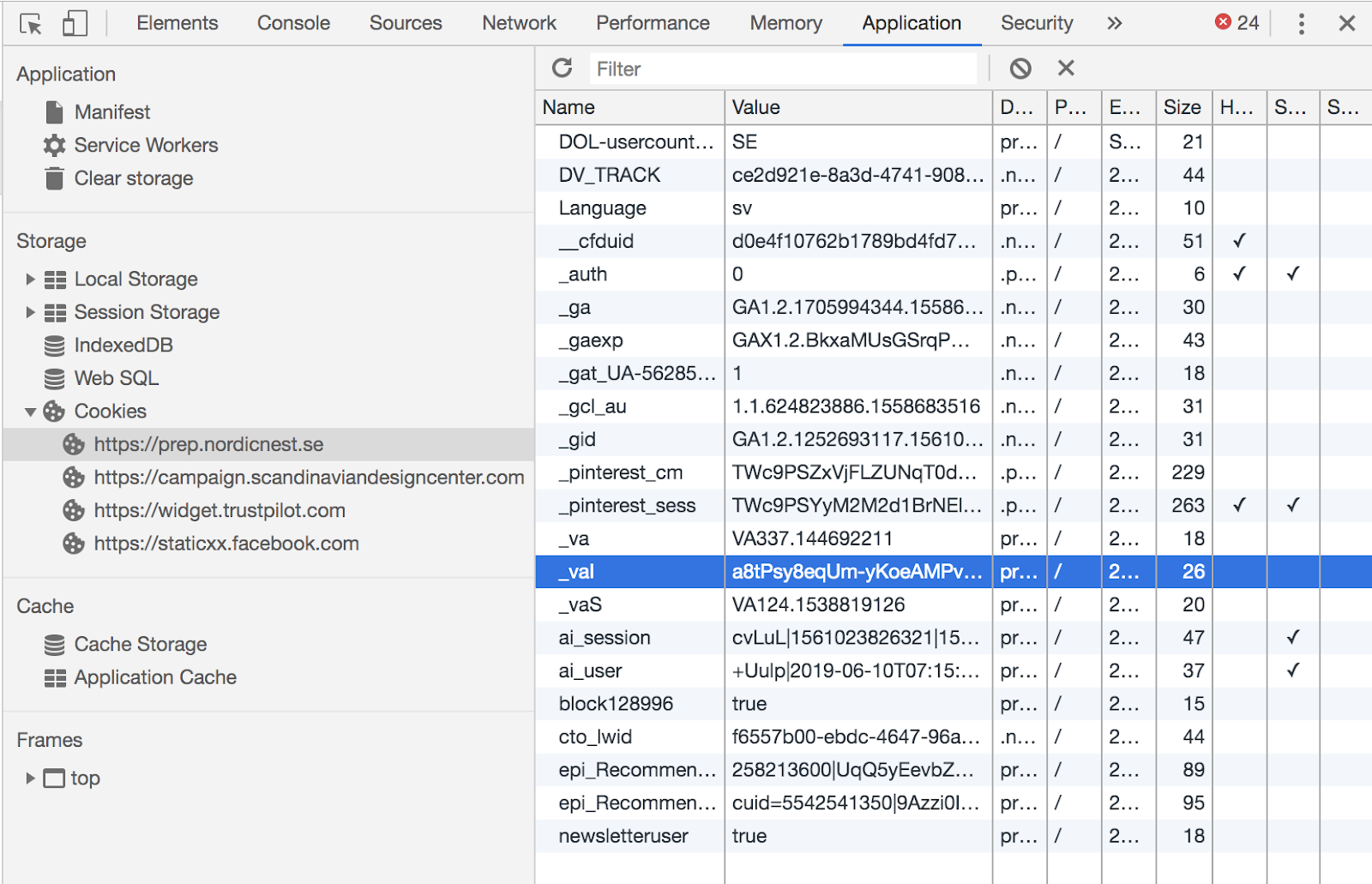
4. Go to **Application → Cookies** and select the site running the tracking.
5. If you are identified or logged in, look for the `_vaI` cookie.
6. If you are not identified, look for the `_va` cookie.
 ## Verify product views
1. Go to your e-com site.
2. Open the developer console, go to **Network** and select the **Fetch/XHR** tab.
3. Visit any product on the site.
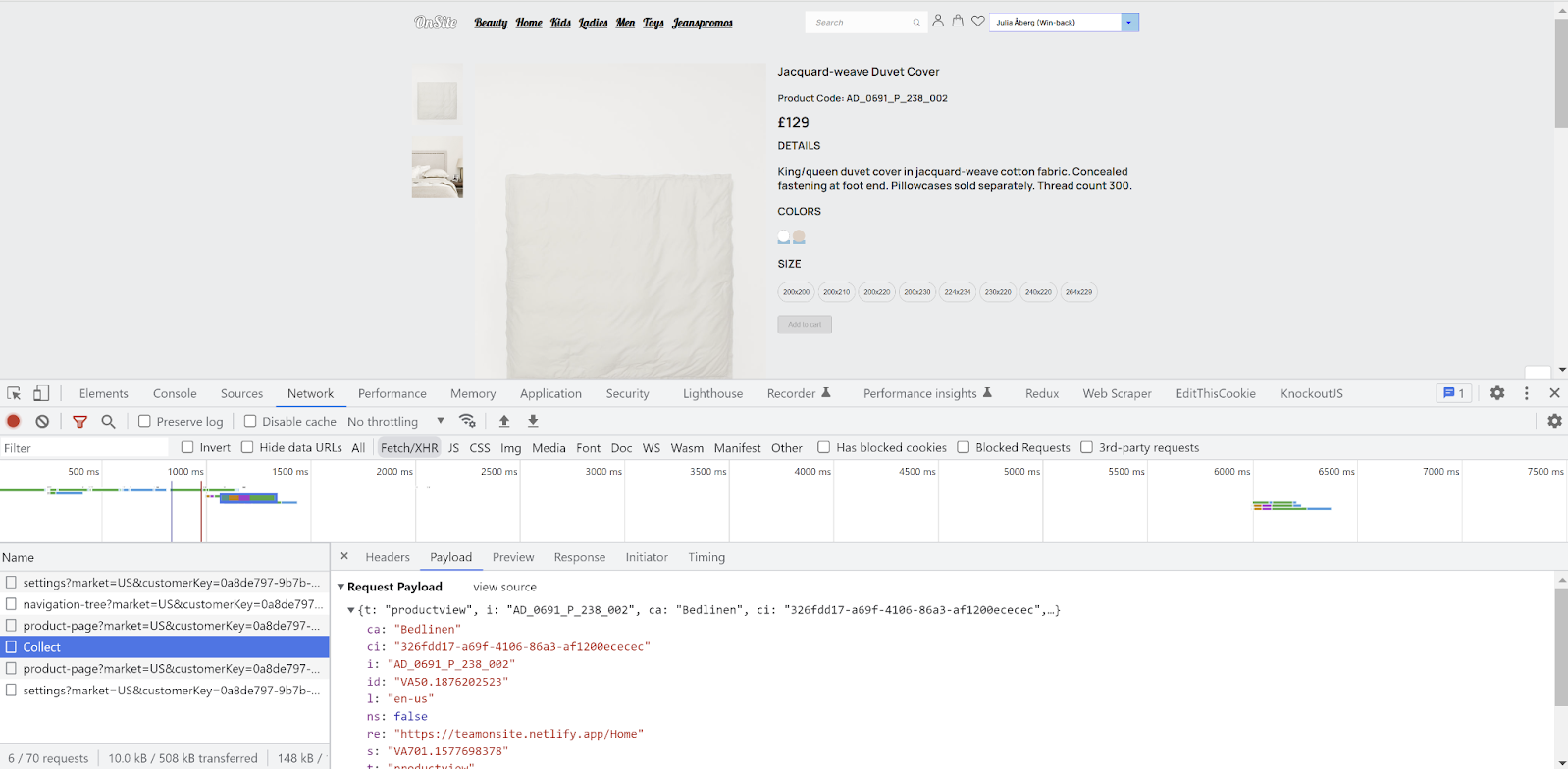
4. You should see a call to the Collect endpoint.
5. In the payload, `te` should be your tenant/account name.
6. `t` (type) should be `productview`.
7. If you are identified, check that `ci` holds the same ID as the `_vaI` cookie — and nothing else.
The `locale` in a product view payload does not have to match the locale in your cart payloads, and it is not used to identify anything. It does, however, need to match a product feed for abandoned browse to trigger.
## Verify product views
1. Go to your e-com site.
2. Open the developer console, go to **Network** and select the **Fetch/XHR** tab.
3. Visit any product on the site.
4. You should see a call to the Collect endpoint.
5. In the payload, `te` should be your tenant/account name.
6. `t` (type) should be `productview`.
7. If you are identified, check that `ci` holds the same ID as the `_vaI` cookie — and nothing else.
The `locale` in a product view payload does not have to match the locale in your cart payloads, and it is not used to identify anything. It does, however, need to match a product feed for abandoned browse to trigger.
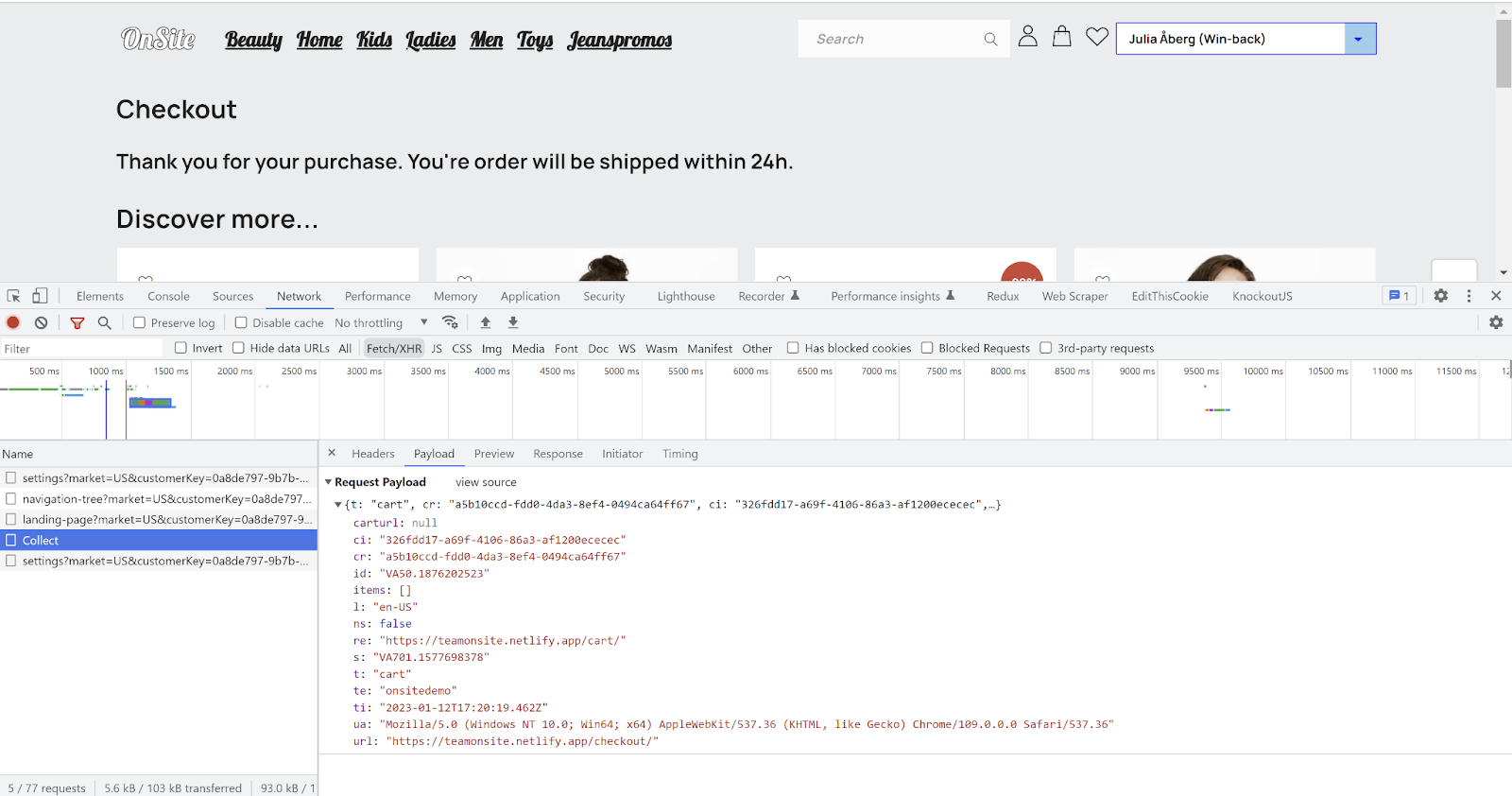
 ## Verify cart changes
1. Go to your e-com site.
2. Open the developer console, go to **Network** and select the **Fetch/XHR** tab.
3. Place an item in the cart.
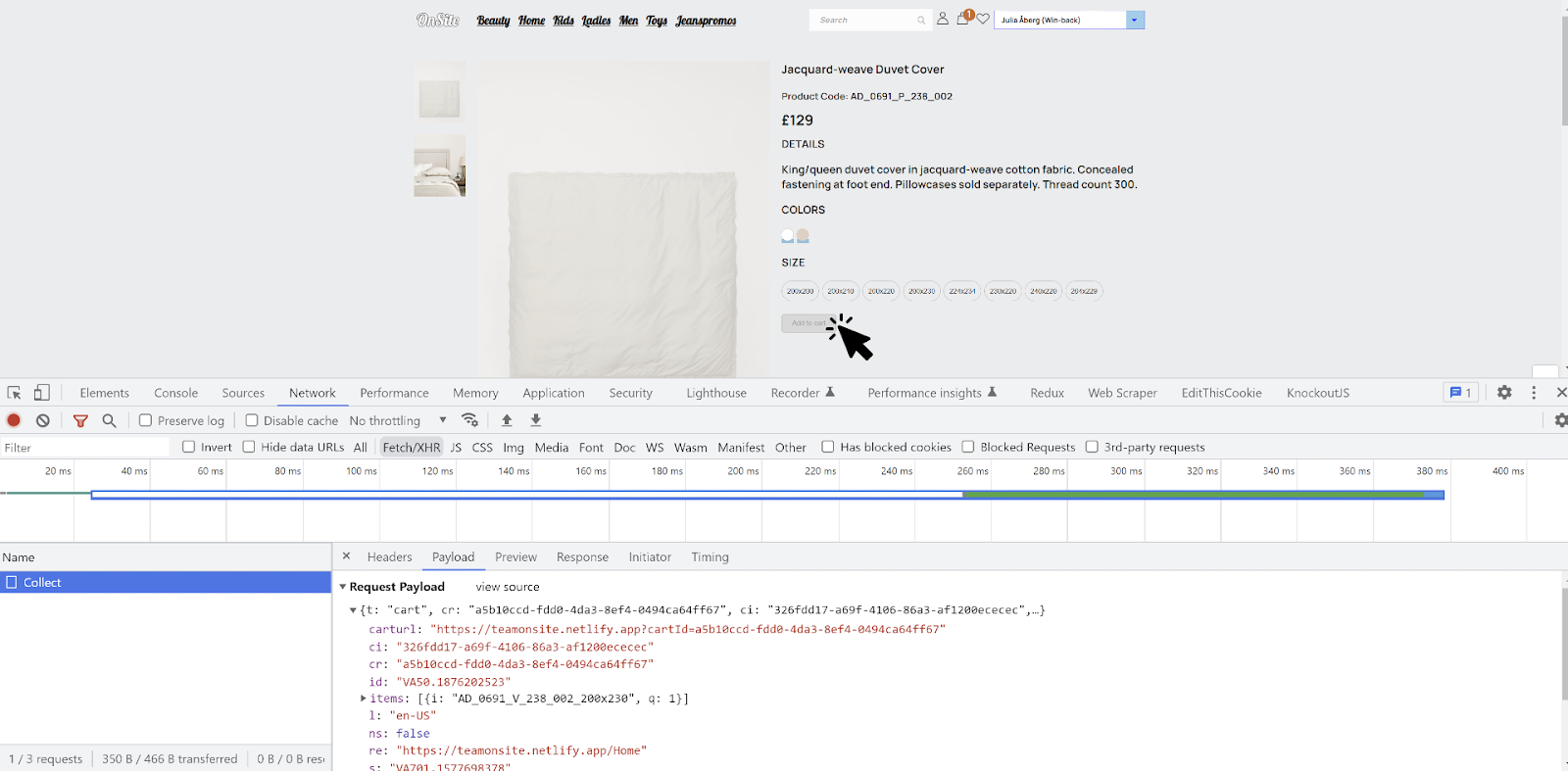
4. You should see a call to the Collect endpoint.
5. In the payload, `t` (type) should be `cart`. Check the `items[]` array against what's actually in your cart.
6. If possible, complete the purchase.
7. A new Collect event should fire with an empty cart, confirming the purchase was registered.
## Verify cart changes
1. Go to your e-com site.
2. Open the developer console, go to **Network** and select the **Fetch/XHR** tab.
3. Place an item in the cart.
4. You should see a call to the Collect endpoint.
5. In the payload, `t` (type) should be `cart`. Check the `items[]` array against what's actually in your cart.
6. If possible, complete the purchase.
7. A new Collect event should fire with an empty cart, confirming the purchase was registered.
 ## Checklist: script and identification
The script must load on landing pages, category pages and any other non-product page. If an email link lands on a page without the script, identification fails.
Confirm that simply loading or navigating between pages sends no events.
Events should be sent when no `_vaI` cookie exists. Engage connects anonymous events to a contact once they are identified.
Arrive via an email link and confirm events are sent and `_vaI` is set correctly. A visitor can be identified without being logged in.
Log in and confirm that `setContactId()` sets `_vaI` correctly and that events are sent with the identification in place.
`_vaI` should be set whether or not the URL has a trailing slash.
* With: `www.site.se/?vtid=LTq-P1eRKU2s8CWc5KPe5w`
* Without: `www.site.se?vtid=LTq-P1eRKU2s8CWc5KPe5w`
Then navigate further into the site and confirm `_vaI` is not cleared.
`_vaI` should update when a different `vtid` is used. Set `vtid` to `a4fa7a46-23b0-4523-b09c-5462053e7627`, then change it to `3fbe3a2d-9157-4d29-acf0-259ce4a3dee7` and confirm the cookie follows.
Abandoned browse will not trigger without it. The script adds it automatically; if you use the tracking API, you must add it yourself.
Running the production script in staging, or the staging script in production, means no tracking at all.
## Checklist: cart tracking
The cart's locale must match both a product feed in Engage and the language version of the site, if you run a multimarket site.
Try every way of changing the cart: add an item, remove an item, change quantity, empty it. Does the quantity update when the same item is added a second time? What happens when you remove the last item? Carts can usually be updated from the product page and a popup as well — and sites built as SPAs tend to behave inconsistently.
Checkout usually behaves differently from the rest of the site. Is there a difference between setting quantity to zero and removing the item? What happens when all items are removed? Can you add new items from checkout? Does any of it differ with and without `vtid`?
Update the cart on both the checkout page and elsewhere, moving back and forth. Confirm no incorrect or duplicate events are sent.
Without this, the cart stays populated in Engage and can trigger an abandoned cart email to someone who already bought.
## Checklist: product views and products of interest
To detect whether a purchase followed a product view, Engage matches the `itemId` from the view against the SKU in the article register on the receipt.
A product page should fire one `productview` per unique `itemId`/SKU. Several events on one page are fine only if they are for different SKUs.
Product pages can be reached from the landing page, checkout, another product page, the menu or the cart. Test each route. Sites built as SPAs don't do full page loads, which frequently causes events to be missed.
## Common implementation errors
* **A cart event isn't sent for every update.** Every change — add, remove, quantity change, empty — must generate a cart event to the Collect endpoint. These changes happen in different contexts (product page, cart popup or sidebar, checkout) that often behave differently.
* **The `cartRef` changes for the same cart.** `cartRef` must be unique per cart and identical across all of that cart's events. Invalid or changed `cartRef` values on remove-product and empty-cart events are a frequent cause of missing abandoned cart emails.
* **Duplicate cart or product view events.** One cart update should produce exactly one cart event, and actions that aren't cart updates (such as page loads) should produce none. A product page should produce no more than one `productview` per unique SKU.
## Common identification errors
* **The `_vaI` cookie is cleared after being set by `vtid`.** A visitor identified by an email link is identified without being signed in. Calling `setContactId()` with an empty or null value in that state wipes the identification. Only call it when your site has actually identified someone.
* **No cart or product view events before checkout or sign-in.** Don't limit events to the checkout page, or to signed-in visitors. Anonymous events are connected retroactively.
* **`_vaI` isn't set when the email link ends in a slash.** Some websites strip trailing slashes without preserving the query string, so `vtid` is lost. For example `www.mysite.com/myproduct/?vtid=uaz2QuT9NEez_eAsr8hEeQ` becomes `www.mysite.com/myproduct`.
## Checklist: script and identification
The script must load on landing pages, category pages and any other non-product page. If an email link lands on a page without the script, identification fails.
Confirm that simply loading or navigating between pages sends no events.
Events should be sent when no `_vaI` cookie exists. Engage connects anonymous events to a contact once they are identified.
Arrive via an email link and confirm events are sent and `_vaI` is set correctly. A visitor can be identified without being logged in.
Log in and confirm that `setContactId()` sets `_vaI` correctly and that events are sent with the identification in place.
`_vaI` should be set whether or not the URL has a trailing slash.
* With: `www.site.se/?vtid=LTq-P1eRKU2s8CWc5KPe5w`
* Without: `www.site.se?vtid=LTq-P1eRKU2s8CWc5KPe5w`
Then navigate further into the site and confirm `_vaI` is not cleared.
`_vaI` should update when a different `vtid` is used. Set `vtid` to `a4fa7a46-23b0-4523-b09c-5462053e7627`, then change it to `3fbe3a2d-9157-4d29-acf0-259ce4a3dee7` and confirm the cookie follows.
Abandoned browse will not trigger without it. The script adds it automatically; if you use the tracking API, you must add it yourself.
Running the production script in staging, or the staging script in production, means no tracking at all.
## Checklist: cart tracking
The cart's locale must match both a product feed in Engage and the language version of the site, if you run a multimarket site.
Try every way of changing the cart: add an item, remove an item, change quantity, empty it. Does the quantity update when the same item is added a second time? What happens when you remove the last item? Carts can usually be updated from the product page and a popup as well — and sites built as SPAs tend to behave inconsistently.
Checkout usually behaves differently from the rest of the site. Is there a difference between setting quantity to zero and removing the item? What happens when all items are removed? Can you add new items from checkout? Does any of it differ with and without `vtid`?
Update the cart on both the checkout page and elsewhere, moving back and forth. Confirm no incorrect or duplicate events are sent.
Without this, the cart stays populated in Engage and can trigger an abandoned cart email to someone who already bought.
## Checklist: product views and products of interest
To detect whether a purchase followed a product view, Engage matches the `itemId` from the view against the SKU in the article register on the receipt.
A product page should fire one `productview` per unique `itemId`/SKU. Several events on one page are fine only if they are for different SKUs.
Product pages can be reached from the landing page, checkout, another product page, the menu or the cart. Test each route. Sites built as SPAs don't do full page loads, which frequently causes events to be missed.
## Common implementation errors
* **A cart event isn't sent for every update.** Every change — add, remove, quantity change, empty — must generate a cart event to the Collect endpoint. These changes happen in different contexts (product page, cart popup or sidebar, checkout) that often behave differently.
* **The `cartRef` changes for the same cart.** `cartRef` must be unique per cart and identical across all of that cart's events. Invalid or changed `cartRef` values on remove-product and empty-cart events are a frequent cause of missing abandoned cart emails.
* **Duplicate cart or product view events.** One cart update should produce exactly one cart event, and actions that aren't cart updates (such as page loads) should produce none. A product page should produce no more than one `productview` per unique SKU.
## Common identification errors
* **The `_vaI` cookie is cleared after being set by `vtid`.** A visitor identified by an email link is identified without being signed in. Calling `setContactId()` with an empty or null value in that state wipes the identification. Only call it when your site has actually identified someone.
* **No cart or product view events before checkout or sign-in.** Don't limit events to the checkout page, or to signed-in visitors. Anonymous events are connected retroactively.
* **`_vaI` isn't set when the email link ends in a slash.** Some websites strip trailing slashes without preserving the query string, so `vtid` is lost. For example `www.mysite.com/myproduct/?vtid=uaz2QuT9NEez_eAsr8hEeQ` becomes `www.mysite.com/myproduct`.