> ## Documentation Index
> Fetch the complete documentation index at: https://developer.voyado.com/llms.txt
> Use this file to discover all available pages before exploring further.
# Web activity tracking
Web activity tracking in Engage is the online tracking of a contact's website activity. Using cookies, it allows the activity of both anonymous and identified contacts to be tracked.
Reading this guide will help you to understand about:
* Identification and cookies
* Abandoned carts
* Product views
## Introductory concepts
Here are a list of the basic concepts in this area.
### 1 - Identification and cookies
The foundation of web activity tracking is identification and cookies. A contact can be identified through the script in three ways:
* An email link (sent from Engage) that takes them to the website.
* Being identified by the website by, for example, signing in, in which case the method setContactId() is called.
* Being identified by an exiting \_vaI cookie, previously set by the Voyado script.
The script, once implemented, will generate a unique client ID and store it in a first-party cookie named `_va`. All web activity on that browser will then be linked to that client ID via the cookie. When that user clicks on a link in an email from Engage, the tracking script reads the contact ID from the URL (vtid) and stores it in a cookie named `_vaI`. With this method, all web activity can be connected to a specific contact in Engage.
### 2 - Abandoned cart
The tracking script enables **abandoned cart** functionality. By registering every state of a user's cart, Engage is able to receive information about cart abandonment and use this to trigger automations.
How to get started:
* Configure a product feed, [read more here.](/docs/setup/product-feeds)
* Implement the tracking script, [read more here.](/docs/tracking/web-activity-tracking#implementing-the-tracking-script)
* Track cart changes, [read more here.](/docs/tracking/web-activity-tracking#tracking-cart-changes))
### 3 - Abandoned browse
The tracking script enables abandoned browse functionality, in the same way as abandoned cart. The site sends product view and cart events to Engage through the tracking script (or the API if the user has been identified). Using this Engage can detect when a session is abandoned and nothing has been added to the cart and then trigger an automation.
How to get started:
* First implement everything for Abandoned cart (see above).
* Track product views, including locale. [Read more here.](/docs/tracking/web-activity-tracking#tracking-product-views)
### 4 - Products of interest
By tracking which products a user interacts with, Engage can calculate a list of products of interest. This can then be used in, for example, segmentations. This data will also be a part of the algorithm that calculates Engage's product recommendations.
* Configure a product feed, [read more here.](/docs/setup/product-feeds)
* Implement the tracking script [read more here.](/docs/tracking/web-activity-tracking#implementing-the-tracking-script)
* Track product views, [read more here.](/docs/tracking/web-activity-tracking#tracking-product-views)
Products of interest are connected to the article register, and not to the product feed.
### 5 - The sessionId
The `sessionId` value is unique for every session. When using the tracking script, this is included automatically in the data sent. However, if you are using the API to handle web activity tracking, the `sessionId` needs to be manually added to the payload that you send.
While the `sessionId` value is not mandatory for Abandoned Cart events, it will need to be included if the retailer is using Abandoned Browse and Abandoned Cart together. This is to prevent both automations from being triggered based on the same `sessionId`.
Engage will check if "cart" and "productView" events are using the same `sessionId`. If they are, then only the Abandoned Cart automation in Engage will be triggered. The Abandoned Browse automation will only get triggered if there are no cart events registered during the session that has that specific sessionId.
To summarise:
* Every session has a unique sessionId
* This gets added automatically when using the tracking script
* It needs to be manually added to the payload when using the tracking API
* Engage uses `sessionId` to avoid triggering both automations for the same session
### 6 - Collect endpoint
The Collect endpoint is the URL called when the cart/productView/emptyCart method is invoked and it is used to send updates for cart content and product views. This is not one of the Engage API endpoints used for integration, but a different endpoint used by the Voyado tracking script.
## The tracking script
A tracking script allows you to gather behavioral data such as cart changes and product views from website visitors. It consists of a small snippet of code, usually as JavaScript, placed in the HTML source code of a website.
The tracking script is required for using features like abandoned cart and products of interest. The tracking script should not be confused with any tracking parameters attached to the URL.
Once the script is implemented it will generate a unique client ID and store it in a first-party cookie named `_va`. All web activity on that browser is then linked to that client ID via the cookie. When that user clicks on a link in an email from Engage, the tracking script reads the contact ID (`vtid`) from the URL and stores it in a cookie named `_vaI`. With this method, web activities can be connected to a specific contact in Engage.
The name "\_vaI" is "\_va" followed by an uppercase letter I (I as in Ingemar) which can be difficult to make out in some fonts.
### Configuring the tracking script
This is the Voyado tracking script:
```javascript theme={null}
```
Two things need to be inserted into the script before you can use it (expand for details):
This is the path to the JavaScript analytics package. There are just two options, which depond on if you are running in the staging or production environment.
* For the production environment, change \[SCRIPT-PATH] to:
```http Production theme={null}
https://assets.voyado.com/jsfiles/analytics_0.1.7.min.js
```
* For the staging environment \[SCRIPT-PATH] will be:
```http Staging theme={null}
https://assets.voyado.com/jsfiles/analytics_0.1.7.staging.min.js
```
The **analytics\_0.1.7** in the paths above refers to the latest version but this can be changed to a previous version if you need to.
This string is your unique client (tenant) ID and is the same in production and staging. It is usually the subdomain name in your root URL.
For instance, the \[TENANT-ID] when your URL is "supershop.voyado.com" would just be "supershop".
Contact your Voyado Engage team if you are unsure about this.
Here's how it might look when SCRIPT-PATH] and \[TENANT-ID] are inserted into the tracking script:
```javascript Example of complete tracking script theme={null}
```
### Implementing the tracking script
The tracking script can now be placed as it is (implemented in code) on your website, or it can be implemented in these two ways:
Copy your configured code snippet and paste it right after the \ tag in the HTML page of each page on your website.
It's vital, on every page it's used, that the script is initiated and always running, so that it can catch all relevant interactions like cart changes and productviews (through the script's `cart()` and `productview()` methods).
Follow these step:
1. Log into your Tag Manager
2. Select "New Tag"
3. Name your tag something easily recognizable
4. Open “Tag configuration” and select “Custom HTML” as tag type
5. Copy and paste your configured tracking script into the box
6. Open ”Triggers” and select the trigger “All pages” (recommended)
7. Save your tag
8. Publish the new version of your tag container
The tracking script can identify which user has arrived via an email link and is therefore required on all pages on your site, including non-product and other landing pages.
Make sure the script is implemented on all pages or you risk the user not being identified.
To increase the identification rate for Safari browsers, cookies can be created *server-side*. The latest script version (0.1.7) supports this. The section linked to here (which is further down in this article) shows you how to implement them:
## Identification and cookies
*Identification* in this sense means linking a user browsing the site to a contact ID in Engage.
As a user interacts with the site, their activity is saved in a *first-party cookie*. This happens whether they have already been identified or not. When they are identified, those anonymous tracking events can then be linked to a contact ID. This means the e-com site should not limit tracking events such as cart() and productview() to only identified or logged-in users.
Once a user is identified, it's then possible to build an understanding of their behavior on the site, using the data saved in cookies. This can be used, for example, to offer them a personalized experience and more relevant communication.
All upcoming tracking events from the same browser are then linked to that user. This applies until the first-party cookie disappears or changes (for example, when another user logs into the site from the same browser).
Voyado recommends that the e-com always includes the `contactId` for identified users in all tracking events such as cart() and productview().
Common situations when a user can be identified is when they:
* Register as a newsletter subscriber
* Register for a loyalty program
* Log into the site
* Complete a purchase
* Use soft identification
### Using setContactId()
As soon as a visitor is identified by the site the `setContactId()` method should be invoked with their unique `contactId` value:
```javascript theme={null}
va("setContactId", "contactId");
```
Keep in mind the visitor might already be identified (such as by an email link click), and invoking this method incorrectly might clear the existing identification. The function setContactId() will *not* generate a HTTP request to the Collect endpoint.
### Browser cookies
There are two cookies involved here:
This contains the Client ID. This value is generated by the script and is used to link all events to a specific contact.
* **Example value**: VA671.1135834162
* **Lifespan**: 1 year
This contains the Contact ID (guid/shortguid). If the contact is identified in Engage, this links events to them.
* **Example value**: a8tPsy8eqUm-yKoeAMPv7Q
* **Lifespan**: 1 year
In Safari, the lifespan of all cookies created with JavaScript is **a maximum of 7 days**, but this can be extended using server-side cookies (see below).
During implementation, call setContactId() with the user's `contactId` *only* at the moment when the user is identified by the site. Likewise, when using the soft identification in links to sites implementing the tracking script, make sure to set the `contactId` from the decrypted "eClub" query parameter.
The SetContactId() function should never be called with zero, empty (no value) or other invalid value, as this could reset an existing identification.
### Server-side cookies
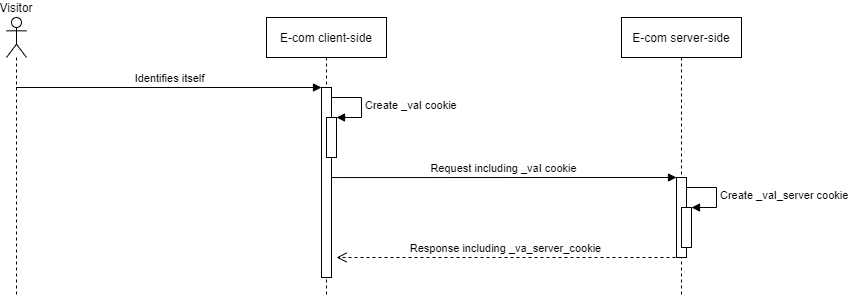
The cookie `_vaI` (which stores the `contactId`) is created client-side by the script. With Apple ITP (Intelligent Tracking Prevention) all client-side cookies (and LocalStorage) have a capped lifetime of 7 days in Safari. Which means that when an identified visitor doesn't revisit the site within 7 days, the cookie will expire and the script won't be able to identify the visitor using the `_vaI` cookie.
This cookie lifetime cap applies only to cookies created client-side (with Safari) and doesn't affect server-side created cookies.
The tracking script supports copying the value from a cookie `_vaI_server` that was created server-side as a fallback, which can be used to recreate the client-side cookie `_vaI`.
The cookie `_vaI` will be recreated:
1. When the site invokes setContactId() or includes `contactId`in an event
2. If the URL param `vtid` exists
3. If the LocalStorage key `vtid` exists
4. If the cookie `_vaI_server` exists
By implementing `_vaI_server` identified visitors will stay identified when returning even after 7 days have passed.
To implement this, the site (server-side) should check if the request includes a`_vaI` cookie. If so, the site should copy the value to a new cookie `_vaI_server`, give it a 1-year expiration date, and add it to the response.
```csharp An example in C# theme={null}
if(HttpContext.Request.Cookies.TryGetValue("_vaI", out var contactId) && !string.IsNullOrWhiteSpace(contactId) && contactId != "undefined")
{
var option = new CookieOptions
{
Expires = DateTimeOffset.Now.AddYears(1),
HttpOnly = false
};
HttpContext.Response.Cookies.Append("_vaI_server", contactId, option);
}
```
 ## Tracking cart changes
Cart changes can be tracked either with the Voyado Engage tracking script or the tracking API. Engage can trigger abandoned cart communication to be sent to identified contacts. To enable this, Engage needs to know:
* Every update of every unique shopping cart
* The `contactId` of the visitor
There are two methods to consider when tracking cart changes:
* **cart()**: Used for registering visitor actions related to any cart modification
* **emptyCart()**: Used for pruning the cart of all items, usually when indicating a purchase or logout by the e-com visitor
### The data flow
This is how the flow looks:
1. The site submits shopping cart changes, either via the tracking script implemented on the e-com site or through the tracking API.
2. Carts containing products that haven't been accessed for at least 30 minutes are considered abandoned. If the cart is connected to a specific contact it will be sent to Engage. All other carts will be filtered out.
3. Engage then triggers the relevant automation (based on language/locale).
### Cart automation requirements
The following are required so that an abaondoned cart automation can be triggered:
* The locale must match a product feed in Engage and the corresponding language must be set in an automation.
* The SKU/SKUs must match products in the product feed (commonly “g:id”). If a SKU doesn't match the feed, that particular product will not be included in the email. If no SKUs match the products in the feed the automation won't be triggered at all.
* No products in the cart have been purchased (meaning no transaction has been sent to Engage) since the cart was identified as abandoned (although this can be overruled when configuring the trigger).
### Using the tracking script
Here is how to use the tracking script to track cart changes.
Invoke this method every time the cart is changed (items added/removed or the quantity updated) regardless of if the user has been identified by the website or not. The cart() method will then generate a HTTP POST request to the Collect endpoint.
```javascript Cart update in code theme={null}
va("cart",{
"cartRef":"354354",
"contactId":"afa7625d-2e97-4667-b4c1-ad3b01194bee",
"cartUrl":"https://www.store.se/cart?id=354354",
"locale":"sv-SE",
"items":
[{
"itemId": "456436",
"quantity": 2,
},
{
"itemId": "456437",
"quantity": 2,
}]
});
```
Cart identifier, must be unique for each cart.
Cart identifier, must be unique for each cart.
Engage contact ID, cookie \_vaI will be used as fallback.
Locale for the site where the cart is (such as "sv-SE"). Format as defined by IETF language tag. Only locales with a Product Feed assigned in Engage can trigger an abandoned cart automation.
The array of items that were added to the cart.
Item ID (SKU in Engage).
The number of items
Invoke this method when the cart has been emptied, either manually by the user or when the checkout process has been completed. This method is equivalent to invoking cart() with no items. Itis important to invoke emptyCart() after each successful checkout to avoid faulty abandoned cart communications.
The emptyCart() method will generate a HTTP POST request to the Collect endpoint.
```javascript A call to emptyCart() in code theme={null}
va("emptyCart",{
"cartRef": "354354"}
);
```
Cart identifier, must be unique for each cart.
Engage contact ID, cookie \_vaI will be used as fallback.
### Using the tracking API
It's possible to submit cart changes directly via the API instead of implementing the tracking script. If you choose this approach, it is important to identify all contacts that come to the e-com via links in emails (add “vtid” in “contactId”).
The calls can be tested through your OpenAPI (Swagger) page.
```http Example of call to tracking API theme={null}
[tenantname].voyado.com/api/v3/ui/index#/tracking
```
### When tracking cart changes
Those points are important to remember when tracking cart changes:
* **All behavioral data** can be used to build understanding and insights. A shopping cart belonging to an anonymous user can still be linked to a contact after they are identified.
* If the user is \*\*identified / logged in, \*\*both the “cart()” script method and the Carts API can be used to track their behavior. For anonymous users, however, only the “cart()” script can be used. This is because the tracking API always requires the contactId.
* For **cart updates**, call the “cart()” script method (for identified and anonymous users) or the Carts API (for identified users only) for all updates to the shopping cart, regardless of where on the site or at what stage the cart update takes place (product page, popup or checkout). Engage handles the shopping cart based on *its latest change*. It is therefore important that all changes generate a call to “cart()” or the Carts API and that the data corresponds to the shopping cart currently displayed on the website.
* The “cartRef” value **must be unique** and must not be shared between different baskets or users. A "cartRef" of a specific shopping cart must not be changed, and all updates regarding a shopping cart must use the same "cartRef" value.
* For **empty carts**, use “cartRef” as well. Even empty carts need a cart reference.
* Call the “cart()” script method or Carts API with a “locale” value corresponding to **the locale of your Product Feed** in Engage. In order to enrich the products with article data, a Product Feed for that locale needs to be set up in Engage. An automation using that locale also needs to be active.
* All carts not emptied before the website visitor leaves, or makes a purchase, **risk being marked as abandoned**. If you have an abandoned cart automation active, that automation will then be triggered by those unemptied carts.
Make sure to call “cart()” script method or the Carts API only when the cart is updated. Doing it at other times risks polluting your data in Engage.
## Tracking product views
By tracking product views, Engage can:
* Trigger abandoned browse automations
* Build audiences based on products of interest
* Get improved product recommendations
Product views can be tracked in two ways:
* Using the Voyado tracking script
* Using the tracking API
When tracking product views, the JavaScript method used is productview().
The following features in Engage are enabled by the tracking of product views:
* Abandoned browse
* Products of interest
* Product recommendations
Here follows descriptions of each.
1. The site submits product views, which are part of a session, either via the tracking script implemented on the e-com site or through the tracking API.
2. Sessions without activity for at least 30 minutes are considered abandoned. If the session doesn't contain any cart event, and the product views are connected to a specific contact, it will be sent to Engage. All other sessions will be filtered out. A session can only be sent to Engage once.
3. All product views sent to Engage are enriched with data from the product feed.
4. Engage then triggers the relevant automation, based on the specific trigger configurations. If automations contain email activities those can include dynamic product data enriched from the product feed.
1. The site submits product views, which are part of a session, either via the tracking script implemented on the e-com site or through the tracking API.
2. Engage, using the recency, frequency and other patterns of product views from the last 90 days, calculates up to 25 products which each contact is probably most interested in, based only on their onsite behaviour.
3. These products are updated using a scheduled job and enriched by the article registry and can then be used in segmentation and as part of a scheduled selection in an automation.
If a contact has products of interest, these will be part of the data used to calculate personal recommendations in Engage. This means that their onsite behavior (Products of interest) will be combined with all historical purchase and return behavior to present a set of personalized recommendations that can be used in emails.
### Abandoned browse automations
The following are required so that an abandoned browse automation can be triggered:
* The locale must match a product feed in Engage. Events without a matching product feed will be filtered out.
* The SKUs must match products in the product feed (commonly “g:id”). If an SKU doesn't match the feed, that particular product will not be included in the email. If no SKUs match the products in the feed, the automation won't be triggered at all.
### Using the tracking script
The tracking script to track product views works via the productview() method. Invoke this method every time a product is viewed, such as on a product page, whether the user has been identified by the website or not.
```javascript A call to the productview() method theme={null}
va("productview", {
"categoryName": "Women / Armour / Greaves",
"itemId": "123XYZ",
"contactId":"afa7625d-2e97-4667-b4c1-ad3b01194bbb",
"locale":"sv-SE"
})
```
Product category, e.g. “Men / Sweaters / Cardigan”.
Mapped to SKU in Engage.
The Engage contact ID.
Format as defined by IETF language tag. Should match a product feed locale in Engage.
The field `locale` is also mandatory when using abandoned browse, to start abandoned browse automations.
Further important points when tracking product views:
* **Call productview() in all cases, regardless of whether the user is identified or logged in or not**. All behavioral data can be used for insights and a product view belonging to an anonymous user can be linked to a specific user after they are identified.
* **Call productview() for all product views and with an `itemId` that matches SKU in Engage.** A product view can be a visit to a product page but also anything else that shows a selected product to the user, for example a “quick look” in a popup. The product/itemId will be matched against the SKU in Engage and enriched with product and transaction data. A product page can call productview() multiple times if it represents multiple SKUs.
### Using the tracking API
It's possible to submit product views directly via the API instead of implementing the tracking script. Keep in mind, if doing things this way, that a lot of functionality that exists out-of-the-box when using the script has to now be handled directly by the retailer.
It's important to **identify contacts** that enter the e-com from a link in a newsletter by reading the encrypted JSON that is sent in the link's query string. This contains the information needed to identify the contact. Only identified product views can be registered via API (since the contactId is required).
A product view is part of a **session**, identified by its `sessionId`, which is required for abandoned browse. This is handled automatically by the tracking script, but when using the API the `sessionId` has to be included in the payload in all calls.
## Web activity tracking use cases
Here are some use cases for web activity tracking:
**What happens:**
The user clicks a link to the e-com in an email newsletter that was sent out from Engage. The link is decorated with vtid (the contact ID). The user then views a specific product and invokes productview().
**What you need to do:**
* Populate `categoryName` with the current product category, for example: `“categoryName”: ”Computer accessories \> Printers \> Toners”)`
* Populate `itemId` with the current product SKU (e.g. "itemId": "549852″)
* Populate `locale` based on the site's current language/market (e.g. “locale“: “sv-SE“)
* Populate `contactId` with user's contact ID from Engage (`vtid` is used as fallback)
**What happens:**
An unidentified user browses into the e-com. They view a specific product, invoking productview().
**What you need to do:**
* Populate `categoryName` with the current product category, for example: `“categoryName”: ”Computer accessories \> Printers \> Toners”)`
* Populate `itemId` with the current product SKU (e.g. "itemId": "549852″)
* Populate `locale` based on the site's current language/market (e.g. “locale“: “sv-SE“)
* Do NOT populate `contactId`
**What happens:**
The user enters a product display page (PDP) with multiple SKUs/colors/variants.
**What you need to do:**
* Avoid sending a productview for every size and instead send one when a specific size/colour/variant is picked
* If you want to track the view no matter the variant, then send a random SKU from the PDP. Or, as a last resort, send all variants. If all variants are sent, beware that you risk triggering abandoned browse emails containing many variants of the same product.
## Verification and common issues
Here's how to deal with a few common situations and issues connected to web tracking.
### 1 - Verify tracking script
1. Go to your e-com site.
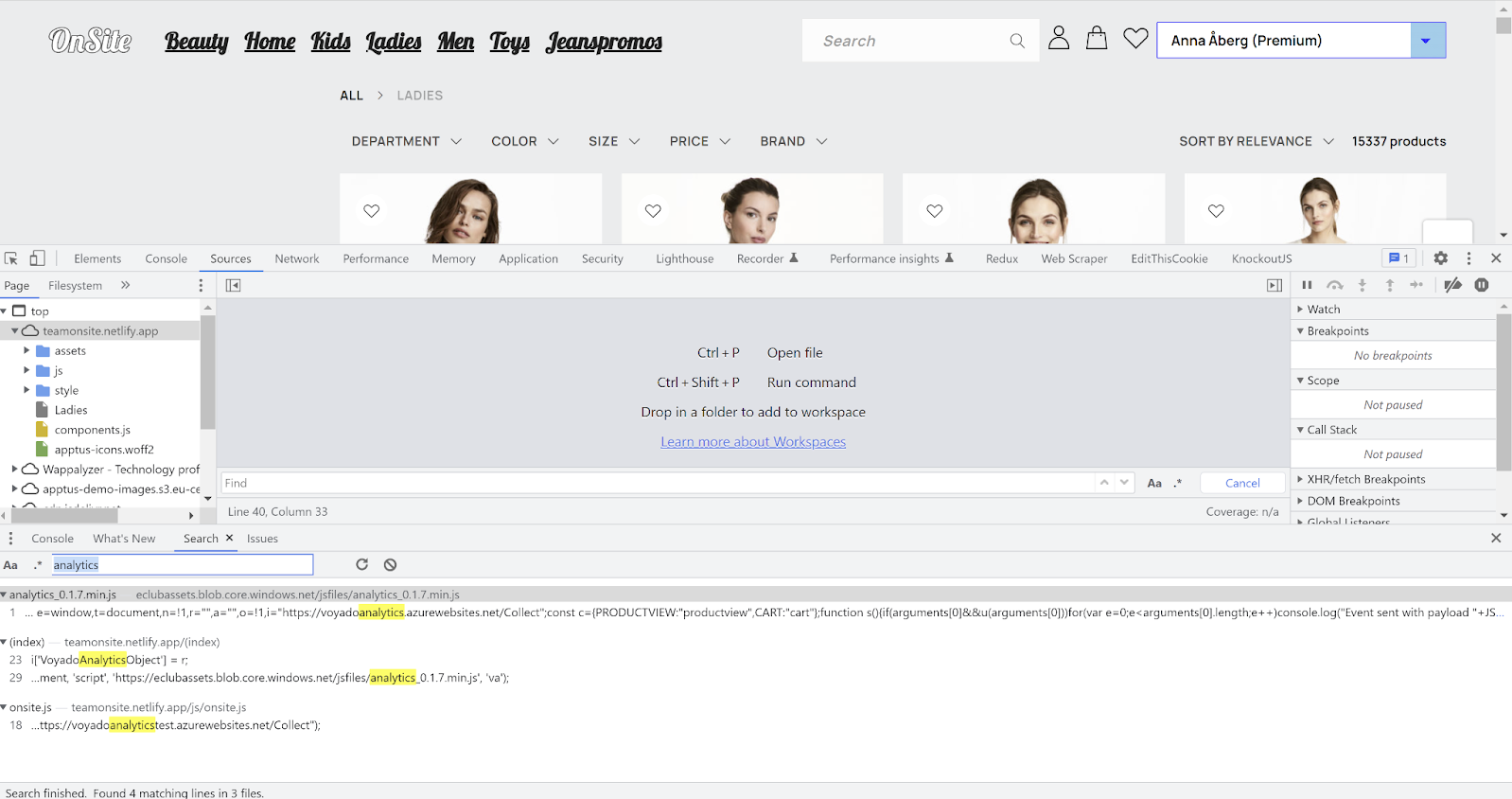
2. Open the JavaScript/developer console and go to “Sources”.
3. Search for “analytics” and make sure you are using the latest script version.
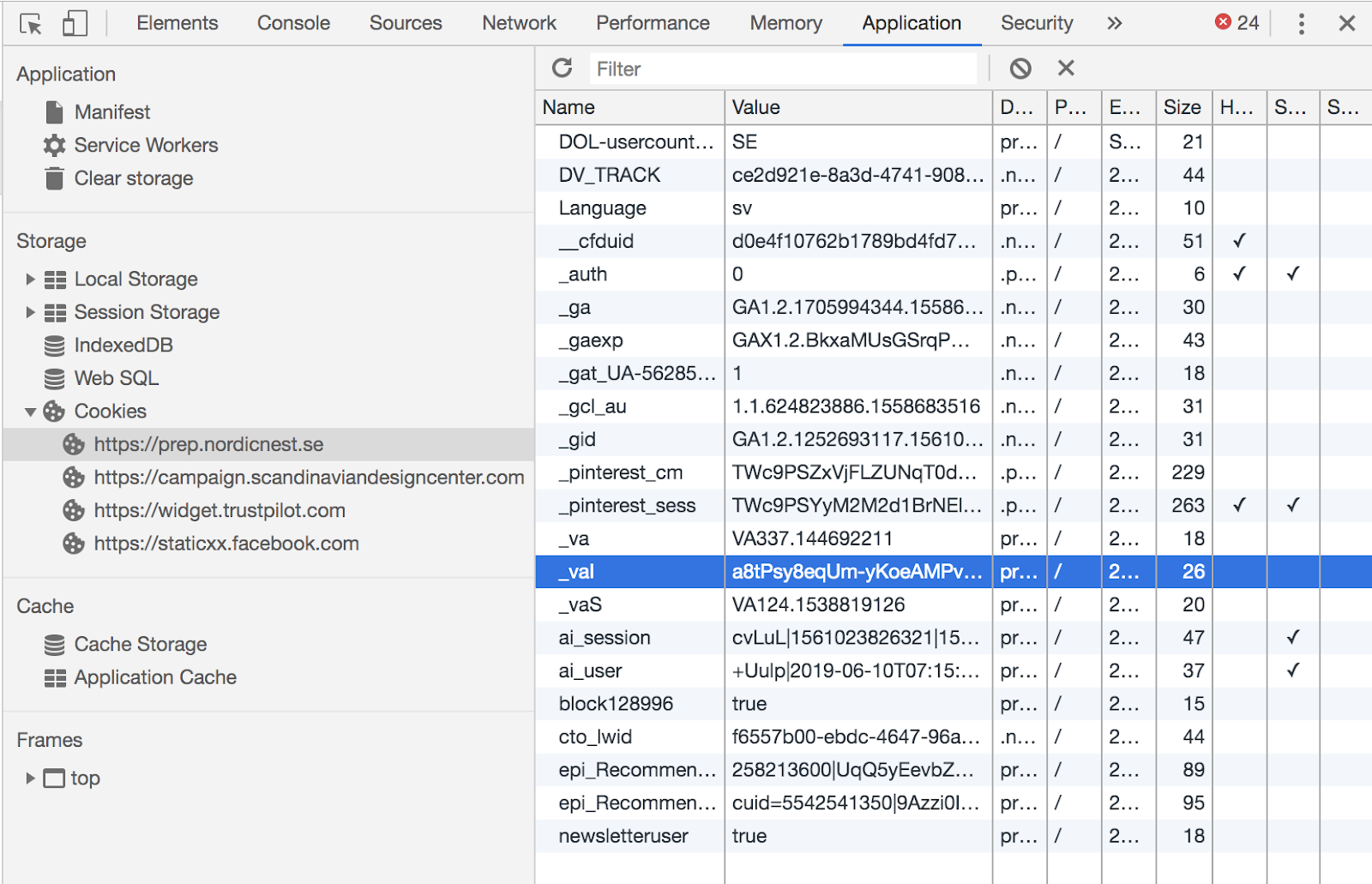
4. Go to "Application" → Cookies → the site that has implemented the tracking.
5. If you are logged in/identified, look for the \_val cookie
6. If you are *not* logged in/identified then look for a \_va cookie.
### 2 - Checklist - Tracking script
Go through these steps to verify your tracking script implementation.
The tracking script should also be loaded on non-product pages, such as the landing page. If an email link leads to a page that does not have the tracking script, the contact identification could fail.
Verify that no empty events are sent on page load or page navigation.
Events should be sent when the user is anonymous and a cookie should not exist. Engage can connect anonymous events to a user after they have been identified.
Events should be sent when a contact is identified via an email link and the \_vaI cookie should be set correctly. The user can thus be identified without being logged in.
When the user identifies themselves via login, verify that events are sent when they are identified, and also that the \_vaI cookie is set correctly set with the setContactId() function.
The cookie \_vaI should be set correctly no matter if the URL has a trailing slash or not.\*\*
* Test with the slash: *[www.site.se/?vtid=LTq-P1eRKU2s8CWc5KPe5w](http://www.site.se/?vtid=LTq-P1eRKU2s8CWc5KPe5w)*
* Test without the slash: [*www.site.se*](http://www.site.se)*?vtid=LTq-P1eRKU2s8CWc5KPe5w*
* ALso navigate further into the site to verify that \_vaI is not cleared.
The cookie \_vaI should be updated if a new vtid is used. Try first setting vtid to "a4fa7a46-23b0-4523-b09c-5462053e7627" and then changing it to "3fbe3a2d-9157-4d29-acf0-259ce4a3dee7".
The sessionid value should be set in the payload. The abandoned browse trigger will not work if this is not set.
You should be using the correct tracking script for your environment. If, for example, you are running the production script in the staging environment, tracking will not work.
## Tracking cart changes
Cart changes can be tracked either with the Voyado Engage tracking script or the tracking API. Engage can trigger abandoned cart communication to be sent to identified contacts. To enable this, Engage needs to know:
* Every update of every unique shopping cart
* The `contactId` of the visitor
There are two methods to consider when tracking cart changes:
* **cart()**: Used for registering visitor actions related to any cart modification
* **emptyCart()**: Used for pruning the cart of all items, usually when indicating a purchase or logout by the e-com visitor
### The data flow
This is how the flow looks:
1. The site submits shopping cart changes, either via the tracking script implemented on the e-com site or through the tracking API.
2. Carts containing products that haven't been accessed for at least 30 minutes are considered abandoned. If the cart is connected to a specific contact it will be sent to Engage. All other carts will be filtered out.
3. Engage then triggers the relevant automation (based on language/locale).
### Cart automation requirements
The following are required so that an abaondoned cart automation can be triggered:
* The locale must match a product feed in Engage and the corresponding language must be set in an automation.
* The SKU/SKUs must match products in the product feed (commonly “g:id”). If a SKU doesn't match the feed, that particular product will not be included in the email. If no SKUs match the products in the feed the automation won't be triggered at all.
* No products in the cart have been purchased (meaning no transaction has been sent to Engage) since the cart was identified as abandoned (although this can be overruled when configuring the trigger).
### Using the tracking script
Here is how to use the tracking script to track cart changes.
Invoke this method every time the cart is changed (items added/removed or the quantity updated) regardless of if the user has been identified by the website or not. The cart() method will then generate a HTTP POST request to the Collect endpoint.
```javascript Cart update in code theme={null}
va("cart",{
"cartRef":"354354",
"contactId":"afa7625d-2e97-4667-b4c1-ad3b01194bee",
"cartUrl":"https://www.store.se/cart?id=354354",
"locale":"sv-SE",
"items":
[{
"itemId": "456436",
"quantity": 2,
},
{
"itemId": "456437",
"quantity": 2,
}]
});
```
Cart identifier, must be unique for each cart.
Cart identifier, must be unique for each cart.
Engage contact ID, cookie \_vaI will be used as fallback.
Locale for the site where the cart is (such as "sv-SE"). Format as defined by IETF language tag. Only locales with a Product Feed assigned in Engage can trigger an abandoned cart automation.
The array of items that were added to the cart.
Item ID (SKU in Engage).
The number of items
Invoke this method when the cart has been emptied, either manually by the user or when the checkout process has been completed. This method is equivalent to invoking cart() with no items. Itis important to invoke emptyCart() after each successful checkout to avoid faulty abandoned cart communications.
The emptyCart() method will generate a HTTP POST request to the Collect endpoint.
```javascript A call to emptyCart() in code theme={null}
va("emptyCart",{
"cartRef": "354354"}
);
```
Cart identifier, must be unique for each cart.
Engage contact ID, cookie \_vaI will be used as fallback.
### Using the tracking API
It's possible to submit cart changes directly via the API instead of implementing the tracking script. If you choose this approach, it is important to identify all contacts that come to the e-com via links in emails (add “vtid” in “contactId”).
The calls can be tested through your OpenAPI (Swagger) page.
```http Example of call to tracking API theme={null}
[tenantname].voyado.com/api/v3/ui/index#/tracking
```
### When tracking cart changes
Those points are important to remember when tracking cart changes:
* **All behavioral data** can be used to build understanding and insights. A shopping cart belonging to an anonymous user can still be linked to a contact after they are identified.
* If the user is \*\*identified / logged in, \*\*both the “cart()” script method and the Carts API can be used to track their behavior. For anonymous users, however, only the “cart()” script can be used. This is because the tracking API always requires the contactId.
* For **cart updates**, call the “cart()” script method (for identified and anonymous users) or the Carts API (for identified users only) for all updates to the shopping cart, regardless of where on the site or at what stage the cart update takes place (product page, popup or checkout). Engage handles the shopping cart based on *its latest change*. It is therefore important that all changes generate a call to “cart()” or the Carts API and that the data corresponds to the shopping cart currently displayed on the website.
* The “cartRef” value **must be unique** and must not be shared between different baskets or users. A "cartRef" of a specific shopping cart must not be changed, and all updates regarding a shopping cart must use the same "cartRef" value.
* For **empty carts**, use “cartRef” as well. Even empty carts need a cart reference.
* Call the “cart()” script method or Carts API with a “locale” value corresponding to **the locale of your Product Feed** in Engage. In order to enrich the products with article data, a Product Feed for that locale needs to be set up in Engage. An automation using that locale also needs to be active.
* All carts not emptied before the website visitor leaves, or makes a purchase, **risk being marked as abandoned**. If you have an abandoned cart automation active, that automation will then be triggered by those unemptied carts.
Make sure to call “cart()” script method or the Carts API only when the cart is updated. Doing it at other times risks polluting your data in Engage.
## Tracking product views
By tracking product views, Engage can:
* Trigger abandoned browse automations
* Build audiences based on products of interest
* Get improved product recommendations
Product views can be tracked in two ways:
* Using the Voyado tracking script
* Using the tracking API
When tracking product views, the JavaScript method used is productview().
The following features in Engage are enabled by the tracking of product views:
* Abandoned browse
* Products of interest
* Product recommendations
Here follows descriptions of each.
1. The site submits product views, which are part of a session, either via the tracking script implemented on the e-com site or through the tracking API.
2. Sessions without activity for at least 30 minutes are considered abandoned. If the session doesn't contain any cart event, and the product views are connected to a specific contact, it will be sent to Engage. All other sessions will be filtered out. A session can only be sent to Engage once.
3. All product views sent to Engage are enriched with data from the product feed.
4. Engage then triggers the relevant automation, based on the specific trigger configurations. If automations contain email activities those can include dynamic product data enriched from the product feed.
1. The site submits product views, which are part of a session, either via the tracking script implemented on the e-com site or through the tracking API.
2. Engage, using the recency, frequency and other patterns of product views from the last 90 days, calculates up to 25 products which each contact is probably most interested in, based only on their onsite behaviour.
3. These products are updated using a scheduled job and enriched by the article registry and can then be used in segmentation and as part of a scheduled selection in an automation.
If a contact has products of interest, these will be part of the data used to calculate personal recommendations in Engage. This means that their onsite behavior (Products of interest) will be combined with all historical purchase and return behavior to present a set of personalized recommendations that can be used in emails.
### Abandoned browse automations
The following are required so that an abandoned browse automation can be triggered:
* The locale must match a product feed in Engage. Events without a matching product feed will be filtered out.
* The SKUs must match products in the product feed (commonly “g:id”). If an SKU doesn't match the feed, that particular product will not be included in the email. If no SKUs match the products in the feed, the automation won't be triggered at all.
### Using the tracking script
The tracking script to track product views works via the productview() method. Invoke this method every time a product is viewed, such as on a product page, whether the user has been identified by the website or not.
```javascript A call to the productview() method theme={null}
va("productview", {
"categoryName": "Women / Armour / Greaves",
"itemId": "123XYZ",
"contactId":"afa7625d-2e97-4667-b4c1-ad3b01194bbb",
"locale":"sv-SE"
})
```
Product category, e.g. “Men / Sweaters / Cardigan”.
Mapped to SKU in Engage.
The Engage contact ID.
Format as defined by IETF language tag. Should match a product feed locale in Engage.
The field `locale` is also mandatory when using abandoned browse, to start abandoned browse automations.
Further important points when tracking product views:
* **Call productview() in all cases, regardless of whether the user is identified or logged in or not**. All behavioral data can be used for insights and a product view belonging to an anonymous user can be linked to a specific user after they are identified.
* **Call productview() for all product views and with an `itemId` that matches SKU in Engage.** A product view can be a visit to a product page but also anything else that shows a selected product to the user, for example a “quick look” in a popup. The product/itemId will be matched against the SKU in Engage and enriched with product and transaction data. A product page can call productview() multiple times if it represents multiple SKUs.
### Using the tracking API
It's possible to submit product views directly via the API instead of implementing the tracking script. Keep in mind, if doing things this way, that a lot of functionality that exists out-of-the-box when using the script has to now be handled directly by the retailer.
It's important to **identify contacts** that enter the e-com from a link in a newsletter by reading the encrypted JSON that is sent in the link's query string. This contains the information needed to identify the contact. Only identified product views can be registered via API (since the contactId is required).
A product view is part of a **session**, identified by its `sessionId`, which is required for abandoned browse. This is handled automatically by the tracking script, but when using the API the `sessionId` has to be included in the payload in all calls.
## Web activity tracking use cases
Here are some use cases for web activity tracking:
**What happens:**
The user clicks a link to the e-com in an email newsletter that was sent out from Engage. The link is decorated with vtid (the contact ID). The user then views a specific product and invokes productview().
**What you need to do:**
* Populate `categoryName` with the current product category, for example: `“categoryName”: ”Computer accessories \> Printers \> Toners”)`
* Populate `itemId` with the current product SKU (e.g. "itemId": "549852″)
* Populate `locale` based on the site's current language/market (e.g. “locale“: “sv-SE“)
* Populate `contactId` with user's contact ID from Engage (`vtid` is used as fallback)
**What happens:**
An unidentified user browses into the e-com. They view a specific product, invoking productview().
**What you need to do:**
* Populate `categoryName` with the current product category, for example: `“categoryName”: ”Computer accessories \> Printers \> Toners”)`
* Populate `itemId` with the current product SKU (e.g. "itemId": "549852″)
* Populate `locale` based on the site's current language/market (e.g. “locale“: “sv-SE“)
* Do NOT populate `contactId`
**What happens:**
The user enters a product display page (PDP) with multiple SKUs/colors/variants.
**What you need to do:**
* Avoid sending a productview for every size and instead send one when a specific size/colour/variant is picked
* If you want to track the view no matter the variant, then send a random SKU from the PDP. Or, as a last resort, send all variants. If all variants are sent, beware that you risk triggering abandoned browse emails containing many variants of the same product.
## Verification and common issues
Here's how to deal with a few common situations and issues connected to web tracking.
### 1 - Verify tracking script
1. Go to your e-com site.
2. Open the JavaScript/developer console and go to “Sources”.
3. Search for “analytics” and make sure you are using the latest script version.
4. Go to "Application" → Cookies → the site that has implemented the tracking.
5. If you are logged in/identified, look for the \_val cookie
6. If you are *not* logged in/identified then look for a \_va cookie.
### 2 - Checklist - Tracking script
Go through these steps to verify your tracking script implementation.
The tracking script should also be loaded on non-product pages, such as the landing page. If an email link leads to a page that does not have the tracking script, the contact identification could fail.
Verify that no empty events are sent on page load or page navigation.
Events should be sent when the user is anonymous and a cookie should not exist. Engage can connect anonymous events to a user after they have been identified.
Events should be sent when a contact is identified via an email link and the \_vaI cookie should be set correctly. The user can thus be identified without being logged in.
When the user identifies themselves via login, verify that events are sent when they are identified, and also that the \_vaI cookie is set correctly set with the setContactId() function.
The cookie \_vaI should be set correctly no matter if the URL has a trailing slash or not.\*\*
* Test with the slash: *[www.site.se/?vtid=LTq-P1eRKU2s8CWc5KPe5w](http://www.site.se/?vtid=LTq-P1eRKU2s8CWc5KPe5w)*
* Test without the slash: [*www.site.se*](http://www.site.se)*?vtid=LTq-P1eRKU2s8CWc5KPe5w*
* ALso navigate further into the site to verify that \_vaI is not cleared.
The cookie \_vaI should be updated if a new vtid is used. Try first setting vtid to "a4fa7a46-23b0-4523-b09c-5462053e7627" and then changing it to "3fbe3a2d-9157-4d29-acf0-259ce4a3dee7".
The sessionid value should be set in the payload. The abandoned browse trigger will not work if this is not set.
You should be using the correct tracking script for your environment. If, for example, you are running the production script in the staging environment, tracking will not work.
 ### 3 - Verify tracking of product views
Here's how to verify that tracking of your product views is working.
1. Go to your e-com site.
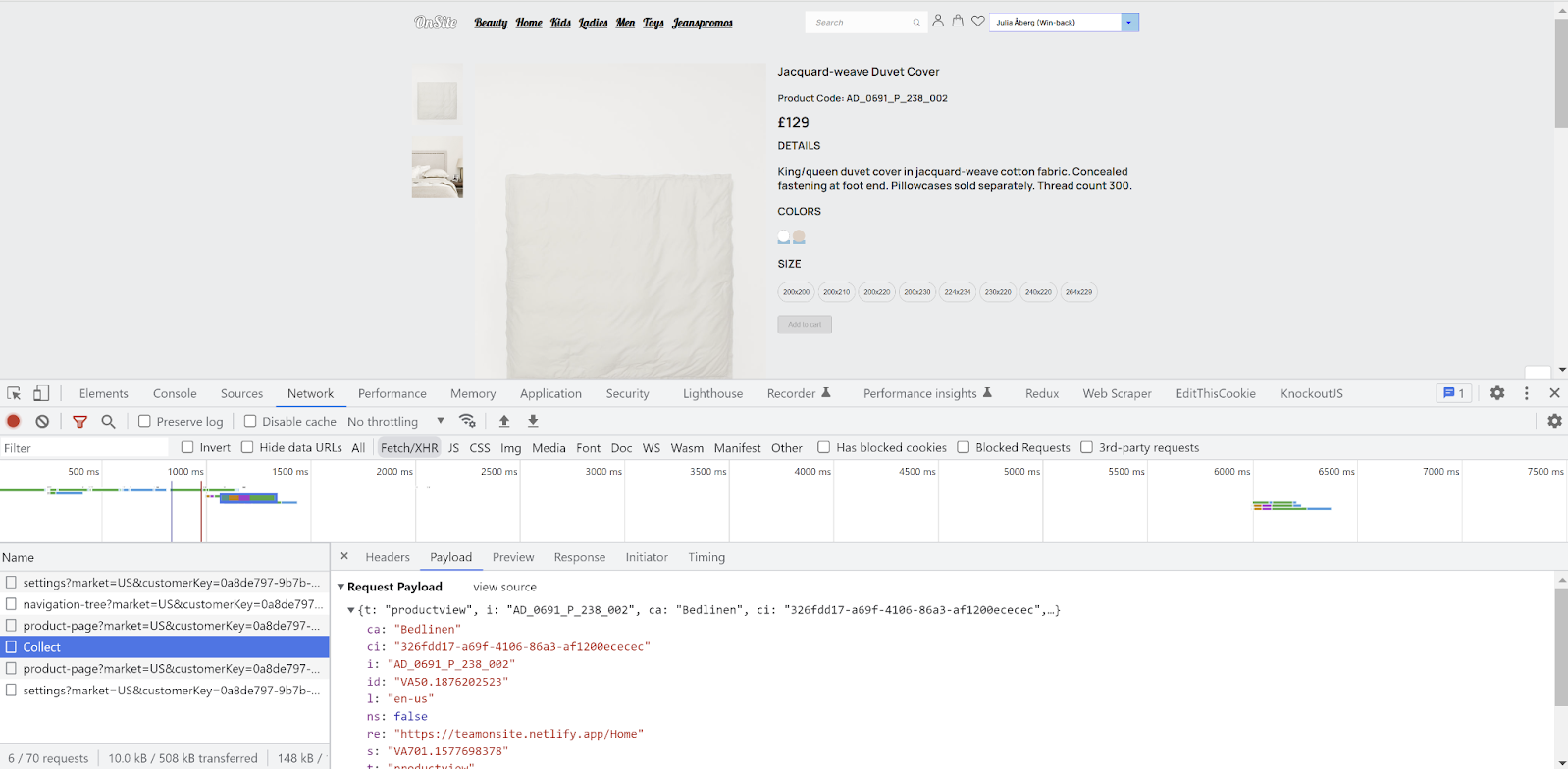
2. Open the JavaScript/developer console, go to "Networks", and select the Fetch/XHR tab.
3. Visit any random product on the site.
4. You should now see a call made to the Collect endpoint.
5. In the payload, the te value should be your tenants/account name. Note that Locale does not have to be the same as the cart payload, and is not used in to identify anything.
6. When viewing a product, the t (type) value should be "productview", as pictured below.
7. If you are logged in/identified, click on the payload and make sure the ci value is the same ID as in the \_val cookie mentioned above. The value of ci should not be anything other than the ID.
### 4 - Checklist - Product of Interest
In order to track if a purchase followed after the last product view, the itemId from the product view is matched against the SKU in the article registry that is included on the receipt.
The sessionid should be set in the payload. The abandoned browse trigger will not work if this is not set.
A product page should trigger a productview event for each itemId/SKU. If several productview events are triggered, they must be for different itemId/SKU.
There are usually different ways to navigate to a product page, for example via the landing page, checkout, another product page, the menu, the shopping cart. For sites that are built as SPAs, no full page loading is done, which can cause inconsistent functionality.
### 3 - Verify tracking of product views
Here's how to verify that tracking of your product views is working.
1. Go to your e-com site.
2. Open the JavaScript/developer console, go to "Networks", and select the Fetch/XHR tab.
3. Visit any random product on the site.
4. You should now see a call made to the Collect endpoint.
5. In the payload, the te value should be your tenants/account name. Note that Locale does not have to be the same as the cart payload, and is not used in to identify anything.
6. When viewing a product, the t (type) value should be "productview", as pictured below.
7. If you are logged in/identified, click on the payload and make sure the ci value is the same ID as in the \_val cookie mentioned above. The value of ci should not be anything other than the ID.
### 4 - Checklist - Product of Interest
In order to track if a purchase followed after the last product view, the itemId from the product view is matched against the SKU in the article registry that is included on the receipt.
The sessionid should be set in the payload. The abandoned browse trigger will not work if this is not set.
A product page should trigger a productview event for each itemId/SKU. If several productview events are triggered, they must be for different itemId/SKU.
There are usually different ways to navigate to a product page, for example via the landing page, checkout, another product page, the menu, the shopping cart. For sites that are built as SPAs, no full page loading is done, which can cause inconsistent functionality.
 ### 5 - Verifying cart changes
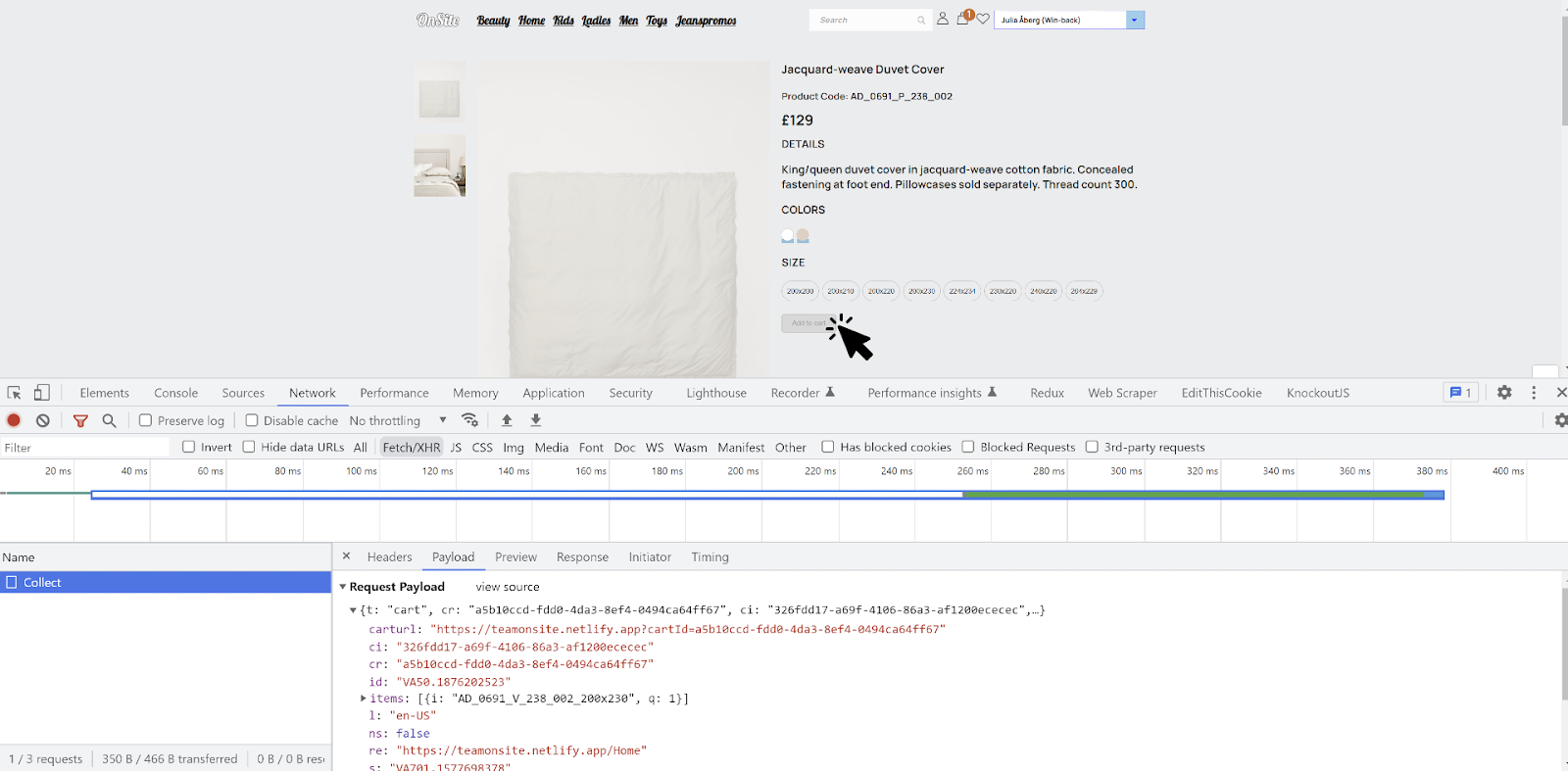
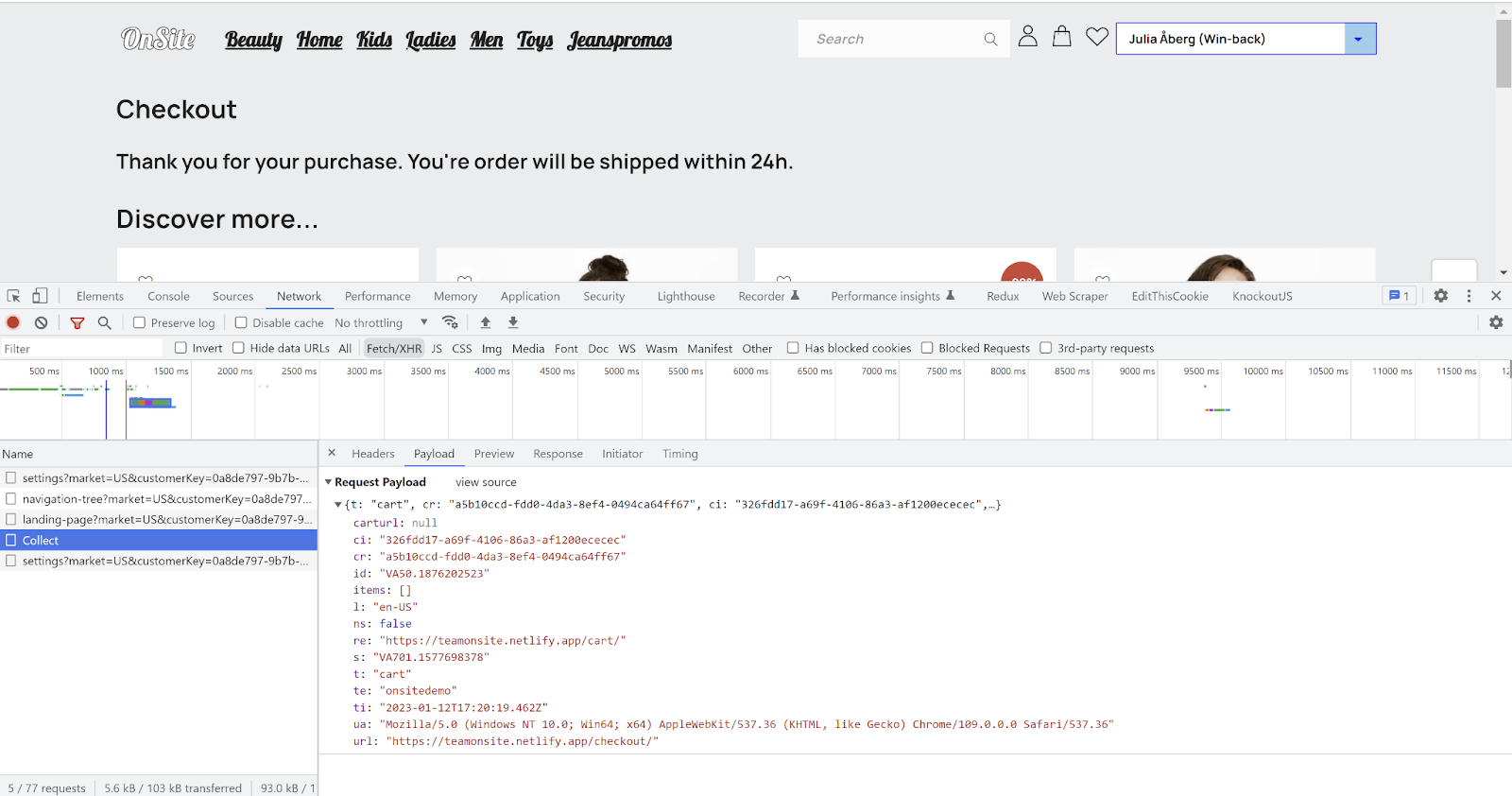 1. Go to your e-com site.
2. Open the JavaScript/developer console and go to "Networks" and select the Fetch/XHR tab.
3. Place an item in the cart.
4. You should now see a call made to an endpoint named Collect.
5. In the payload, the t (type) value should be "cart". Note the items\[] array which may include products you've placed in your cart.
6. If possible, complete the purchase / check out the cart.
7. At this point a new Collect event should be fired with an empty cart indicating that the purchase has been made.
### 6 - Checklist - Cart tracking
Go through these steps to verify your cart tracking.
A shopping cart must have a language/locale that matches a Product Feed and the language version of the site (if it is a multimarket site).
Try updating the shopping cart in different ways (add item, remove item, change quantity, emptying). Is the quantity updated when the same item is added for the second time? What happens when you remove the last item? There are usually different ways to update the shopping cart, e.g. on the product page, popup. Sites built as SPAs tend to have inconsistent functionality.
Try updating the shopping cart on the checkout page, since the functionality on the checkout page usually differs from the rest of the site. Is there a difference between when you change the quantity to zero and remove the item? What happens when all items are removed? Is it possible to add new items from checkout? Does it differ between with/without vtid?
What happens when you go in and out of the checkout and update the shopping cart on both pages? Check that no incorrect events are sent.
### 7 - Common implementation errors
* **Cart event is not sent for every update**: Every update of the cart needs to generate a cart event to the Collect endpoint. This includes updates such as add/remove product, update quantity, empty cart. These updates can occur in different contexts (product page, cart popup/sidebar, checkout, etc) and function differently.
* **Different cartRef for the same cart**: The cartRef value must be unique per cart and have to stay persistent for all cart-events, it cannot change between updates. Invalid cartRef on remove product and empty cart are common problems.
* **Multiple cart/productview events**: Make sure that a cart update only generates a single cart event and that non-cart actions (e.g. page loads) don't generate any additional cart events. A visit to a product page should not generate more than one productview event per unique SKU (multiple SKUs with corresponding events on a single product page is fine).
### 8 - Common identification errors
* **Clearing the \_vaI cookie when it is set with vtid**: The \_val cookie is set with vtid when the user is identified by e-mail. Do not invoke setContactId() with an invalid value (such as empty or null) when the user is not signed in, since the user might already be identified without being signed into the website.
* **No cart/productview events before checkout or sign in**: Do not limit cart/productview events only to the checkout page only, or only to signed in/identified users.
* **The \_val cookie is not set when link in e-mail ends with slash (/)**: Some websites remove the ending slash from URLs without the query strings being preserved. This might cause \_vaI to not be set if the link in an Engage e-mail contains an ending slash.
1. Go to your e-com site.
2. Open the JavaScript/developer console and go to "Networks" and select the Fetch/XHR tab.
3. Place an item in the cart.
4. You should now see a call made to an endpoint named Collect.
5. In the payload, the t (type) value should be "cart". Note the items\[] array which may include products you've placed in your cart.
6. If possible, complete the purchase / check out the cart.
7. At this point a new Collect event should be fired with an empty cart indicating that the purchase has been made.
### 6 - Checklist - Cart tracking
Go through these steps to verify your cart tracking.
A shopping cart must have a language/locale that matches a Product Feed and the language version of the site (if it is a multimarket site).
Try updating the shopping cart in different ways (add item, remove item, change quantity, emptying). Is the quantity updated when the same item is added for the second time? What happens when you remove the last item? There are usually different ways to update the shopping cart, e.g. on the product page, popup. Sites built as SPAs tend to have inconsistent functionality.
Try updating the shopping cart on the checkout page, since the functionality on the checkout page usually differs from the rest of the site. Is there a difference between when you change the quantity to zero and remove the item? What happens when all items are removed? Is it possible to add new items from checkout? Does it differ between with/without vtid?
What happens when you go in and out of the checkout and update the shopping cart on both pages? Check that no incorrect events are sent.
### 7 - Common implementation errors
* **Cart event is not sent for every update**: Every update of the cart needs to generate a cart event to the Collect endpoint. This includes updates such as add/remove product, update quantity, empty cart. These updates can occur in different contexts (product page, cart popup/sidebar, checkout, etc) and function differently.
* **Different cartRef for the same cart**: The cartRef value must be unique per cart and have to stay persistent for all cart-events, it cannot change between updates. Invalid cartRef on remove product and empty cart are common problems.
* **Multiple cart/productview events**: Make sure that a cart update only generates a single cart event and that non-cart actions (e.g. page loads) don't generate any additional cart events. A visit to a product page should not generate more than one productview event per unique SKU (multiple SKUs with corresponding events on a single product page is fine).
### 8 - Common identification errors
* **Clearing the \_vaI cookie when it is set with vtid**: The \_val cookie is set with vtid when the user is identified by e-mail. Do not invoke setContactId() with an invalid value (such as empty or null) when the user is not signed in, since the user might already be identified without being signed into the website.
* **No cart/productview events before checkout or sign in**: Do not limit cart/productview events only to the checkout page only, or only to signed in/identified users.
* **The \_val cookie is not set when link in e-mail ends with slash (/)**: Some websites remove the ending slash from URLs without the query strings being preserved. This might cause \_vaI to not be set if the link in an Engage e-mail contains an ending slash.
For example `www.mysite.com/myproduct/?vtid=uaz2QuT9NEez_eAsr8hEeQ` might be changed to `www.mysite.com/myproduct`.