

How a visitor gets identified
The tracking script identifies a visitor in three ways:- They click a link in an Customer Engagement email. The link carries a
vtidquery parameter, which the script reads from the URL. - Your site identifies them and calls
setContactId(), for example on login, registration, newsletter signup, completed purchase, or soft identification. - A
_vaIcookie already exists from a previous visit.

See how soft identification works
The order of events
- The visitor gives consent for cookies. No cookies are created before this.
- Activity in that browser is recorded anonymously against the client ID in the
_vacookie. - The visitor is identified, and their contact ID is stored in the
_vaIcookie. - Customer Engagement connects the earlier anonymous activity to that contact.
The cookies
Both cookies are first-party.About the vtid parameter
vtid holds the contact ID in an encoded form, which Customer Engagement decodes internally. An Customer Engagement user cannot retrieve the contact ID or identify the contact from the vtid value alone.
When you send events, the contactId field accepts either the full contact ID guid or the encoded value from vtid.
Using setContactId()
CallsetContactId() with the visitor’s contactId at the moment your site identifies them:
contactId from the decrypted eClub query parameter.
setContactId() does not generate a request to the Collect endpoint.
A visitor may already be identified without being logged in. For instance, if they arrived from an email link. Calling setContactId() with an invalid value clears that existing identification.
Server-side cookies
Apple’s Intelligent Tracking Prevention (ITP) caps client-side cookies and LocalStorage in Safari at 7 days. Since_vaI is created by the script, an identified visitor who doesn’t return within 7 days loses their identification.
The cap does not apply to cookies created server-side. Script version 0.1.7 and later can therefore read a server-created cookie named _vaI_server and use it to recreate _vaI. Identified visitors then stay identified when they return, even after months away.
How to implement it
Server-side, check whether the incoming request contains a_vaI cookie. If it does, copy its value into a new _vaI_server cookie with a one-year expiry and add it to the response.
An example in C#
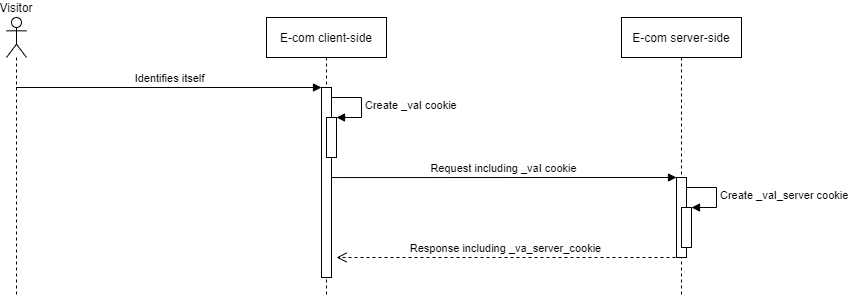
Server-side cookie
When _vaI is recreated
The script recreates the_vaI cookie in any of these cases, checked in this order:
- Your site calls
setContactId(), or includescontactIdin an event. - The URL contains a
vtidparameter. - LocalStorage contains a
vtidkey. - A
_vaI_servercookie exists.