

- A points model must be configured in your Customer Engagement installation, in the Rewards module, for points to be available. Contact your Voyado AM about this.
- On the contact card under the tab “Reward points” in the Customer Engagement UI, you can see all points gained by a contact.
- All points changes done over the API use the
v3/point-accountsendpoints, which are discussed below.
Terms and parameters
Here are some important parameters and terms when working with points: Point definitions: The “type” of points. Currently one point definition exists but the system allows for different kinds of points to be tracked in parallel, each with their own point definition value. The parameter used to tell point definitions apart isdefinitionId.
Point accounts: Points of different types are separated by their point definition value. This allows contacts to have many independent point totals and histories (accounts) each uniquely defined by a specific contact ID and a specific definition ID. The parameter for a point account is accountId.
Point transactions: A transaction or an update to a transaction that specifies the changes to a contact’s points.
Active points: The points that a contact currently owns which can be used to create vouchers.
Pending points: Points with a validFrom date in the future, which means they will not become active points until then.
Pagination in responses: Done with the optional offset and count parameters.
Filter active or pending: The filter parameter for point transactions which can be “Active”, “Pending”, “Expired” or “All” returns active points, pending points, expired points, or all.
Get all point accounts
To get all of a customer’s point accounts, use this endpoint:contactId as a query string parameter. This returns all of their point accounts in this form:
Point accounts response
Point accounts response
Response as JSON array
Get specific point account
If you know the unique ID of the point account, you can get the data for that account directly by using its ID in the path as shown here:Specific point account response
Specific point account response
links array contains optional information with some useful API calls you can use.The balanceExpires field indicates a point in time when the balance may change due to activation or expiration of points. However, because it depends on multiple factors, its behavior can be unpredictable. Therefore, we don’t recommend relying on this field.Get transactions for point account
A point account ID is unique for every point account in the database. You get it using the contact ID and the/api/v3/point-accounts endpoint.
Once you have the point account ID, you can then get all the detailed transactions for that particular point account, showing every time that particular contact’s points have been generated, removed or adjusted:
All transactions for a point account
All transactions for a point account
items array.The value of type can be “Addition”, “Deduction”, “Expiry” or “Cancellation”.- The parameters
offsetandcountcan be used to paginate the results - The parameter
filtercan be used to fetch active points, pending points, expired points, or all points (default is “Active”) - The parameter
sortBylets you sort the results on transaction date or created-on date - With
sortOrderyou can order results in ascending or descending order
Point transactions descriptions
In the payload returned from /point-transactions you’ll see a “description” field. This functionality has changed somewhat in API v3.Point transactions payload example
Point transactions payload example
description values contain a code, such as @@(ConvertedToBonusCheck). These codes are placeholders for a certain type of description and for each one you can configure a custom text to explain the transaction. for example, on a contact’s My Pages.
Here are explanations along with suggested descriptions:
You will need to handle this manually in your frontend, using either the texts suggested in the table, or your own customized version of them, whichever suit your needs.
Add single point transaction
This is the recommended way to add a single points transaction to a points account.See request payload structure
See request payload structure
See response errors
See response errors
- 400: Bad Request
- 504: GatewayTimeout
validTo or expireAfterMonthsInactive matches that expiration setting, these fields can both be set to blank and values will be added based on the expiration settings.
Add several point transactions
To batch-add point transactions to Customer Engagement, or adjust existing points, use this endpoint.See request payload structure
See request payload structure
Adding several transactions at once
source are “Purchase”, “Adjustment” and “Return”. Other values are also available.
Since the points in this example have a validFrom date that’s in the future from the purchase date, these points will be pending until then. When that date arrives, they will change to active.
See responses
See responses
- 202 Accepted response
- 400 Too many items, New point system not active
Get a specific transaction
You can fetch the information for a specific point transaction if your know its unique transaction ID:See request payload structure
See request payload structure
Transaction data example
retailTransactionLineItemId allows you to link this particular point transaction back to the exact line item that caused it.Pending points
Pending points are a Customer Engagement feature powered by the latest version of points. They can be seen as points that are granted but that only become “real” after a configurable delay.- Active: Points with no
validFromdate or one that is in the past (regular points, basically) - Pending: Points with a
validFromdate in the future, after which they become active
Fetch pending point balance
To get the point account balances for a customer, you use the following endpoint, sending in the query string thecontactId of the contact you are interested in.
pendingPoints as one of the values.
Fetch pending point transactions
To get the pending point transactions for a customer, make a request with the point account ID (asid) in the query string to this endpoint.
filter in the query string with the value of “Pending”.
Create pending points
Points can also be created as pending for one or more contacts when added through this endpoint:validFrom parameter along with the other information required in the body of the request. Set validFrom it to the date in the future from which these points will change from pending to active, and now you have created pending points. Example:
See request payload structure
See request payload structure
Adding pending points example
Add points manually
ThevalidFrom parameter is not used for points which are added manually or via automations. Points created in one of these ways will always be active immediately.
When you activate pending points, a contact’s already existing points will not be affected. Only points created after the activation will be able to use the pending points function.
Webhooks
Customer Engagement provides webhooks for working with points and vouchers.
Read a general introduction to webhooks
Read about webhooks for points and vouchers
Point follower
Sometimes a customer wants to be the point master (that is, to own and calculate their end-user’s points in their own system). But they might still want to use Customer Engagement’s functionality for visualizing and adding points based on non-purchase events like engagements, birthday, reviews or whatever. In this case, Customer Engagement can be configured to be the point follower. Customer Engagement and the point master system must then sync points with each other, with the point master being the single source of truth. Customer Engagement receives the current point balances for a contact from the point master system and sets the total in Customer Engagement to this value. Not that there will be no information sent about why the balance changed. The current solution for Customer Engagement as point-follower uses a combination of API endpoints and webhooks. There are three parts to the solution:- The point master sends balance-only updates via the Customer Engagement API
- Customer Engagement imports the points log from an external API provided by the point master
- Customer Engagement exports point adjustments to the point master via a webhook
1 - Balance-only points update via the API
1 - Balance-only points update via the API
The point master needs to regularly send points updates to Customer Engagement so that both systems remain in sync. This is done using this Customer Engagement API endpoint:The payload has the following form:When the point master calls this endpoint, Customer Engagement receives the request and puts it into a queue. A unique transaction ID is also returned. When the job “BalanceAccountToAmountJob” is run, the queue is processed and the received point balance is then set in Customer Engagement for each of the contacts, putting Customer Engagement in sync with the point masterBe aware that this endpoint is due to be deprecated. Voyado recommend not building any new workflows using this endpoint.The response from this call will be in this form:
Payload to sync points accounts
Track processing of request
If the point master needs to track how the requests are being processed in Customer Engagement, it can use the following endpoint along with the transaction ID it received when it posted to /api/v3/point-accounts/balances:2 - Fetch points log via external API
2 - Fetch points log via external API
When Customer Engagement is acting as point follower, it does not hold the points log (points history) for a contact. The point master owns all that information. Customer Engagement, however, can fetch the points log using an external API supplied by the point master, and then display it on the contact card.The API call will look something like this:The value “contactId” here is the ID of the contact in question.This URL is hosted by the point master on their end.This URL needs to be entered into the Customer Engagement back-end. Your Voyado team will do this.The point master needs to ensure the response from the endpoint has this form:Or, if the contact in question has no points yet, the response should be an empty array:
3 - Points adjustment via a webhook
3 - Points adjustment via a webhook
If a points adjustment is made in Customer Engagement manually in the UI or by an automation, and Customer Engagement is acting as point follower, then that adjustment is not made right away. Instead it is sent as a request to the point master system. This is done using a webhook, provided by the point master and configured in Customer Engagement.Once the point master has received the update, the points change will only be visible in Customer Engagement when the point master performs its next sync (see step 1 for how that works).Points adjustments made in Customer Engagement when it is acting as point follower might not have an immediate effect. You might have to wait for the next sync from the point master.The data sent over the webhook has the following form:The payload part is encrypted. The encryption key used must be entered into the Customer Engagement back-end, and also communicated separately to the point master system so they can perform the decryption with the same key. Once decrypted, the form of the payload will depend on whether the points adjustment was done via an automation, or manually in the Customer Engagement UI.The attributes ProcessId, WorkflowId and WorkflowName refer to the automation.The
Points adjustment via automation
In this case, the decrypted payload will look like this:Points adjustment manually
In this case, the decrypted payload will look like this:userId and userName here refer to the user who made the change in Customer Engagement.The point master system can now read the points adjustment and apply it.View points in Customer Engagement
As mentioned, when Customer Engagement is point follower, adjustments are not applied directly, but instead sent to the point master using the webhook, and from there back to Customer Engagement via the API when the next sync happens. In the Customer Engagement UI, the user can view the points added and sent out: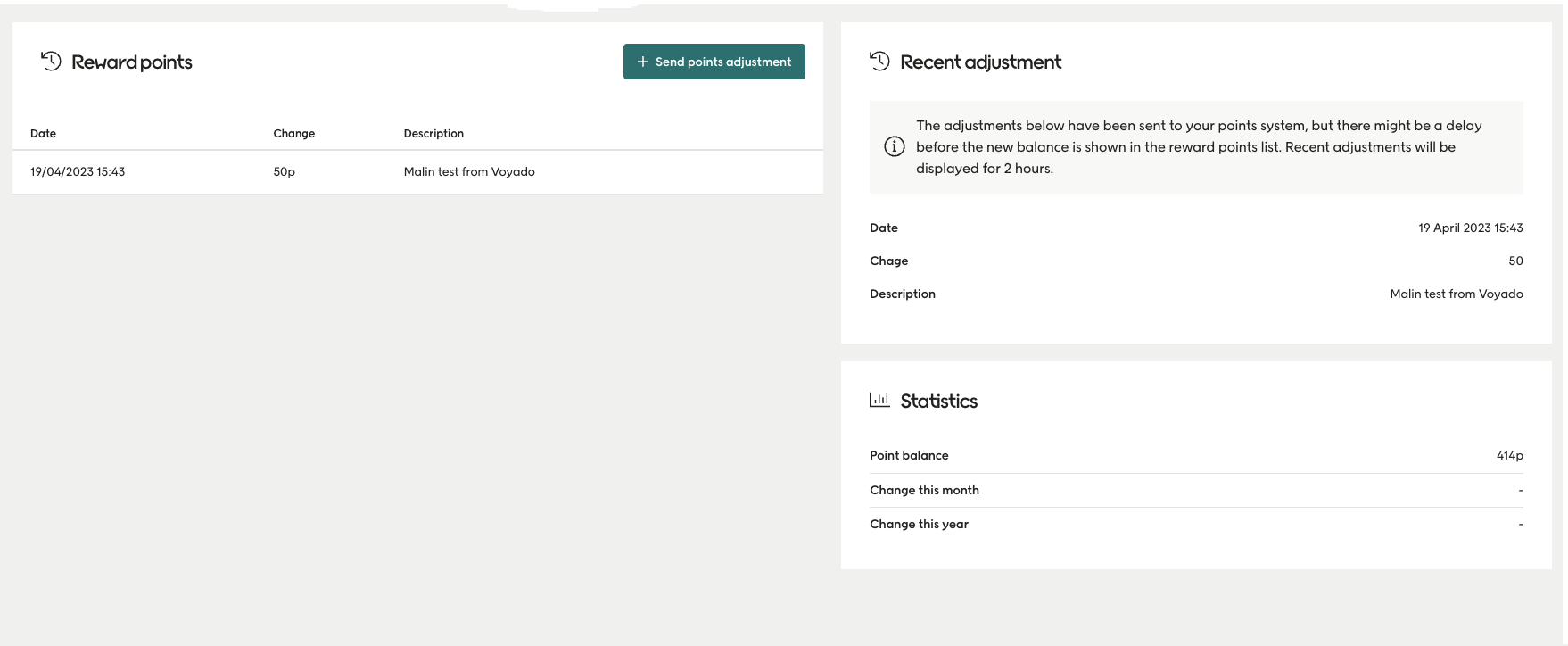
Viewing points adjustments