Responses are generated using AI and may contain mistakes.
IMPORTANT: We're updating product naming across our documentation. Engage is now Customer Engagement and Elevate is now Product Discovery. This doesn't change Voyado's services, functionality, or terms of your agreement. Be aware, as these changes happen, that you may see both the old and new names being used.
Voyado Product Discovery (formerly Voyado Elevate) is a powerful search and recommendation engine, tailor-made for e-commerce. It analyses shopper behaviour (clicks, searches, purchases) to make tailored product recommendations. Recommendations adapt in real time based on behaviour on the site.With the Customer Engagement integration to Product Discovery, you can unlock a set of connected features where the two products work together in ways that aren’t possible on their own. This integration is powered by shared identification, contact data, and behavioral signals, enabling smarter personalization across channels. Examples include:
Connected recommendations – Product Discovery generates dynamic product recommendations that can be used directly in Customer Engagement’s Design Studio.
Audience-driven personalization – Product Discovery personalizes the on-site experience based on audiences created in Customer Engagement.
Current interest audiences – Customer Engagement audiences can be built using real-time behavioral data from Product Discovery.
Smarter recommendations – Product Discovery’s recommendations are enhanced with in-store purchase data captured by Customer Engagement.
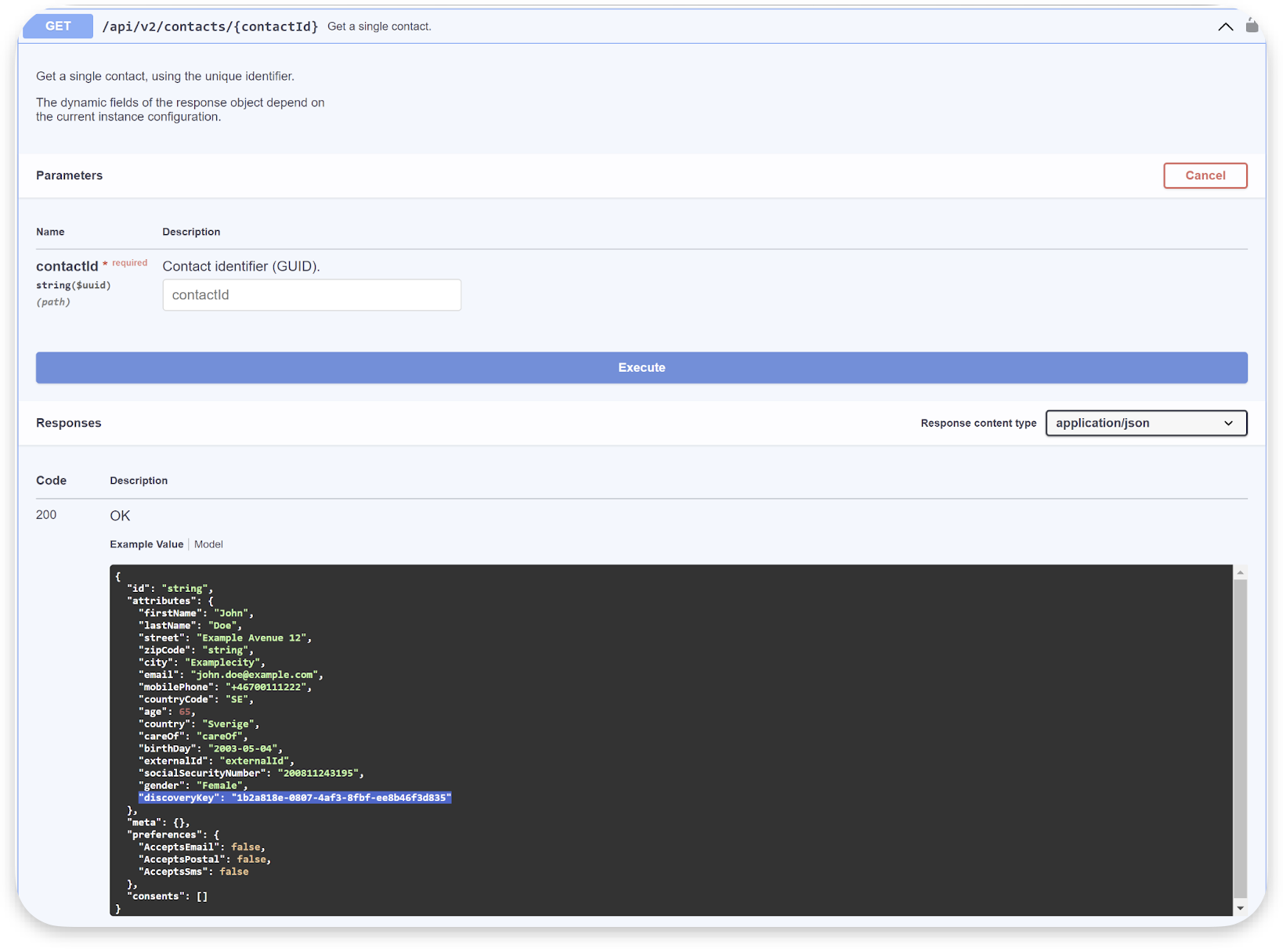
By making Customer Engagement and Product Discovery agree on who a particular contact is, data such as audiences and behavior can be easily shared between the two products. This is done with a unified identifier called discoveryKey.
The discoveryKey attribute is used to connect the same contact in Customer Engagement and Product Discovery.
This article looks at how this integration is done.
In Product Discovery, the customerKey is the unique identifier for a visitor on the website.A customerKey is required for every request to the Product Discovery API, whether for notifications or queries. To link a visitor in Product Discovery to a Customer Engagement contact, the customerKey from Product Discovery should be stored in the discoveryKey contact attribute within Customer Engagement. This enables cross-platform understanding of the visitor and enhances personalization capabilities across both Product Discovery and Customer Engagement.
There are two general ways a visitor can be identified:
Upon entry
During the session
1 - Identification upon entry
When a visitor enters the site, they may arrive wither organically, from a referral or through a newsletter.What happens next in this case depends on the customerKey:
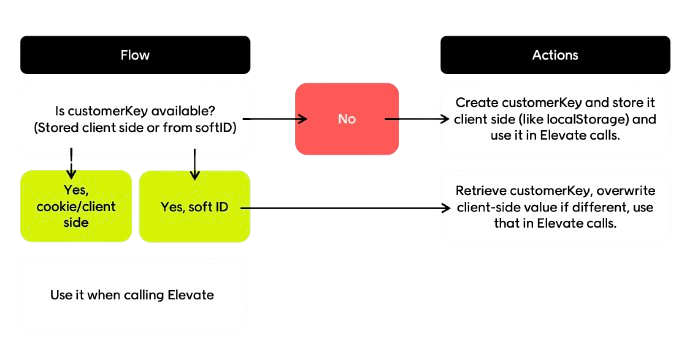
If a customerKey is already available (stored client-side or retrieved from softId), use it in all Product Discovery calls
If no customerKey exists, create one, store it client-side (localStorage or cookie) and then use it in Product Discovery calls
If a visitor arrives via softId (from a Customer Engagement newsletter), you’ll need to decode the softId, retrieve the matching customerKey, and overwrite the local value of customerKey if it is different
The customer key
For detailed behavior, see the specific visitor types below.
2 - Identification during session
If the customer is not identified at entry (see above), they can be identified during the session if they:
Creating an account
Logging in to an existing account
Signing up for a newsletter, wishlist, or reminder
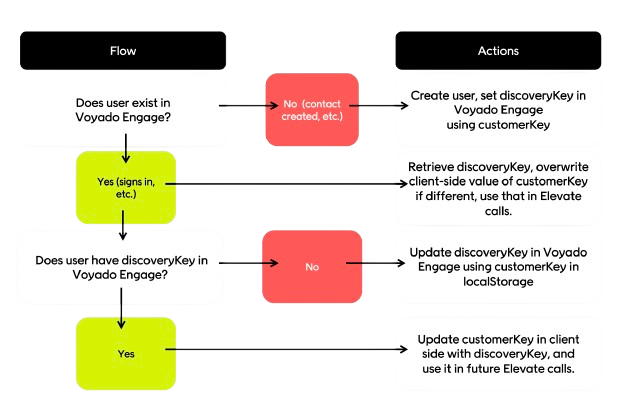
When the visitor has been identified, check if they exist in Customer Engagement.
If they don’t exist, create the contact and assign discoveryKey to the customerKey value
If they do exist, retrieve and compare the discoveryKey to the client’s customerKey and if the values are different, overwrite the client-side customerKey with the Customer Engagement discoveryKey
For detailed behavior, see the specific visitor types below.
Ensure Customer Engagement is updated with the discoveryKey for all members (visitors who can sign in)
All discoveryKey values must be unique; duplicate values in Customer Engagement prevent personalization
Always call Product Discovery with the existing customerKey when a visitor is identified
Use Customer Engagement’s softId for newsletters to maximize identification rate and cross-system linking
Define a single source of truth for the customerKey, for example the discoveryKey in Customer Engagement, to resolve conflicts between local and server values
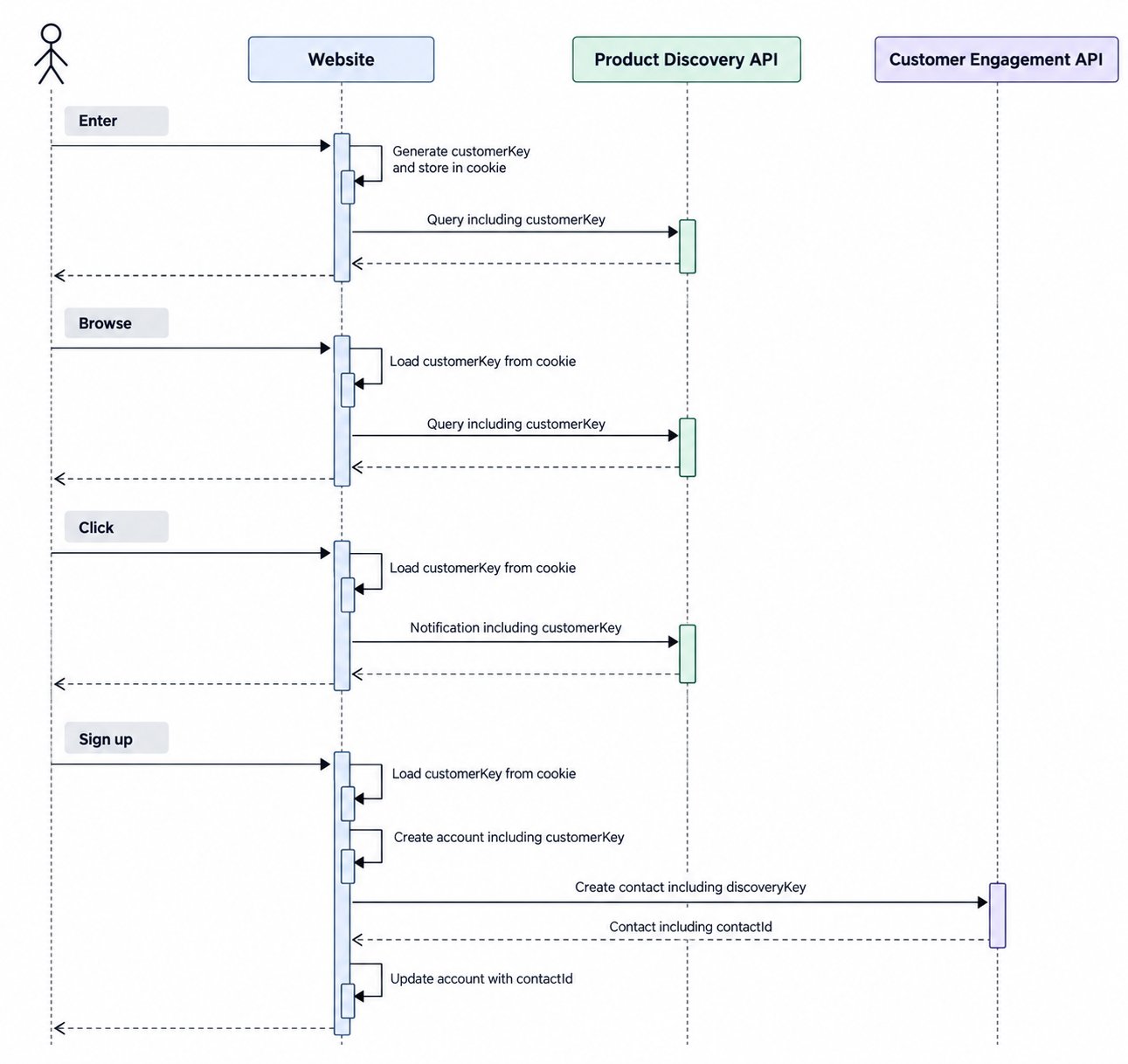
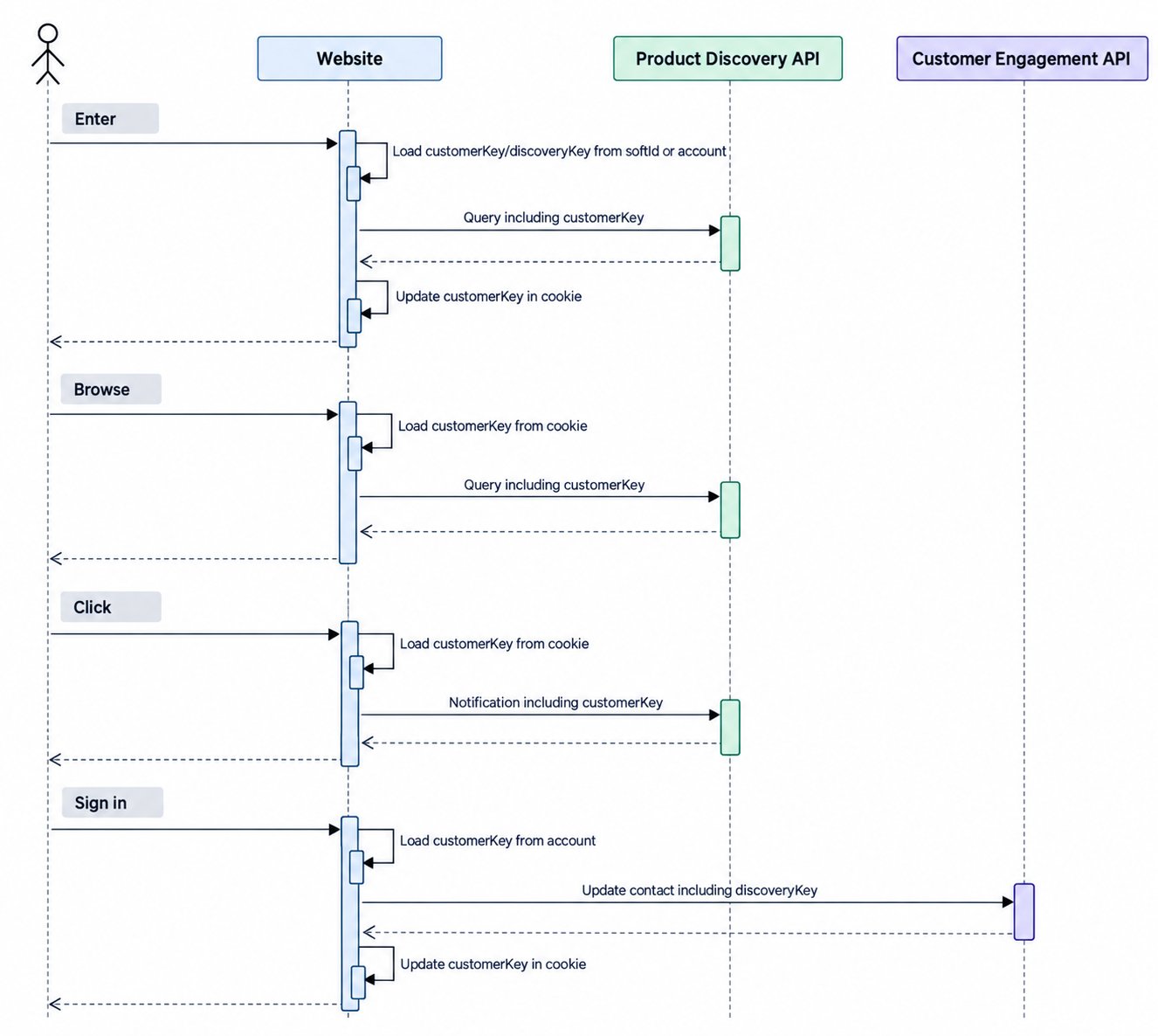
When the visitor browses, for example, a category or product page:
Read customerKey from the client side
Call Product Discovery API with customerKey
3
The visitor clicks
When the visitor clicks on, for example, a navigation link, add to cart or add favorite:
Read customerKey from the client side
Call Product Discovery API with customerKey
4
The visitor signs up
When the visitor signs up:
Read customerKey from the client side
Create user account with customerKey
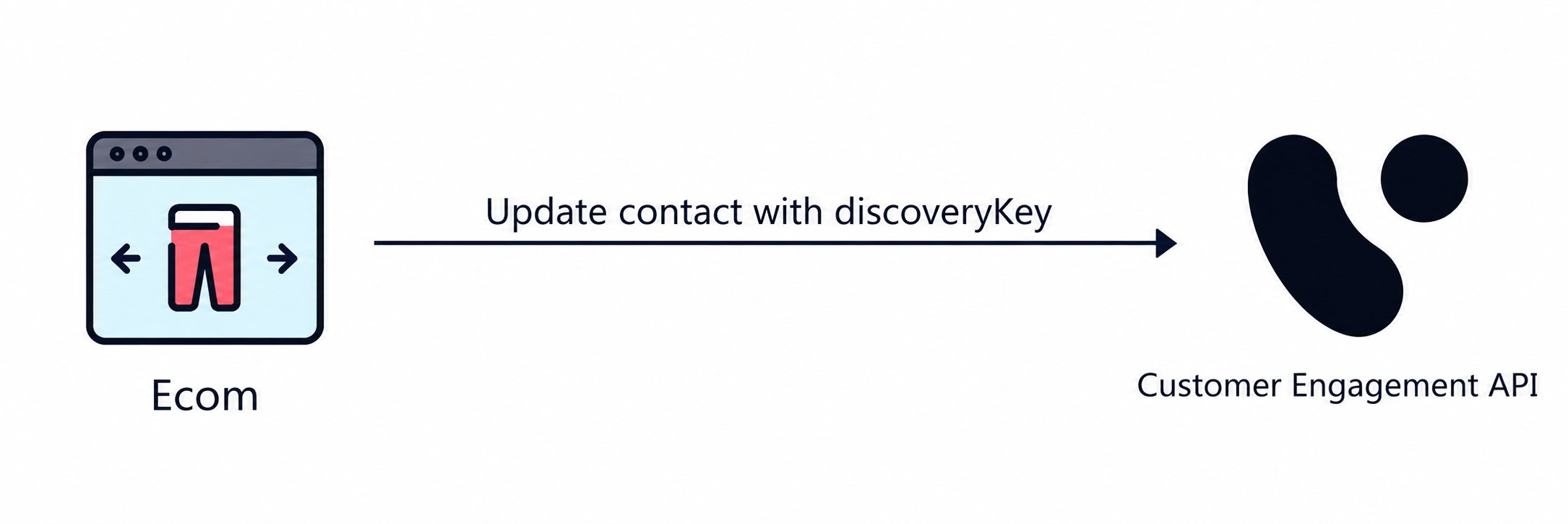
Call Customer Engagement API to create new contact with discoveryKey
Update user account with contactId from Customer Engagement This should create a mapping between the user account, the Product Discovery customerKey, and the Customer Engagement contactId.
New visitor flow
This scenario also covers situations where an unknown visitor makes a purchase and a contact is created in Customer Engagement.
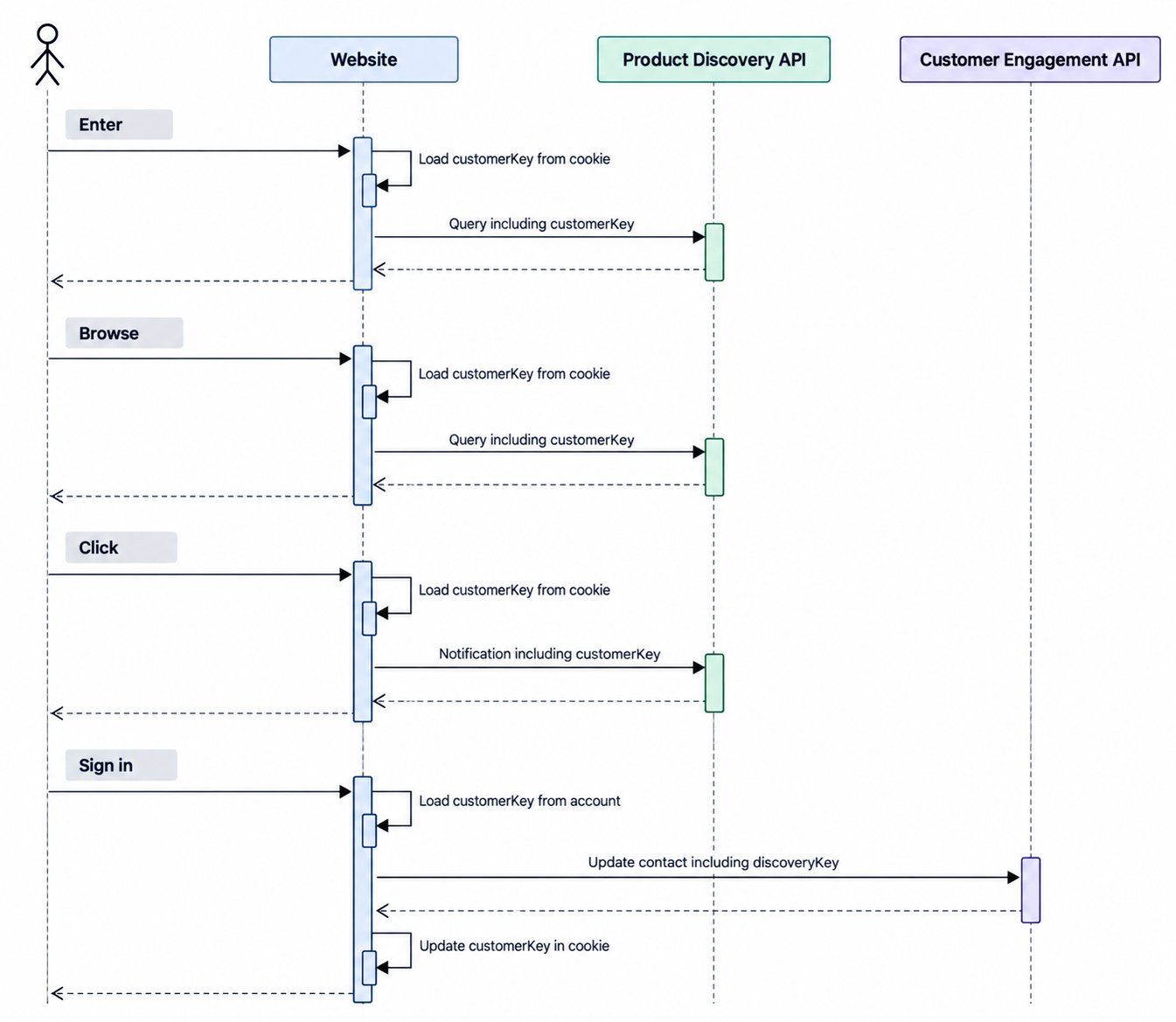
When the visitor browses, for example, a category or product page:
Read customerKey from the client side
Call Product Discovery API with customerKey
3
The visitor clicks
When the visitor clicks on, for example, a navigation link, add to cart or add favorite:
Read customerKey from the client side
Call Product Discovery API with customerKey
4
The visitor signs in
When the visitor signs in:
Read customerKey from user account
Call Customer Engagement API to update contact with discoveryKey
Update the client side with customerKey The visitor is now identified, and the existing customerKey from the user account may differ from the customerKey on the client side. Therefore it is important to use the customerKey from the user account when calling the Customer Engagement API and to update the client side value accordingly
The discoveryKey is an integral part of the Customer Engagement soft login (previously called auto-login) and needs to be activated by your Customer Engagement specialist.Soft login is critical for maximizing identification across Customer Engagement, Product Discovery, and between the two products. A high identification rate is the foundation for realizing the full value of the integrated setup.The soft login happens via an encrypted query string parameter named “eclub” which holds information about the contact who has clicked on a link, such as a URL in an email campaign.The target site back-end can listen to this query parameter and decrypt it. The decryption of the soft login should never be done on the client side for security reasons and GDPR concerns. The encryption key property in the module settings should also never be shared or made accessible in client implementations.A soft (auto) login URL might look like this:
The result of the server-side decryption will be an object with the following properties, containing the discoveryKey which is the identification key (customerKey) used in interactions with Product Discovery.
A customer website running both Customer Engagement and Product Discovery must decrypt the soft login server-side and use the resulting discoveryKey as the customerKey in all subsequent calls to Product Discovery.This ensures that traffic originating from Customer Engagement (for example email campaigns) is correctly identified in Product Discovery, allowing personalization, tracking, and recommendations to be applied consistently from the first page view.If the decrypted payload does not contain a discoveryKey, it indicates that the contact has not previously been identified in Product Discovery and should be treated as a new or anonymous visitor.
In Customer Engagement the SKU (stock-keeping unit) is a standard article property. Product Discovery, however, refers to articles as products, and the variations of products as variants.
Read about variants in Product Discovery
Each product and variant has a unique key and must use a variantKey that corresponds to the article SKU in Customer Engagement.Several features depend on these values being aligned. For example, Customer Engagement retrieves product metadata from Product Discovery to render product recommendations, and matching keys are also required for Product Discovery to consume in-store purchase data from Customer Engagement.If the Customer Engagement and Product Discovery feeds are not aligned, contact your Customer Engagement representative to discuss next steps. Be aware that some features will be unavailable until the feeds are aligned.
This is a simple way to test the discoveryKey implementation end-to-end.
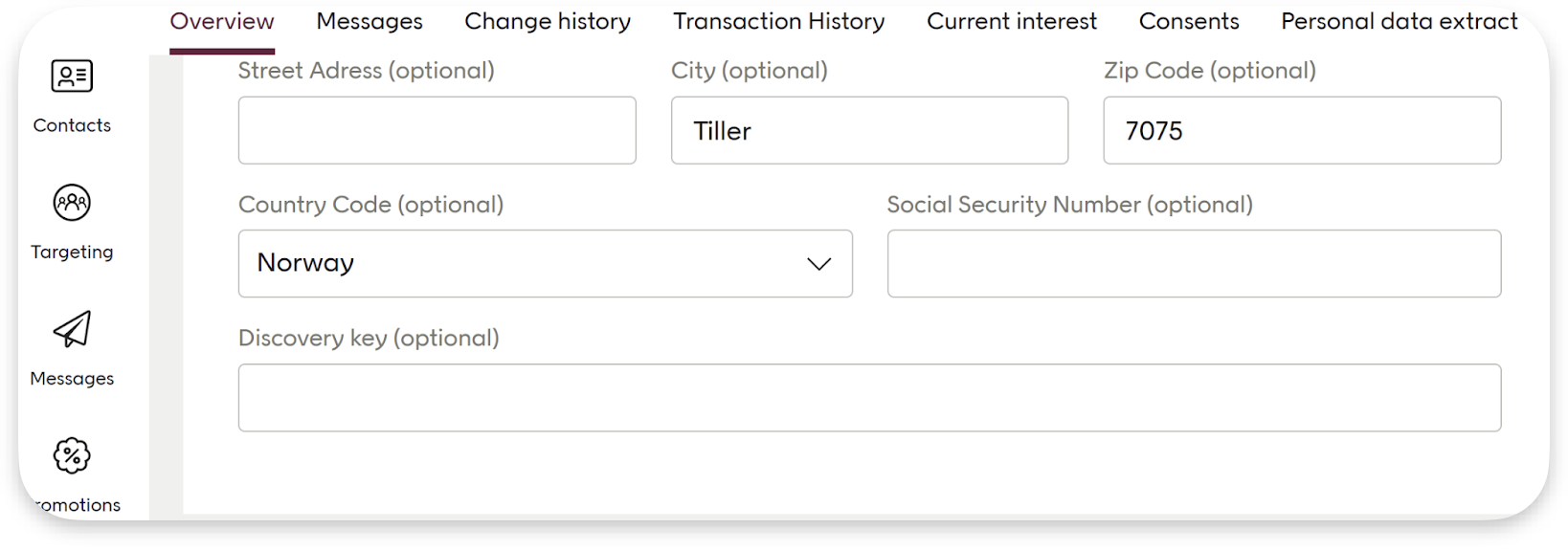
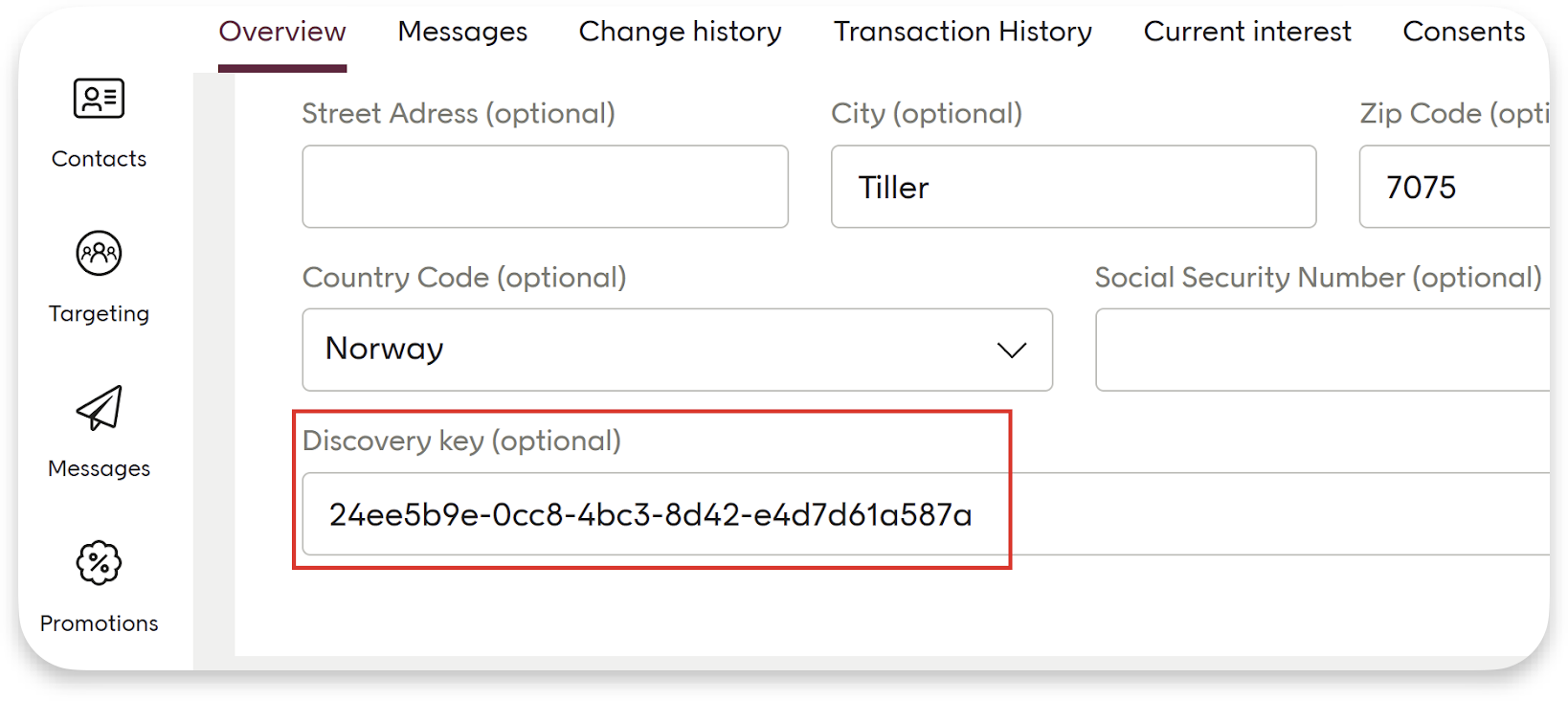
Go to the contact card in Customer Engagement for your user. Note that the “Discovery key” field is empty.
Contact card before
Go to the storefront of the retailer
Identify yourself on the site, either by signing in or creating an account. If possible, take note of the customerKey or ID if that is stored for a contact in the e-com/back-end system. This may be needed for future reference or troubleshooting.
Now back to the Customer Engagement tenant. Confirm that the discoveryKey has been applied to the contact by checking the field in the contact card. If you have noted the customerKey or ID in step 3, verify that it matches.
Contact card after
This is an optional step you can do if the e-com/website creates a pre-membership account during newsletter sign-up. You can verify if the discoveryKey has been assigned to the pre-membership contact in the Customer Engagement tenant by signing up for a newsletter and checking the discoveryKey of the newly created contact in the Customer Engagement tenant.
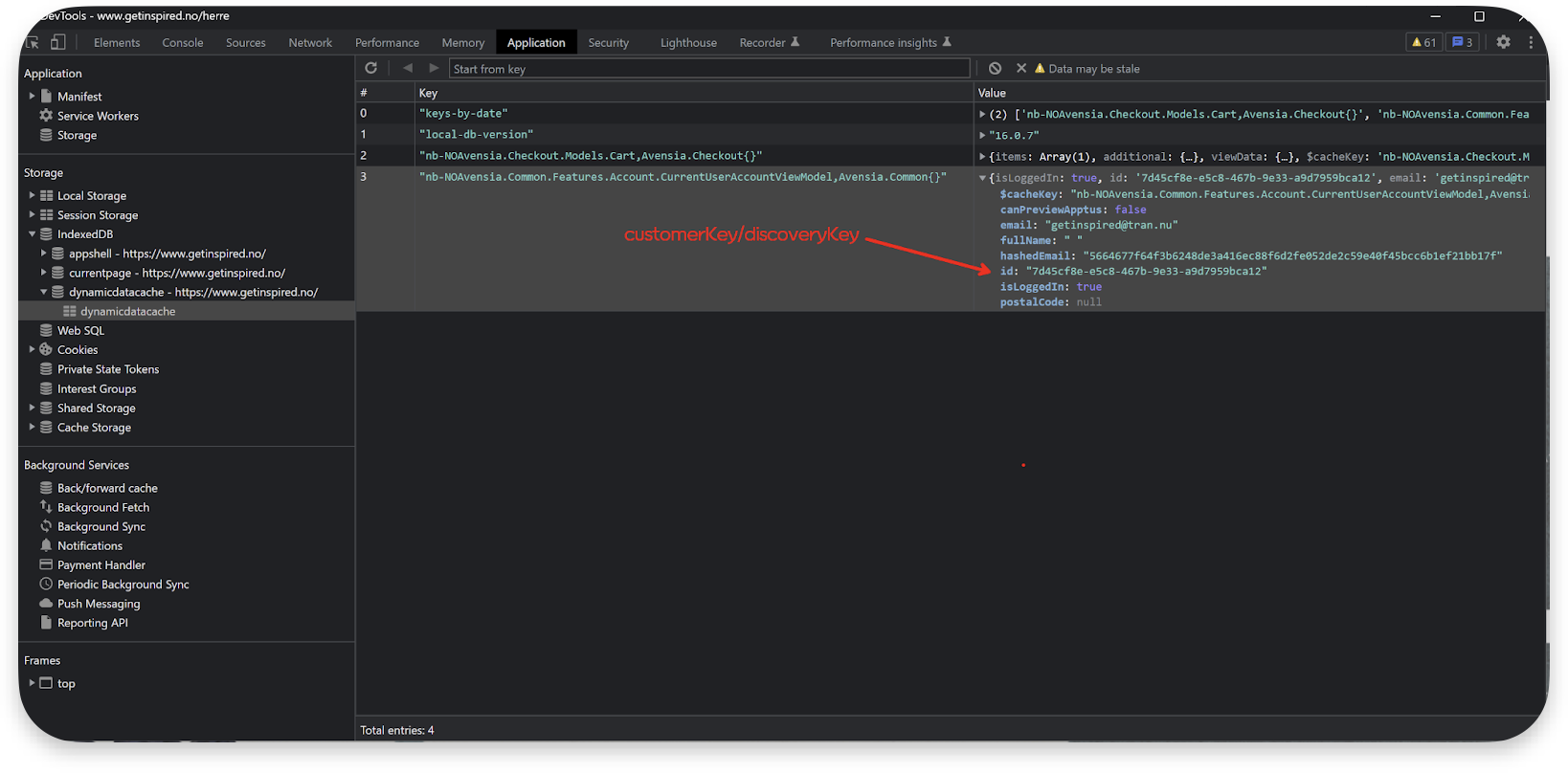
Sometimes it is possible to verify that the Product Discovery customerKey matches the discoveryKey in the Customer Engagement contact card by using the browser’s developer console. Here you can analyze network communication and browser storage for clues to confirm the match between the customerKey and discoveryKey.This ensures that the correct user data is being used for current interests.
All contacts in Customer Engagement must have unique a discoveryKey value. If a discoveryKey is not unique, this can block contact creation and prevent personalization from working correctly.
A discoveryKey validation error means that the discoveryKey you tried to save already exists in Customer Engagement. New or updated contacts are validated when added through the Contact API v2/v3. Other interfaces for creating or updating contacts, such as bulk endpoints, are not affected by this validation.In this case, an error will be returned:
Error when discoveryKey is already in use
{
  "errors": [
    {
      "code": "DuplicateDiscoveryKey",
      "message": "The discoveryKey already exists and must be unique."
    }
  ]
}
If you receive this error repeatedly, it may indicate that your website is not assigning unique discoveryKey values to visitors. This can sometimes be related to how your site generates and stores identifiers, including through connection with integrations (for example, to Product Discovery).
Your site must always assign visitors a new, unique discoveryKey. Once generated, this new discoveryKey must be used in:
Contact API requests
The visitor’s cookie
Any other system where discoveryKey is stored (such as databases, Customer Engagement, Product Discovery)
How this is implemented is site-specific, but the goal is always the same: to ensure that every visitor and member has a unique discoveryKey across all systems.
Confirm that the normal flows for adding and updating contacts work correctly (without disabling validation)
Here are three important cases when handling duplicates:
When e-com / 3rd party system is the master
If your e-commerce platform or another system is the master of discoveryKey, duplicates must be resolved there first. Once corrected, you will then send the updated discoveryKey values to Customer Engagement.
When Customer Engagement is the master
If Customer Engagement is the master of discoveryKey, duplicates can be removed directly within Customer Engagement. Contact Voyado Support for assistance with this process.
Updating duplicates instead of removing them
If you prefer to update duplicate records rather than remove them, the master system must:
Identify which contacts to update.
Send the changes to Customer Engagement (via API or integration).
Depending on the scale and complexity, this process may require assistance from Voyado Support to export duplicate lists or perform bulk updates.
{"docsConfig":{"theme":"mint","$schema":"https://mintlify.com/docs.json","name":"Voyado Docs","colors":{"primary":"#fe4a49","light":"#ffffff","dark":"#fe4a49"},"logo":{"light":"https://mintcdn.com/voyado/fiZZVymeDExCOKTK/logo/light.svg?fit=max\u0026auto=format\u0026n=fiZZVymeDExCOKTK\u0026q=85\u0026s=114e763881bcc646add31724b257f726","dark":"https://mintcdn.com/voyado/fiZZVymeDExCOKTK/logo/dark.svg?fit=max\u0026auto=format\u0026n=fiZZVymeDExCOKTK\u0026q=85\u0026s=68eaa3b1f64893ebcee4c7d65f20ecbc","href":"/docs"},"favicon":"https://mintcdn.com/voyado/_EinvHkwtU2pq43w/favicon.png?fit=max\u0026auto=format\u0026n=_EinvHkwtU2pq43w\u0026q=85\u0026s=4109ede7a6d04311c67ffa2f695ce527","appearance":{"default":"light"},"background":{"decoration":"grid"},"navbar":{"links":[{"icon":"/icons/help-center-link.png","href":"https://help.engage.voyado.com/hc/en-gb","label":"Help Center"}],"primary":{"type":"button","label":"Contact us","href":"https://voyado.com/about-voyado/contact-us/"}},"footer":{"socials":{"facebook":"https://www.facebook.com/voyado","linkedin":"https://www.linkedin.com/company/voyadoab"}},"fonts":{"heading":{"family":"Voyado Text","source":"https://mintlify-assets.b-cdn.net/VoyadoText-Medium.woff2","format":"woff2"},"body":{"family":"Voyado Regular","source":"https://mintlify-assets.b-cdn.net/VoyadoText-Regular.woff2","format":"woff2"}},"integrations":{"cookies":{"key":"mintlify_telemetry","value":"granted"}},"banner":{"content":"IMPORTANT: We're updating product naming across our documentation. **Engage** is now **Customer Engagement** and **Elevate** is now **Product Discovery**. This doesn't change Voyado's services, functionality, or terms of your agreement. Be aware, as these changes happen, that you may see both the old and new names being used.","dismissible":false},"errors":{"404":{"redirect":false,"title":"The page you are looking for can't be found. Search for it in the box above.","description":"Or press [here](https://developer.voyado.com/) to come to the start page and the menu."}},"contextual":{"options":["claude","chatgpt","assistant","copy","view","mcp"],"display":"header"},"styling":{"latex":false},"navigation":{"pages":[]}},"deployment":{"deploymentMetadataValue":{"subdomain":"voyado","hasAudioNarration":false,"actualSubdomain":"voyado","customDomains":["developer.voyado.com"],"gitSource":{"type":"github","owner":"voyado","repo":"developer-docs","deployBranch":"main","contentDirectory":"","isPrivate":true,"mountPath":"","label":""},"chroma":{"liveDeploymentHistoryId":"6ae1bb4a83326b7b15e9050b","collectionId":"97bdc92d-fe34-45d7-8595-921786581f7e","schemaVersion":"v3","latestBuiltDeploymentHistoryId":"6ae1bb4a83326b7b15e9050b"},"feedback":{"thumbs":true,"edits":false,"issues":false},"entitlements":{"AI_CHAT":{"status":"ENABLED"},"REMOVE_BRANDING":{"status":"DISABLED"},"WEB_MCP":{"status":"ENABLED"},"NARRATION":{"status":"ENABLED"}},"buildId":"6ae1bb4a83326b7b15e9050b","clientVersion":"0.0.4021","searchFilterCounts":[{"language":"default","tag":"Integration","count":46},{"language":"default","tag":"Data access","count":26},{"language":"default","tag":"E-com and communication","count":19},{"language":"default","tag":"File based transfer","count":18},{"language":"default","tag":"Contacts","count":15},{"language":"default","tag":"BI export","count":14},{"language":"default","tag":"BI Exports available","count":13},{"language":"default","tag":"E-com and tracking","count":11},{"language":"default","tag":"Delta share","count":9},{"language":"default","tag":"Home","count":8}]},"assistantConfig":{"enableStarterQuestions":false},"basePath":"","hasChatPermissions":true,"hasWebMcpPermissions":true,"toggles":[{"name":"kill-isr","enabled":true,"variant":{"name":"disabled","enabled":false,"feature_enabled":true},"impressionData":false},{"name":"agent-mintlify-slack","enabled":true,"variant":{"name":"disabled","enabled":false,"feature_enabled":true},"impressionData":false},{"name":"agent-integrations-settings","enabled":true,"variant":{"name":"disabled","enabled":false,"feature_enabled":true},"impressionData":false},{"name":"automations-pr-grouping","enabled":true,"variant":{"name":"disabled","enabled":false,"feature_enabled":true},"impressionData":false},{"name":"custom-prefix","enabled":true,"variant":{"name":"disabled","enabled":false,"feature_enabled":true},"impressionData":false},{"name":"analytics-v7","enabled":true,"variant":{"name":"disabled","enabled":false,"feature_enabled":true},"impressionData":false},{"name":"user-flows-analytics","enabled":true,"variant":{"name":"disabled","enabled":false,"feature_enabled":true},"impressionData":false},{"name":"no-publish-flow","enabled":true,"variant":{"name":"disabled","enabled":false,"feature_enabled":true},"impressionData":false},{"name":"workos-onboarding","enabled":true,"variant":{"name":"disabled","enabled":false,"feature_enabled":true},"impressionData":false},{"name":"llms-txt-v2","enabled":true,"variant":{"name":"disabled","enabled":false,"feature_enabled":true},"impressionData":false},{"name":"snapshot-serving-live","enabled":true,"variant":{"name":"disabled","enabled":false,"feature_enabled":true},"impressionData":false},{"name":"stripTemperatureMiddleware","enabled":true,"variant":{"name":"disabled","enabled":false,"feature_enabled":true},"impressionData":false},{"name":"per-site-search-delta","enabled":true,"variant":{"name":"disabled","enabled":false,"feature_enabled":true},"impressionData":false},{"name":"support-platform-pylon-zendesk","enabled":true,"variant":{"name":"disabled","enabled":false,"feature_enabled":true},"impressionData":false},{"name":"snapshot-serving","enabled":true,"variant":{"name":"disabled","enabled":false,"feature_enabled":true},"impressionData":false},{"name":"instant-rollback","enabled":true,"variant":{"name":"disabled","enabled":false,"feature_enabled":true},"impressionData":false},{"name":"granular-notifications-server","enabled":true,"variant":{"name":"disabled","enabled":false,"feature_enabled":true},"impressionData":false},{"name":"granular-notifications","enabled":true,"variant":{"name":"disabled","enabled":false,"feature_enabled":true},"impressionData":false},{"name":"editor-private-page-search","enabled":true,"variant":{"name":"disabled","enabled":false,"feature_enabled":true},"impressionData":false},{"name":"automations-fable","enabled":true,"variant":{"name":"disabled","enabled":false,"feature_enabled":true},"impressionData":false},{"name":"fixed-ai-action-pricing","enabled":true,"variant":{"name":"disabled","enabled":false,"feature_enabled":true},"impressionData":false},{"name":"automation-resolve-merge-conflict","enabled":true,"variant":{"name":"disabled","enabled":false,"feature_enabled":true},"impressionData":false},{"name":"scoped-publishing","enabled":true,"variant":{"name":"disabled","enabled":false,"feature_enabled":true},"impressionData":false},{"name":"mintql","enabled":true,"variant":{"name":"disabled","enabled":false,"feature_enabled":true},"impressionData":false},{"name":"page-level-analytics","enabled":true,"variant":{"name":"disabled","enabled":false,"feature_enabled":true},"impressionData":false},{"name":"editor-version-history-v2","enabled":true,"variant":{"name":"disabled","enabled":false,"feature_enabled":true},"impressionData":false},{"name":"billing-page-v2","enabled":true,"variant":{"name":"disabled","enabled":false,"feature_enabled":true},"impressionData":false},{"name":"workspace-projects","enabled":true,"variant":{"name":"disabled","enabled":false,"feature_enabled":true},"impressionData":false},{"name":"assistant-v5","enabled":true,"variant":{"name":"disabled","enabled":false,"feature_enabled":true},"impressionData":false},{"name":"byok-sep-25","enabled":true,"variant":{"name":"disabled","enabled":false,"feature_enabled":true},"impressionData":false},{"name":"fork-pr-previews","enabled":true,"variant":{"name":"disabled","enabled":false,"feature_enabled":true},"impressionData":false},{"name":"revalidation-jwt","enabled":true,"variant":{"name":"disabled","enabled":false,"feature_enabled":true},"impressionData":false},{"name":"vite-origin","enabled":true,"variant":{"name":"disabled","enabled":false,"feature_enabled":true},"impressionData":false},{"name":"billing-updated-9-15","enabled":true,"variant":{"name":"disabled","enabled":false,"feature_enabled":true},"impressionData":false},{"name":"workos-sso-scim","enabled":true,"variant":{"name":"disabled","enabled":false,"feature_enabled":true},"impressionData":false},{"name":"hobby-abuse-scan","enabled":true,"variant":{"name":"disabled","enabled":false,"feature_enabled":true},"impressionData":false},{"name":"dashboard-inbox","enabled":true,"variant":{"name":"disabled","enabled":false,"feature_enabled":true},"impressionData":false},{"name":"workos-signup","enabled":true,"variant":{"name":"disabled","enabled":false,"feature_enabled":true},"impressionData":false},{"name":"workos-enabled","enabled":true,"variant":{"name":"disabled","enabled":false,"feature_enabled":true},"impressionData":false}],"privacy":{"consentBanner":{"enabled":false}},"googleFontsInlined":false},"customCss":[{"filePath":"styles/style.css","content":".border-b{border-bottom-width:2px;border-color:rgb(var(--gray-200))}.prose-sm{font-size:.9rem;line-height:1.7}.prose :where(code):not(:where([class~=not-prose],[class~=not-prose] *)){color:var(--tw-prose-code);font-weight:500;background-color:#f8f8f7;border:1px solid #c7dbe8;border-radius:4px}.py-1\\.5{padding-top:1px;padding-bottom:1px}@media (min-width:1024px){.lg\\:mt-8{margin-top:1rem}}.sidebar-title{margin-bottom:-.3rem;font-size:15px}#pagination{display:none!important}.prose table{border-collapse:collapse;width:100%}.prose table td,.prose table th{border:1px solid rgba(0,0,0,.15);padding:.6rem .75rem}html.dark .prose table td,html.dark .prose table th{border:1px solid rgba(255,255,255,.15)}.prose table thead tr{background-color:rgba(59,130,246,.12)}html.dark .prose table thead tr{background-color:rgba(59,130,246,.25)}.prose table thead th{font-weight:600}.prose table tbody tr:nth-child(odd) td{background-color:rgba(0,0,0,.03)}html.dark .prose table tbody tr:nth-child(odd) td{background-color:rgba(255,255,255,.05)}.prose :where(h2):not(:where([class~=not-prose],[class~=not-prose] *)){margin-top:1.6em;margin-bottom:.7em}.prose :where(h3):not(:where([class~=not-prose],[class~=not-prose] *)),.prose :where(h4):not(:where([class~=not-prose],[class~=not-prose] *)){margin-top:1.5em;margin-bottom:.6em}@media (min-width:1024px){.update h2{margin-top:-2px!important}}.update-container{padding-top:15px!important;padding-bottom:25px!important;gap:5px!important}"}],"page":{"pagePath":"docs/product-discovery/integration","slug":"/docs/product-discovery/integration","pageMetadata":{"title":"Integration with Product Discovery","description":null,"href":"/docs/product-discovery/integration"},"pageType":"default","mdx":{"mdxSource":{"compiledSource":"\"use strict\";const{Fragment:_Fragment,jsx:_jsx,jsxs:_jsxs}=arguments[0];const{useMDXComponents:_provideComponents}=arguments[0];function _createMdxContent(props){const _components={code:`code`,em:`em`,li:`li`,ol:`ol`,p:`p`,pre:`pre`,span:`span`,strong:`strong`,ul:`ul`,..._provideComponents(),...props.components},{Accordion,AccordionGroup,Card,CodeBlock,Frame,Heading,OptimizedImage,Step,Steps,Tip,Warning}=_components;if(!Accordion)_missingMdxReference(`Accordion`,true);if(!AccordionGroup)_missingMdxReference(`AccordionGroup`,true);if(!Card)_missingMdxReference(`Card`,true);if(!CodeBlock)_missingMdxReference(`CodeBlock`,true);if(!Frame)_missingMdxReference(`Frame`,true);if(!Heading)_missingMdxReference(`Heading`,true);if(!OptimizedImage)_missingMdxReference(`OptimizedImage`,true);if(!Step)_missingMdxReference(`Step`,true);if(!Steps)_missingMdxReference(`Steps`,true);if(!Tip)_missingMdxReference(`Tip`,true);if(!Warning)_missingMdxReference(`Warning`,true);return _jsxs(_Fragment,{children:[_jsx(_components.p,{children:`Voyado Product Discovery (formerly Voyado Elevate) is a powerful search and recommendation engine, tailor-made for e-commerce. It analyses shopper behaviour (clicks, searches, purchases) to make tailored product recommendations. Recommendations adapt in real time based on behaviour on the site.`}),`\n`,_jsx(_components.p,{children:`With the Customer Engagement integration to Product Discovery, you can unlock a set of connected features where the two products work together in ways that aren’t possible on their own. This integration is powered by shared identification, contact data, and behavioral signals, enabling smarter personalization across channels. Examples include:`}),`\n`,_jsxs(_components.ul,{children:[`\n`,_jsxs(_components.li,{children:[_jsx(_components.strong,{children:`Connected recommendations`}),` – Product Discovery generates dynamic product recommendations that can be used directly in Customer Engagement’s Design Studio.`]}),`\n`,_jsxs(_components.li,{children:[_jsx(_components.strong,{children:`Audience-driven personalization`}),` – Product Discovery personalizes the on-site experience based on audiences created in Customer Engagement.`]}),`\n`,_jsxs(_components.li,{children:[_jsx(_components.strong,{children:`Current interest audiences`}),` – Customer Engagement audiences can be built using real-time behavioral data from Product Discovery.`]}),`\n`,_jsxs(_components.li,{children:[_jsx(_components.strong,{children:`Smarter recommendations`}),` – Product Discovery’s recommendations are enhanced with in-store purchase data captured by Customer Engagement.`]}),`\n`]}),`\n`,_jsxs(_components.p,{children:[`By making Customer Engagement and Product Discovery agree on who a particular contact is, data such as audiences and behavior can be easily shared between the two products. This is done with a unified identifier called `,_jsx(_components.code,{children:`discoveryKey`}),`.`]}),`\n`,_jsx(Tip,{children:_jsxs(_components.p,{children:[`The `,_jsx(_components.code,{children:`discoveryKey`}),` attribute is used to connect the same contact in Customer Engagement and Product Discovery.`]})}),`\n`,_jsx(_components.p,{children:`This article looks at how this integration is done.`}),`\n`,_jsx(Heading,{level:`2`,id:`customer-key`,children:`Customer key`}),`\n`,_jsxs(_components.p,{children:[`In Product Discovery, the `,_jsx(_components.code,{children:`customerKey`}),` is the unique identifier for a visitor on the website.`]}),`\n`,_jsxs(_components.p,{children:[`A `,_jsx(_components.code,{children:`customerKey`}),` is required for every request to the Product Discovery API, whether for notifications or queries. To link a visitor in Product Discovery to a Customer Engagement contact, the `,_jsx(_components.code,{children:`customerKey`}),` from Product Discovery should be stored in the `,_jsx(_components.code,{children:`discoveryKey`}),` contact attribute within Customer Engagement. This enables cross-platform understanding of the visitor and enhances personalization capabilities across both Product Discovery and Customer Engagement.`]}),`\n`,_jsx(Heading,{level:`2`,id:`identifying-the-visitor`,children:`Identifying the visitor`}),`\n`,_jsx(_components.p,{children:`There are two general ways a visitor can be identified:`}),`\n`,_jsxs(_components.ul,{children:[`\n`,_jsx(_components.li,{children:`Upon entry`}),`\n`,_jsx(_components.li,{children:`During the session`}),`\n`]}),`\n`,_jsxs(AccordionGroup,{children:[_jsxs(Accordion,{title:`1 - Identification upon entry`,id:`1-identification-upon-entry`,children:[_jsx(_components.p,{children:`When a visitor enters the site, they may arrive wither organically, from a referral or through a newsletter.`}),_jsxs(_components.p,{children:[`What happens next in this case depends on the `,_jsx(_components.code,{children:`customerKey`}),`:`]}),_jsxs(_components.ul,{children:[`\n`,_jsxs(_components.li,{children:[`If a `,_jsx(_components.code,{children:`customerKey`}),` is already available (stored client-side or retrieved from `,_jsx(_components.code,{children:`softId`}),`), use it in all Product Discovery calls`]}),`\n`,_jsxs(_components.li,{children:[`If no `,_jsx(_components.code,{children:`customerKey`}),` exists, create one, store it client-side (localStorage or cookie) and then use it in Product Discovery calls`]}),`\n`,_jsxs(_components.li,{children:[`If a visitor arrives via `,_jsx(_components.code,{children:`softId`}),` (from a Customer Engagement newsletter), you’ll need to decode the `,_jsx(_components.code,{children:`softId`}),`, retrieve the matching `,_jsx(_components.code,{children:`customerKey`}),`, and overwrite the local value of `,_jsx(_components.code,{children:`customerKey`}),` if it is different`]}),`\n`]}),_jsx(Frame,{caption:`The customer key`,children:_jsx(OptimizedImage,{src:`https://mintcdn.com/voyado/hA0bH-u93Mtgbfj0/images/customerkey01.png?fit=max\u0026auto=format\u0026n=hA0bH-u93Mtgbfj0\u0026q=85\u0026s=2c1df3ddde00a65c9d33b4a8e080c3de`,alt:`The customer key\"`,\"data-og-width\":`695`,width:`695`,\"data-og-height\":`359`,height:`359`,\"data-path\":`images/customerkey01.png`,\"data-optimize\":`true`,\"data-opv\":`3`,srcset:`https://mintcdn.com/voyado/hA0bH-u93Mtgbfj0/images/customerkey01.png?w=280\u0026fit=max\u0026auto=format\u0026n=hA0bH-u93Mtgbfj0\u0026q=85\u0026s=54e4e09ea5c51547267c87a45aa6ac70 280w, https://mintcdn.com/voyado/hA0bH-u93Mtgbfj0/images/customerkey01.png?w=560\u0026fit=max\u0026auto=format\u0026n=hA0bH-u93Mtgbfj0\u0026q=85\u0026s=63b07d8d0457b1273a1b8f83851d6daf 560w, https://mintcdn.com/voyado/hA0bH-u93Mtgbfj0/images/customerkey01.png?w=840\u0026fit=max\u0026auto=format\u0026n=hA0bH-u93Mtgbfj0\u0026q=85\u0026s=cce87567f4f6ff41718c2b9f568f3d83 840w, https://mintcdn.com/voyado/hA0bH-u93Mtgbfj0/images/customerkey01.png?w=1100\u0026fit=max\u0026auto=format\u0026n=hA0bH-u93Mtgbfj0\u0026q=85\u0026s=9800acd3a6e8d1f79e83f6f76a6073f0 1100w, https://mintcdn.com/voyado/hA0bH-u93Mtgbfj0/images/customerkey01.png?w=1650\u0026fit=max\u0026auto=format\u0026n=hA0bH-u93Mtgbfj0\u0026q=85\u0026s=62d23fd23260521f6476293c1a8ce5b2 1650w, https://mintcdn.com/voyado/hA0bH-u93Mtgbfj0/images/customerkey01.png?w=2500\u0026fit=max\u0026auto=format\u0026n=hA0bH-u93Mtgbfj0\u0026q=85\u0026s=f248b51280a69e65951f335de30f47ed 2500w`})}),_jsx(_components.p,{children:`For detailed behavior, see the specific visitor types below.`})]}),_jsxs(Accordion,{title:`2 - Identification during session`,id:`2-identification-during-session`,children:[_jsx(_components.p,{children:`If the customer is not identified at entry (see above), they can be identified during the session if they:`}),_jsxs(_components.ul,{children:[`\n`,_jsx(_components.li,{children:`Creating an account`}),`\n`,_jsx(_components.li,{children:`Logging in to an existing account`}),`\n`,_jsx(_components.li,{children:`Signing up for a newsletter, wishlist, or reminder`}),`\n`,_jsx(_components.li,{children:`Placing an order`}),`\n`]}),_jsx(Frame,{caption:`Visitor identification`,children:_jsx(OptimizedImage,{src:`https://mintcdn.com/voyado/hA0bH-u93Mtgbfj0/images/customerkey02.png?fit=max\u0026auto=format\u0026n=hA0bH-u93Mtgbfj0\u0026q=85\u0026s=a706b9c81254eaf164ef4d26dbf8fa73`,alt:`Visitor identification`,\"data-og-width\":`617`,width:`617`,\"data-og-height\":`405`,height:`405`,\"data-path\":`images/customerkey02.png`,\"data-optimize\":`true`,\"data-opv\":`3`,srcset:`https://mintcdn.com/voyado/hA0bH-u93Mtgbfj0/images/customerkey02.png?w=280\u0026fit=max\u0026auto=format\u0026n=hA0bH-u93Mtgbfj0\u0026q=85\u0026s=4b572a0df399fc2cd672723d5bf9f006 280w, https://mintcdn.com/voyado/hA0bH-u93Mtgbfj0/images/customerkey02.png?w=560\u0026fit=max\u0026auto=format\u0026n=hA0bH-u93Mtgbfj0\u0026q=85\u0026s=95231fb4d6d861e18cfd1a5b38bf4cef 560w, https://mintcdn.com/voyado/hA0bH-u93Mtgbfj0/images/customerkey02.png?w=840\u0026fit=max\u0026auto=format\u0026n=hA0bH-u93Mtgbfj0\u0026q=85\u0026s=475e0032d1302dc2b72a04adc6ef01b9 840w, https://mintcdn.com/voyado/hA0bH-u93Mtgbfj0/images/customerkey02.png?w=1100\u0026fit=max\u0026auto=format\u0026n=hA0bH-u93Mtgbfj0\u0026q=85\u0026s=f2c24668b4f675b93d432387369db259 1100w, https://mintcdn.com/voyado/hA0bH-u93Mtgbfj0/images/customerkey02.png?w=1650\u0026fit=max\u0026auto=format\u0026n=hA0bH-u93Mtgbfj0\u0026q=85\u0026s=16beb90f48d96487983f7f26558614ea 1650w, https://mintcdn.com/voyado/hA0bH-u93Mtgbfj0/images/customerkey02.png?w=2500\u0026fit=max\u0026auto=format\u0026n=hA0bH-u93Mtgbfj0\u0026q=85\u0026s=aef4f8106ab558379b95fc43c611afb7 2500w`})})]})]}),`\n`,_jsx(Heading,{level:`3`,id:`after-identification`,children:`After identification`}),`\n`,_jsx(_components.p,{children:`When the visitor has been identified, check if they exist in Customer Engagement.`}),`\n`,_jsxs(_components.ul,{children:[`\n`,_jsxs(_components.li,{children:[`If they don’t exist, create the contact and assign `,_jsx(_components.code,{children:`discoveryKey`}),` to the `,_jsx(_components.code,{children:`customerKey`}),` value`]}),`\n`,_jsxs(_components.li,{children:[`If they do exist, retrieve and compare the `,_jsx(_components.code,{children:`discoveryKey`}),` to the client’s `,_jsx(_components.code,{children:`customerKey`}),` and if the values are different, overwrite the client-side `,_jsx(_components.code,{children:`customerKey`}),` with the Customer Engagement `,_jsx(_components.code,{children:`discoveryKey`})]}),`\n`]}),`\n`,_jsx(_components.p,{children:`For detailed behavior, see the specific visitor types below.`}),`\n`,_jsx(Heading,{level:`3`,id:`best-practices-for-identification`,children:`Best practices for identification`}),`\n`,_jsxs(_components.ul,{children:[`\n`,_jsxs(_components.li,{children:[`Ensure Customer Engagement is updated with the `,_jsx(_components.code,{children:`discoveryKey`}),` for all members (visitors who can sign in)`]}),`\n`,_jsxs(_components.li,{children:[`All `,_jsx(_components.code,{children:`discoveryKey`}),` values must be unique; duplicate values in Customer Engagement prevent personalization`]}),`\n`,_jsxs(_components.li,{children:[`Always call Product Discovery with the existing `,_jsx(_components.code,{children:`customerKey`}),` when a visitor is identified`]}),`\n`,_jsxs(_components.li,{children:[`Use Customer Engagement’s `,_jsx(_components.code,{children:`softId`}),` for newsletters to maximize identification rate and cross-system linking`]}),`\n`,_jsxs(_components.li,{children:[`Define a single source of truth for the `,_jsx(_components.code,{children:`customerKey`}),`, for example the `,_jsx(_components.code,{children:`discoveryKey`}),` in Customer Engagement, to resolve conflicts between local and server values`]}),`\n`]}),`\n`,_jsx(Heading,{level:`2`,id:`integration-flows`,children:`Integration flows`}),`\n`,_jsx(_components.p,{children:`Now we will examine the different flows for the three types of visitor:`}),`\n`,_jsxs(_components.ul,{children:[`\n`,_jsx(_components.li,{children:`New visitors`}),`\n`,_jsx(_components.li,{children:`Returning visitor`}),`\n`,_jsx(_components.li,{children:`Newsletter visitors`}),`\n`]}),`\n`,_jsx(Heading,{level:`3`,id:`new-visitor-flow`,children:`New visitor flow`}),`\n`,_jsxs(Steps,{children:[_jsxs(Step,{title:`The visitor enters`,children:[_jsx(_components.p,{children:`When the visitor enters the site:`}),_jsxs(_components.ul,{children:[`\n`,_jsxs(_components.li,{children:[`Generate a new `,_jsx(_components.code,{children:`customerKey`})]}),`\n`,_jsxs(_components.li,{children:[`Store that `,_jsx(_components.code,{children:`customerKey`}),` value on the client side`]}),`\n`]})]}),_jsxs(Step,{title:`The visitor browses`,children:[_jsx(_components.p,{children:`When the visitor browses, for example, a category or product page:`}),_jsxs(_components.ul,{children:[`\n`,_jsxs(_components.li,{children:[`Read `,_jsx(_components.code,{children:`customerKey`}),` from the client side`]}),`\n`,_jsxs(_components.li,{children:[`Call Product Discovery API with `,_jsx(_components.code,{children:`customerKey`})]}),`\n`]})]}),_jsxs(Step,{title:`The visitor clicks`,children:[_jsx(_components.p,{children:`When the visitor clicks on, for example, a navigation link, add to cart or add favorite:`}),_jsxs(_components.ul,{children:[`\n`,_jsxs(_components.li,{children:[`Read `,_jsx(_components.code,{children:`customerKey`}),` from the client side`]}),`\n`,_jsxs(_components.li,{children:[`Call Product Discovery API with `,_jsx(_components.code,{children:`customerKey`})]}),`\n`]})]}),_jsxs(Step,{title:`The visitor signs up`,children:[_jsx(_components.p,{children:`When the visitor signs up:`}),_jsxs(_components.ul,{children:[`\n`,_jsxs(_components.li,{children:[`Read `,_jsx(_components.code,{children:`customerKey`}),` from the client side`]}),`\n`,_jsxs(_components.li,{children:[`Create user account with `,_jsx(_components.code,{children:`customerKey`})]}),`\n`,_jsxs(_components.li,{children:[`Call Customer Engagement API to create new contact with `,_jsx(_components.code,{children:`discoveryKey`})]}),`\n`,_jsxs(_components.li,{children:[`Update user account with `,_jsx(_components.code,{children:`contactId`}),` from Customer Engagement This should create a mapping between the user account, the Product Discovery `,_jsx(_components.code,{children:`customerKey`}),`, and the Customer Engagement `,_jsx(_components.code,{children:`contactId`}),`.`]}),`\n`]})]})]}),`\n`,_jsx(Frame,{caption:`New visitor flow`,children:_jsx(OptimizedImage,{src:`https://mintcdn.com/voyado/52n3EacMy4FB2HPg/images/customerkey03.png?fit=max\u0026auto=format\u0026n=52n3EacMy4FB2HPg\u0026q=85\u0026s=b10f26d84ffff0683ead26e40a022a5f`,alt:`New visitor flow`,\"data-og-width\":`1291`,width:`1291`,\"data-og-height\":`1218`,height:`1218`,\"data-path\":`images/customerkey03.png`,\"data-optimize\":`true`,\"data-opv\":`3`,srcset:`https://mintcdn.com/voyado/52n3EacMy4FB2HPg/images/customerkey03.png?w=280\u0026fit=max\u0026auto=format\u0026n=52n3EacMy4FB2HPg\u0026q=85\u0026s=34479a885a3f4eae8ec0c3cc911030fe 280w, https://mintcdn.com/voyado/52n3EacMy4FB2HPg/images/customerkey03.png?w=560\u0026fit=max\u0026auto=format\u0026n=52n3EacMy4FB2HPg\u0026q=85\u0026s=b3ca6205727a4a95af900bdd6ef893bf 560w, https://mintcdn.com/voyado/52n3EacMy4FB2HPg/images/customerkey03.png?w=840\u0026fit=max\u0026auto=format\u0026n=52n3EacMy4FB2HPg\u0026q=85\u0026s=7ef6c794ee0268e7af71791c6cc118fb 840w, https://mintcdn.com/voyado/52n3EacMy4FB2HPg/images/customerkey03.png?w=1100\u0026fit=max\u0026auto=format\u0026n=52n3EacMy4FB2HPg\u0026q=85\u0026s=025bfc008d562979125ad04de4c3f0b8 1100w, https://mintcdn.com/voyado/52n3EacMy4FB2HPg/images/customerkey03.png?w=1650\u0026fit=max\u0026auto=format\u0026n=52n3EacMy4FB2HPg\u0026q=85\u0026s=507bd342d9619f882c3a1f053a68207d 1650w, https://mintcdn.com/voyado/52n3EacMy4FB2HPg/images/customerkey03.png?w=2500\u0026fit=max\u0026auto=format\u0026n=52n3EacMy4FB2HPg\u0026q=85\u0026s=8b758584ade65cde39e8518994f40619 2500w`})}),`\n`,_jsx(Tip,{children:_jsx(_components.p,{children:`This scenario also covers situations where an unknown visitor makes a purchase and a contact is created in Customer Engagement.`})}),`\n`,_jsx(Heading,{level:`3`,id:`returning-visitor-flow`,children:`Returning visitor flow`}),`\n`,_jsxs(Steps,{children:[_jsxs(Step,{title:`The visitor enters`,children:[_jsx(_components.p,{children:`When the visitor enters the site:`}),_jsxs(_components.ul,{children:[`\n`,_jsxs(_components.li,{children:[`Read `,_jsx(_components.code,{children:`customerKey`}),` from the client side`]}),`\n`]})]}),_jsxs(Step,{title:`The visitor browses`,children:[_jsx(_components.p,{children:`When the visitor browses, for example, a category or product page:`}),_jsxs(_components.ul,{children:[`\n`,_jsxs(_components.li,{children:[`Read `,_jsx(_components.code,{children:`customerKey`}),` from the client side`]}),`\n`,_jsxs(_components.li,{children:[`Call Product Discovery API with `,_jsx(_components.code,{children:`customerKey`})]}),`\n`]})]}),_jsxs(Step,{title:`The visitor clicks`,children:[_jsx(_components.p,{children:`When the visitor clicks on, for example, a navigation link, add to cart or add favorite:`}),_jsxs(_components.ul,{children:[`\n`,_jsxs(_components.li,{children:[`Read `,_jsx(_components.code,{children:`customerKey`}),` from the client side`]}),`\n`,_jsxs(_components.li,{children:[`Call Product Discovery API with `,_jsx(_components.code,{children:`customerKey`})]}),`\n`]})]}),_jsxs(Step,{title:`The visitor signs in`,children:[_jsx(_components.p,{children:`When the visitor signs in:`}),_jsxs(_components.ul,{children:[`\n`,_jsxs(_components.li,{children:[`Read `,_jsx(_components.code,{children:`customerKey`}),` from user account`]}),`\n`,_jsxs(_components.li,{children:[`Call Customer Engagement API to update contact with `,_jsx(_components.code,{children:`discoveryKey`})]}),`\n`,_jsxs(_components.li,{children:[`Update the client side with `,_jsx(_components.code,{children:`customerKey`}),` The visitor is now identified, and the existing `,_jsx(_components.code,{children:`customerKey`}),` from the user account may differ from the `,_jsx(_components.code,{children:`customerKey`}),` on the client side. Therefore it is important to use the `,_jsx(_components.code,{children:`customerKey`}),` from the user account when calling the Customer Engagement API and to update the client side value accordingly`]}),`\n`]})]})]}),`\n`,_jsx(Frame,{caption:`Returning visitor flow`,children:_jsx(OptimizedImage,{src:`https://mintcdn.com/voyado/52n3EacMy4FB2HPg/images/customerkey04.png?fit=max\u0026auto=format\u0026n=52n3EacMy4FB2HPg\u0026q=85\u0026s=9f0a87d535baa68692bf33e12bb30329`,alt:`Returning visitor flow`,\"data-og-width\":`1345`,width:`1345`,\"data-og-height\":`1169`,height:`1169`,\"data-path\":`images/customerkey04.png`,\"data-optimize\":`true`,\"data-opv\":`3`,srcset:`https://mintcdn.com/voyado/52n3EacMy4FB2HPg/images/customerkey04.png?w=280\u0026fit=max\u0026auto=format\u0026n=52n3EacMy4FB2HPg\u0026q=85\u0026s=f47d501a566f917ecef54958c8f4b56a 280w, https://mintcdn.com/voyado/52n3EacMy4FB2HPg/images/customerkey04.png?w=560\u0026fit=max\u0026auto=format\u0026n=52n3EacMy4FB2HPg\u0026q=85\u0026s=9015d05523c2e7b3ad7318388240f3e5 560w, https://mintcdn.com/voyado/52n3EacMy4FB2HPg/images/customerkey04.png?w=840\u0026fit=max\u0026auto=format\u0026n=52n3EacMy4FB2HPg\u0026q=85\u0026s=ee17c871f48a4301f41be5288d6cb5bb 840w, https://mintcdn.com/voyado/52n3EacMy4FB2HPg/images/customerkey04.png?w=1100\u0026fit=max\u0026auto=format\u0026n=52n3EacMy4FB2HPg\u0026q=85\u0026s=85c3c25696563eb76896243b6750e0fc 1100w, https://mintcdn.com/voyado/52n3EacMy4FB2HPg/images/customerkey04.png?w=1650\u0026fit=max\u0026auto=format\u0026n=52n3EacMy4FB2HPg\u0026q=85\u0026s=e3d6a196eda64f71665e73b2b648a8db 1650w, https://mintcdn.com/voyado/52n3EacMy4FB2HPg/images/customerkey04.png?w=2500\u0026fit=max\u0026auto=format\u0026n=52n3EacMy4FB2HPg\u0026q=85\u0026s=0ecbcc702f8aa896be664f8aa4b5441c 2500w`})}),`\n`,_jsx(Heading,{level:`3`,id:`newsletter-visitor-flow`,children:`Newsletter visitor flow`}),`\n`,_jsxs(Steps,{children:[_jsxs(Step,{title:`The visitor enters`,children:[_jsx(_components.p,{children:`When the visitor enters the site:`}),_jsxs(_components.ul,{children:[`\n`,_jsxs(_components.li,{children:[`Decode `,_jsx(_components.code,{children:`softId`}),` and identify visitor`]}),`\n`,_jsxs(_components.li,{children:[`Read `,_jsx(_components.code,{children:`discoveryKey`}),` or `,_jsx(_components.code,{children:`customerKey`}),` from decoded `,_jsx(_components.code,{children:`softId`}),` or from user account`]}),`\n`,_jsxs(_components.li,{children:[`Update the client side with `,_jsx(_components.code,{children:`customerKey`})]}),`\n`]})]}),_jsxs(Step,{title:`The visitor browses`,children:[_jsx(_components.p,{children:`When the visitor browses, for example, a category or product page:`}),_jsxs(_components.ul,{children:[`\n`,_jsxs(_components.li,{children:[`Read `,_jsx(_components.code,{children:`customerKey`}),` from the client side`]}),`\n`,_jsxs(_components.li,{children:[`Call Product Discovery API with `,_jsx(_components.code,{children:`customerKey`})]}),`\n`]})]}),_jsxs(Step,{title:`The visitor clicks`,children:[_jsx(_components.p,{children:`When the visitor clicks on, for example, a navigation link, add to cart or add favorite:`}),_jsxs(_components.ul,{children:[`\n`,_jsxs(_components.li,{children:[`Read `,_jsx(_components.code,{children:`customerKey`}),` from the client side`]}),`\n`,_jsxs(_components.li,{children:[`Call Product Discovery API with `,_jsx(_components.code,{children:`customerKey`})]}),`\n`]})]}),_jsxs(Step,{title:`The visitor signs in`,children:[_jsx(_components.p,{children:`When the visitor signs in:`}),_jsxs(_components.ul,{children:[`\n`,_jsxs(_components.li,{children:[`Read `,_jsx(_components.code,{children:`customerKey`}),` from user account`]}),`\n`,_jsxs(_components.li,{children:[`Call Customer Engagement API to update contact with `,_jsx(_components.code,{children:`discoveryKey`})]}),`\n`,_jsxs(_components.li,{children:[`Update the client side with `,_jsx(_components.code,{children:`customerKey`})]}),`\n`]})]})]}),`\n`,_jsx(Frame,{caption:`Newsletter visitor flow`,children:_jsx(OptimizedImage,{src:`https://mintcdn.com/voyado/52n3EacMy4FB2HPg/images/customerkey05.png?fit=max\u0026auto=format\u0026n=52n3EacMy4FB2HPg\u0026q=85\u0026s=7875a76d4142d0d7de430cd7cfaddcaa`,alt:`Newsletter visitor flow`,\"data-og-width\":`1326`,width:`1326`,\"data-og-height\":`1186`,height:`1186`,\"data-path\":`images/customerkey05.png`,\"data-optimize\":`true`,\"data-opv\":`3`,srcset:`https://mintcdn.com/voyado/52n3EacMy4FB2HPg/images/customerkey05.png?w=280\u0026fit=max\u0026auto=format\u0026n=52n3EacMy4FB2HPg\u0026q=85\u0026s=8efbf5f4769d34d6e26150b04e1df307 280w, https://mintcdn.com/voyado/52n3EacMy4FB2HPg/images/customerkey05.png?w=560\u0026fit=max\u0026auto=format\u0026n=52n3EacMy4FB2HPg\u0026q=85\u0026s=7ef6874152942dbb566cb22a3b42a791 560w, https://mintcdn.com/voyado/52n3EacMy4FB2HPg/images/customerkey05.png?w=840\u0026fit=max\u0026auto=format\u0026n=52n3EacMy4FB2HPg\u0026q=85\u0026s=b3a53af70f8e6848dc24c4b6a2e8abf4 840w, https://mintcdn.com/voyado/52n3EacMy4FB2HPg/images/customerkey05.png?w=1100\u0026fit=max\u0026auto=format\u0026n=52n3EacMy4FB2HPg\u0026q=85\u0026s=524171c66a8211021c234c7de596e590 1100w, https://mintcdn.com/voyado/52n3EacMy4FB2HPg/images/customerkey05.png?w=1650\u0026fit=max\u0026auto=format\u0026n=52n3EacMy4FB2HPg\u0026q=85\u0026s=c29e4b24b7964cbd4ee2feb404e400a9 1650w, https://mintcdn.com/voyado/52n3EacMy4FB2HPg/images/customerkey05.png?w=2500\u0026fit=max\u0026auto=format\u0026n=52n3EacMy4FB2HPg\u0026q=85\u0026s=224ac46c7e3d53a44bd18540df8d5fd9 2500w`})}),`\n`,_jsx(Heading,{level:`2`,id:`identifying-email-traffic-by-discoverykey`,children:`Identifying email traffic by discoveryKey`}),`\n`,_jsxs(_components.p,{children:[`The `,_jsx(_components.code,{children:`discoveryKey`}),` is an integral part of the Customer Engagement soft login (previously called auto-login) and needs to be activated by your Customer Engagement specialist.`]}),`\n`,_jsx(_components.p,{children:`Soft login is critical for maximizing identification across Customer Engagement, Product Discovery, and between the two products. A high identification rate is the foundation for realizing the full value of the integrated setup.`}),`\n`,_jsx(_components.p,{children:`The soft login happens via an encrypted query string parameter named “eclub” which holds information about the contact who has clicked on a link, such as a URL in an email campaign.`}),`\n`,_jsx(_components.p,{children:`The target site back-end can listen to this query parameter and decrypt it. The decryption of the soft login should never be done on the client side for security reasons and GDPR concerns. The encryption key property in the module settings should also never be shared or made accessible in client implementations.`}),`\n`,_jsx(_components.p,{children:`A soft (auto) login URL might look like this:`}),`\n`,_jsx(CodeBlock,{filename:`Example of soft login`,numberOfLines:`1`,language:`http`,children:_jsx(_components.pre,{className:`shiki shiki-themes github-light-default dark-plus`,style:{backgroundColor:`#ffffff`,\"--shiki-dark-bg\":`#0B0C0E`,color:`#1f2328`,\"--shiki-dark\":`#D4D4D4`},language:`http`,children:_jsxs(_components.code,{language:`http`,numberOfLines:`1`,children:[_jsx(_components.span,{className:`line`,children:_jsx(_components.span,{style:{color:`#1F2328`,\"--shiki-dark\":`#D4D4D4`},children:`https://ourdemostore.com/?vtid=9cle0_ctRE25K6kMABznMg\u0026amp;eclub=FwoE65oCjhuc70IBFnszvhZJ0R37pdOYIy0x3KYzsbj3kWtwP2ByD2KP4kuRvWtx7JlyrJpaYnIvI4yAnDbFcVfMJDsXW24MgIrDyqoSw09_7KIMxGri8dYkIhW7FdFFm98n4Vq87I77mA9EsBWI6ExC_MQQkHHqa0h-7pmicZtpQMl7-WJOZCsVV0aEU6E6EX7REldFBFGfHpoWw5fukAaK7nJcg68j_f1OlBgHnwM`})}),`\n`]})})}),`\n`,_jsxs(_components.p,{children:[`The result of the server-side decryption will be an object with the following properties, containing the `,_jsx(_components.code,{children:`discoveryKey`}),` which is the identification key (`,_jsx(_components.code,{children:`customerKey`}),`) used in interactions with Product Discovery.`]}),`\n`,_jsx(CodeBlock,{filename:`Decrypted payload`,numberOfLines:`7`,language:`json`,children:_jsx(_components.pre,{className:`shiki shiki-themes github-light-default dark-plus`,style:{backgroundColor:`#ffffff`,\"--shiki-dark-bg\":`#0B0C0E`,color:`#1f2328`,\"--shiki-dark\":`#D4D4D4`},language:`json`,children:_jsxs(_components.code,{language:`json`,numberOfLines:`7`,children:[_jsx(_components.span,{className:`line`,children:_jsx(_components.span,{style:{color:`#1F2328`,\"--shiki-dark\":`#D4D4D4`},children:`{`})}),`\n`,_jsxs(_components.span,{className:`line`,children:[_jsx(_components.span,{style:{color:`#116329`,\"--shiki-dark\":`#9CDCFE`},children:` \"id\"`}),_jsx(_components.span,{style:{color:`#1F2328`,\"--shiki-dark\":`#D4D4D4`},children:`: `}),_jsx(_components.span,{style:{color:`#0A3069`,\"--shiki-dark\":`#CE9178`},children:`\"60333\"`}),_jsx(_components.span,{style:{color:`#1F2328`,\"--shiki-dark\":`#D4D4D4`},children:`,`})]}),`\n`,_jsxs(_components.span,{className:`line`,children:[_jsx(_components.span,{style:{color:`#116329`,\"--shiki-dark\":`#9CDCFE`},children:` \"email\"`}),_jsx(_components.span,{style:{color:`#1F2328`,\"--shiki-dark\":`#D4D4D4`},children:`: `}),_jsx(_components.span,{style:{color:`#0A3069`,\"--shiki-dark\":`#CE9178`},children:`\"withnail@voyado.com\"`}),_jsx(_components.span,{style:{color:`#1F2328`,\"--shiki-dark\":`#D4D4D4`},children:`,`})]}),`\n`,_jsxs(_components.span,{className:`line`,children:[_jsx(_components.span,{style:{color:`#116329`,\"--shiki-dark\":`#9CDCFE`},children:` \"contactId\"`}),_jsx(_components.span,{style:{color:`#1F2328`,\"--shiki-dark\":`#D4D4D4`},children:`: `}),_jsx(_components.span,{style:{color:`#0A3069`,\"--shiki-dark\":`#CE9178`},children:`\"d35ec9f5-2df7-4d44-b92b-a90c001ce732\"`}),_jsx(_components.span,{style:{color:`#1F2328`,\"--shiki-dark\":`#D4D4D4`},children:`,`})]}),`\n`,_jsxs(_components.span,{className:`line`,children:[_jsx(_components.span,{style:{color:`#116329`,\"--shiki-dark\":`#9CDCFE`},children:` \"dateTime\"`}),_jsx(_components.span,{style:{color:`#1F2328`,\"--shiki-dark\":`#D4D4D4`},children:`: `}),_jsx(_components.span,{style:{color:`#0A3069`,\"--shiki-dark\":`#CE9178`},children:`\"2022-05-11T13:15:40Z\"`}),_jsx(_components.span,{style:{color:`#1F2328`,\"--shiki-dark\":`#D4D4D4`},children:`,`})]}),`\n`,_jsxs(_components.span,{className:`line`,children:[_jsx(_components.span,{style:{color:`#116329`,\"--shiki-dark\":`#9CDCFE`},children:` \"discoveryKey\"`}),_jsx(_components.span,{style:{color:`#1F2328`,\"--shiki-dark\":`#D4D4D4`},children:`: `}),_jsx(_components.span,{style:{color:`#0A3069`,\"--shiki-dark\":`#CE9178`},children:`\"0b05119e-eeb8-418a-bbfb-defa0dde417e\"`})]}),`\n`,_jsx(_components.span,{className:`line`,children:_jsx(_components.span,{style:{color:`#1F2328`,\"--shiki-dark\":`#D4D4D4`},children:`}`})}),`\n`]})})}),`\n`,_jsx(Heading,{level:`3`,id:`soft-identification`,children:`Soft identification`}),`\n`,_jsxs(_components.p,{children:[`A customer website running both Customer Engagement and Product Discovery must decrypt the soft login server-side and use the resulting `,_jsx(_components.code,{children:`discoveryKey`}),` as the `,_jsx(_components.code,{children:`customerKey`}),` in all subsequent calls to Product Discovery.`]}),`\n`,_jsx(_components.p,{children:`This ensures that traffic originating from Customer Engagement (for example email campaigns) is correctly identified in Product Discovery, allowing personalization, tracking, and recommendations to be applied consistently from the first page view.`}),`\n`,_jsxs(_components.p,{children:[`If the decrypted payload does not contain a `,_jsx(_components.code,{children:`discoveryKey`}),`, it indicates that the contact has not previously been identified in Product Discovery and should be treated as a new or anonymous visitor.`]}),`\n`,_jsx(Heading,{level:`2`,id:`sku-and-variant-key-need-to-match`,children:`SKU and variant key need to match`}),`\n`,_jsxs(_components.p,{children:[`In Customer Engagement the SKU (stock-keeping unit) is a standard article property. Product Discovery, however, refers to articles as `,_jsx(_components.em,{children:`products`}),`, and the variations of products as `,_jsx(_components.em,{children:`variants`}),`.`]}),`\n`,_jsx(Card,{icon:`right`,horizontal:true,href:`https://docs.apptus.com/elevate/4/integration/data-feed/format-specification/#variant`,title:`Read about variants in Product Discovery`}),`\n`,_jsxs(_components.p,{children:[`Each product and variant has a unique key and must use a `,_jsx(_components.code,{children:`variantKey`}),` that corresponds to the article `,_jsx(_components.code,{children:`SKU`}),` in Customer Engagement.`]}),`\n`,_jsx(_components.p,{children:`Several features depend on these values being aligned. For example, Customer Engagement retrieves product metadata from Product Discovery to render product recommendations, and matching keys are also required for Product Discovery to consume in-store purchase data from Customer Engagement.`}),`\n`,_jsx(_components.p,{children:`If the Customer Engagement and Product Discovery feeds are not aligned, contact your Customer Engagement representative to discuss next steps. Be aware that some features will be unavailable until the feeds are aligned.`}),`\n`,_jsx(Heading,{level:`2`,id:`verifying-discoverykey-implementation`,children:`Verifying discoveryKey implementation`}),`\n`,_jsxs(_components.p,{children:[`The e-com platform/site should include `,_jsx(_components.code,{children:`discoveryKey`}),` in every create/update contact request made to the Customer Engagement API.`]}),`\n`,_jsx(Frame,{caption:`The discovery key`,children:_jsx(OptimizedImage,{src:`https://mintcdn.com/voyado/52n3EacMy4FB2HPg/images/discovery-key-01.png?fit=max\u0026auto=format\u0026n=52n3EacMy4FB2HPg\u0026q=85\u0026s=679ab5ba81c42446e3f656b0c4f89e59`,alt:`The discovery key`,\"data-og-width\":`2170`,width:`2170`,\"data-og-height\":`725`,height:`725`,\"data-path\":`images/discovery-key-01.png`,\"data-optimize\":`true`,\"data-opv\":`3`,srcset:`https://mintcdn.com/voyado/52n3EacMy4FB2HPg/images/discovery-key-01.png?w=280\u0026fit=max\u0026auto=format\u0026n=52n3EacMy4FB2HPg\u0026q=85\u0026s=4ef7a0730cbd774d291ab2ff38d5bbe0 280w, https://mintcdn.com/voyado/52n3EacMy4FB2HPg/images/discovery-key-01.png?w=560\u0026fit=max\u0026auto=format\u0026n=52n3EacMy4FB2HPg\u0026q=85\u0026s=8b3039610d235917bbf5b4e4409bc7f1 560w, https://mintcdn.com/voyado/52n3EacMy4FB2HPg/images/discovery-key-01.png?w=840\u0026fit=max\u0026auto=format\u0026n=52n3EacMy4FB2HPg\u0026q=85\u0026s=4984577736a53b9dbb0093909c624674 840w, https://mintcdn.com/voyado/52n3EacMy4FB2HPg/images/discovery-key-01.png?w=1100\u0026fit=max\u0026auto=format\u0026n=52n3EacMy4FB2HPg\u0026q=85\u0026s=d16334a21db3d2136bde4d627c0d437d 1100w, https://mintcdn.com/voyado/52n3EacMy4FB2HPg/images/discovery-key-01.png?w=1650\u0026fit=max\u0026auto=format\u0026n=52n3EacMy4FB2HPg\u0026q=85\u0026s=ef9adf5f537906ba2b587e5f54315725 1650w, https://mintcdn.com/voyado/52n3EacMy4FB2HPg/images/discovery-key-01.png?w=2500\u0026fit=max\u0026auto=format\u0026n=52n3EacMy4FB2HPg\u0026q=85\u0026s=acb9deaedcbee2f8e01ad87d13aba589 2500w`})}),`\n`,_jsx(_components.p,{children:`There are three ways this identification can be done:`}),`\n`,_jsx(Heading,{level:`3`,id:`verify-by-api`,children:`Verify by API`}),`\n`,_jsxs(_components.p,{children:[`Verification can be done by API requests. The following endpoints include `,_jsx(_components.code,{children:`discoveryKey`}),` in the response:`]}),`\n`,_jsx(CodeBlock,{filename:``,numberOfLines:`1`,language:`http`,children:_jsx(_components.pre,{className:`shiki shiki-themes github-light-default dark-plus`,style:{backgroundColor:`#ffffff`,\"--shiki-dark-bg\":`#0B0C0E`,color:`#1f2328`,\"--shiki-dark\":`#D4D4D4`},language:`http`,children:_jsxs(_components.code,{language:`http`,numberOfLines:`1`,children:[_jsxs(_components.span,{className:`line`,children:[_jsx(_components.span,{style:{color:`#CF222E`,\"--shiki-dark\":`#C586C0`},children:`GET`}),_jsx(_components.span,{style:{color:`#1F2328`,\"--shiki-dark\":`#D4D4D4`},children:` /api/v3/contactoverview`})]}),`\n`]})})}),`\n`,_jsx(CodeBlock,{filename:``,numberOfLines:`1`,language:`http`,children:_jsx(_components.pre,{className:`shiki shiki-themes github-light-default dark-plus`,style:{backgroundColor:`#ffffff`,\"--shiki-dark-bg\":`#0B0C0E`,color:`#1f2328`,\"--shiki-dark\":`#D4D4D4`},language:`http`,children:_jsxs(_components.code,{language:`http`,numberOfLines:`1`,children:[_jsxs(_components.span,{className:`line`,children:[_jsx(_components.span,{style:{color:`#CF222E`,\"--shiki-dark\":`#C586C0`},children:`GET`}),_jsx(_components.span,{style:{color:`#1F2328`,\"--shiki-dark\":`#D4D4D4`},children:` /api/v3/contacts`})]}),`\n`]})})}),`\n`,_jsx(Frame,{caption:`Discovery key in API response`,children:_jsx(OptimizedImage,{src:`https://mintcdn.com/voyado/dhpj7gpcKbeEyWTO/images/discovery-key-02.png?fit=max\u0026auto=format\u0026n=dhpj7gpcKbeEyWTO\u0026q=85\u0026s=9ccf71ced8291ce808110a9c1e2d867c`,alt:`Discovery key in API response`,\"data-og-width\":`1638`,width:`1638`,\"data-og-height\":`1216`,height:`1216`,\"data-path\":`images/discovery-key-02.png`,\"data-optimize\":`true`,\"data-opv\":`3`,srcset:`https://mintcdn.com/voyado/dhpj7gpcKbeEyWTO/images/discovery-key-02.png?w=280\u0026fit=max\u0026auto=format\u0026n=dhpj7gpcKbeEyWTO\u0026q=85\u0026s=ed43ad74a0928d55fcfb4575b79679fc 280w, https://mintcdn.com/voyado/dhpj7gpcKbeEyWTO/images/discovery-key-02.png?w=560\u0026fit=max\u0026auto=format\u0026n=dhpj7gpcKbeEyWTO\u0026q=85\u0026s=cc1ef1bcb4ed5596e289611851df58d7 560w, https://mintcdn.com/voyado/dhpj7gpcKbeEyWTO/images/discovery-key-02.png?w=840\u0026fit=max\u0026auto=format\u0026n=dhpj7gpcKbeEyWTO\u0026q=85\u0026s=8e2fdeb4c9cbff3c28c63878b751f6e1 840w, https://mintcdn.com/voyado/dhpj7gpcKbeEyWTO/images/discovery-key-02.png?w=1100\u0026fit=max\u0026auto=format\u0026n=dhpj7gpcKbeEyWTO\u0026q=85\u0026s=650e637b644e7109e8cf64f0a355a956 1100w, https://mintcdn.com/voyado/dhpj7gpcKbeEyWTO/images/discovery-key-02.png?w=1650\u0026fit=max\u0026auto=format\u0026n=dhpj7gpcKbeEyWTO\u0026q=85\u0026s=a1f9f04e6e8490cd7e8e3e9933c4ba63 1650w, https://mintcdn.com/voyado/dhpj7gpcKbeEyWTO/images/discovery-key-02.png?w=2500\u0026fit=max\u0026auto=format\u0026n=dhpj7gpcKbeEyWTO\u0026q=85\u0026s=8056f53477ef22485793bee6095e4573 2500w`})}),`\n`,_jsx(Heading,{level:`3`,id:`verify-end-to-end`,children:`Verify end-to-end`}),`\n`,_jsxs(_components.p,{children:[`This is a simple way to test the `,_jsx(_components.code,{children:`discoveryKey`}),` implementation end-to-end.`]}),`\n`,_jsxs(_components.ol,{children:[`\n`,_jsx(_components.li,{children:`Go to the contact card in Customer Engagement for your user. Note that the “Discovery key” field is empty.`}),`\n`]}),`\n`,_jsx(Frame,{caption:`Contact card before`,children:_jsx(OptimizedImage,{src:`https://mintcdn.com/voyado/dhpj7gpcKbeEyWTO/images/discovery-key-03.png?fit=max\u0026auto=format\u0026n=dhpj7gpcKbeEyWTO\u0026q=85\u0026s=6d806d103406f184ef554b4d0df9f11f`,alt:`Contact card before`,\"data-og-width\":`1638`,width:`1638`,\"data-og-height\":`576`,height:`576`,\"data-path\":`images/discovery-key-03.png`,\"data-optimize\":`true`,\"data-opv\":`3`,srcset:`https://mintcdn.com/voyado/dhpj7gpcKbeEyWTO/images/discovery-key-03.png?w=280\u0026fit=max\u0026auto=format\u0026n=dhpj7gpcKbeEyWTO\u0026q=85\u0026s=c979904688d06496ca85039f7e22968a 280w, https://mintcdn.com/voyado/dhpj7gpcKbeEyWTO/images/discovery-key-03.png?w=560\u0026fit=max\u0026auto=format\u0026n=dhpj7gpcKbeEyWTO\u0026q=85\u0026s=544da72218b2f9e3683f55c5e585d6a3 560w, https://mintcdn.com/voyado/dhpj7gpcKbeEyWTO/images/discovery-key-03.png?w=840\u0026fit=max\u0026auto=format\u0026n=dhpj7gpcKbeEyWTO\u0026q=85\u0026s=22b4af473d040adc6613dbc9ef5b3d46 840w, https://mintcdn.com/voyado/dhpj7gpcKbeEyWTO/images/discovery-key-03.png?w=1100\u0026fit=max\u0026auto=format\u0026n=dhpj7gpcKbeEyWTO\u0026q=85\u0026s=c14e28e04359a157e227109a9557e6fa 1100w, https://mintcdn.com/voyado/dhpj7gpcKbeEyWTO/images/discovery-key-03.png?w=1650\u0026fit=max\u0026auto=format\u0026n=dhpj7gpcKbeEyWTO\u0026q=85\u0026s=e6cee8b939c465244d06ae6ad5e017f9 1650w, https://mintcdn.com/voyado/dhpj7gpcKbeEyWTO/images/discovery-key-03.png?w=2500\u0026fit=max\u0026auto=format\u0026n=dhpj7gpcKbeEyWTO\u0026q=85\u0026s=e89edd5644951ab08fd43c13f7ef3425 2500w`})}),`\n`,_jsxs(_components.ol,{start:`2`,children:[`\n`,_jsx(_components.li,{children:`Go to the storefront of the retailer`}),`\n`,_jsxs(_components.li,{children:[`Identify yourself on the site, either by signing in or creating an account. If possible, take note of the `,_jsx(_components.code,{children:`customerKey`}),` or ID if that is stored for a contact in the e-com/back-end system. This may be needed for future reference or troubleshooting.`]}),`\n`,_jsxs(_components.li,{children:[`Now back to the Customer Engagement tenant. Confirm that the `,_jsx(_components.code,{children:`discoveryKey`}),` has been applied to the contact by checking the field in the contact card. If you have noted the `,_jsx(_components.code,{children:`customerKey`}),` or ID in step 3, verify that it matches.`]}),`\n`]}),`\n`,_jsx(Frame,{caption:`Contact card after`,children:_jsx(OptimizedImage,{src:`https://mintcdn.com/voyado/dhpj7gpcKbeEyWTO/images/discovery-key-04.png?fit=max\u0026auto=format\u0026n=dhpj7gpcKbeEyWTO\u0026q=85\u0026s=be0366bcfbd6b41b6f5616539f1d7ff9`,alt:`Contact card after`,\"data-og-width\":`1638`,width:`1638`,\"data-og-height\":`732`,height:`732`,\"data-path\":`images/discovery-key-04.png`,\"data-optimize\":`true`,\"data-opv\":`3`,srcset:`https://mintcdn.com/voyado/dhpj7gpcKbeEyWTO/images/discovery-key-04.png?w=280\u0026fit=max\u0026auto=format\u0026n=dhpj7gpcKbeEyWTO\u0026q=85\u0026s=d62ecaa24d20bda06476721b2e981d38 280w, https://mintcdn.com/voyado/dhpj7gpcKbeEyWTO/images/discovery-key-04.png?w=560\u0026fit=max\u0026auto=format\u0026n=dhpj7gpcKbeEyWTO\u0026q=85\u0026s=b324046330246ccb4ca39d4813b2e687 560w, https://mintcdn.com/voyado/dhpj7gpcKbeEyWTO/images/discovery-key-04.png?w=840\u0026fit=max\u0026auto=format\u0026n=dhpj7gpcKbeEyWTO\u0026q=85\u0026s=db3bd41be4bfe386d46fb3d778a5643d 840w, https://mintcdn.com/voyado/dhpj7gpcKbeEyWTO/images/discovery-key-04.png?w=1100\u0026fit=max\u0026auto=format\u0026n=dhpj7gpcKbeEyWTO\u0026q=85\u0026s=9307784c36e267a4ba7a23894dda0e63 1100w, https://mintcdn.com/voyado/dhpj7gpcKbeEyWTO/images/discovery-key-04.png?w=1650\u0026fit=max\u0026auto=format\u0026n=dhpj7gpcKbeEyWTO\u0026q=85\u0026s=217d1e7de784d114513616809657568e 1650w, https://mintcdn.com/voyado/dhpj7gpcKbeEyWTO/images/discovery-key-04.png?w=2500\u0026fit=max\u0026auto=format\u0026n=dhpj7gpcKbeEyWTO\u0026q=85\u0026s=15c527085f4b88c33e648da7aa7fb7bd 2500w`})}),`\n`,_jsxs(_components.ol,{start:`5`,children:[`\n`,_jsxs(_components.li,{children:[`This is an optional step you can do if the e-com/website creates a pre-membership account during newsletter sign-up. You can verify if the `,_jsx(_components.code,{children:`discoveryKey`}),` has been assigned to the pre-membership contact in the Customer Engagement tenant by signing up for a newsletter and checking the `,_jsx(_components.code,{children:`discoveryKey`}),` of the newly created contact in the Customer Engagement tenant.`]}),`\n`]}),`\n`,_jsx(Heading,{level:`3`,id:`verify-in-dev-tools`,children:`Verify in dev tools`}),`\n`,_jsxs(_components.p,{children:[`Sometimes it is possible to verify that the Product Discovery `,_jsx(_components.code,{children:`customerKey`}),` matches the `,_jsx(_components.code,{children:`discoveryKey`}),` in the Customer Engagement contact card by using the browser’s developer console. Here you can analyze network communication and browser storage for clues to confirm the match between the `,_jsx(_components.code,{children:`customerKey`}),` and `,_jsx(_components.code,{children:`discoveryKey`}),`.`]}),`\n`,_jsx(_components.p,{children:`This ensures that the correct user data is being used for current interests.`}),`\n`,_jsx(Frame,{caption:`Dev tools verification`,children:_jsx(OptimizedImage,{src:`https://mintcdn.com/voyado/dhpj7gpcKbeEyWTO/images/discovery-key-05.png?fit=max\u0026auto=format\u0026n=dhpj7gpcKbeEyWTO\u0026q=85\u0026s=ee9eade73eaf8f302192e1c04a9f4e45`,alt:`Dev tools verification`,\"data-og-width\":`1638`,width:`1638`,\"data-og-height\":`808`,height:`808`,\"data-path\":`images/discovery-key-05.png`,\"data-optimize\":`true`,\"data-opv\":`3`,srcset:`https://mintcdn.com/voyado/dhpj7gpcKbeEyWTO/images/discovery-key-05.png?w=280\u0026fit=max\u0026auto=format\u0026n=dhpj7gpcKbeEyWTO\u0026q=85\u0026s=34d61c4f77d54cd5c23c3d7cd139a443 280w, https://mintcdn.com/voyado/dhpj7gpcKbeEyWTO/images/discovery-key-05.png?w=560\u0026fit=max\u0026auto=format\u0026n=dhpj7gpcKbeEyWTO\u0026q=85\u0026s=b5dd7505d2f37bab9838ca7da779a13a 560w, https://mintcdn.com/voyado/dhpj7gpcKbeEyWTO/images/discovery-key-05.png?w=840\u0026fit=max\u0026auto=format\u0026n=dhpj7gpcKbeEyWTO\u0026q=85\u0026s=2ce2811c3018b2136aa23e29062c2673 840w, https://mintcdn.com/voyado/dhpj7gpcKbeEyWTO/images/discovery-key-05.png?w=1100\u0026fit=max\u0026auto=format\u0026n=dhpj7gpcKbeEyWTO\u0026q=85\u0026s=425139ea2808d55293c8881338a97e5b 1100w, https://mintcdn.com/voyado/dhpj7gpcKbeEyWTO/images/discovery-key-05.png?w=1650\u0026fit=max\u0026auto=format\u0026n=dhpj7gpcKbeEyWTO\u0026q=85\u0026s=2b62d8750a6380f1e62d5ce39d5f59f6 1650w, https://mintcdn.com/voyado/dhpj7gpcKbeEyWTO/images/discovery-key-05.png?w=2500\u0026fit=max\u0026auto=format\u0026n=dhpj7gpcKbeEyWTO\u0026q=85\u0026s=691ff0e95c179e467d7477f41c12b584 2500w`})}),`\n`,_jsx(Heading,{level:`2`,id:`handling-duplicate-discoverykey-values`,children:`Handling duplicate discoveryKey values`}),`\n`,_jsxs(_components.p,{children:[`All contacts in Customer Engagement must have unique a `,_jsx(_components.code,{children:`discoveryKey`}),` value. If a `,_jsx(_components.code,{children:`discoveryKey`}),` is not unique, this can block contact creation and prevent personalization from working correctly.`]}),`\n`,_jsx(Heading,{level:`3`,id:`when-a-validation-error-occurs`,children:`When a validation error occurs`}),`\n`,_jsxs(_components.p,{children:[`A `,_jsx(_components.code,{children:`discoveryKey`}),` validation error means that the `,_jsx(_components.code,{children:`discoveryKey`}),` you tried to save already exists in Customer Engagement. New or updated contacts are validated when added through the Contact API v2/v3. Other interfaces for creating or updating contacts, such as bulk endpoints, are not affected by this validation.`]}),`\n`,_jsx(_components.p,{children:`In this case, an error will be returned:`}),`\n`,_jsx(CodeBlock,{filename:`Error when discoveryKey is already in use`,numberOfLines:`8`,language:`json`,children:_jsx(_components.pre,{className:`shiki shiki-themes github-light-default dark-plus`,style:{backgroundColor:`#ffffff`,\"--shiki-dark-bg\":`#0B0C0E`,color:`#1f2328`,\"--shiki-dark\":`#D4D4D4`},language:`json`,children:_jsxs(_components.code,{language:`json`,numberOfLines:`8`,children:[_jsx(_components.span,{className:`line`,children:_jsx(_components.span,{style:{color:`#1F2328`,\"--shiki-dark\":`#D4D4D4`},children:`{ `})}),`\n`,_jsxs(_components.span,{className:`line`,children:[_jsx(_components.span,{style:{color:`#116329`,\"--shiki-dark\":`#9CDCFE`},children:` \"errors\"`}),_jsx(_components.span,{style:{color:`#1F2328`,\"--shiki-dark\":`#D4D4D4`},children:`: [ `})]}),`\n`,_jsx(_components.span,{className:`line`,children:_jsx(_components.span,{style:{color:`#1F2328`,\"--shiki-dark\":`#D4D4D4`},children:` { `})}),`\n`,_jsxs(_components.span,{className:`line`,children:[_jsx(_components.span,{style:{color:`#116329`,\"--shiki-dark\":`#9CDCFE`},children:` \"code\"`}),_jsx(_components.span,{style:{color:`#1F2328`,\"--shiki-dark\":`#D4D4D4`},children:`: `}),_jsx(_components.span,{style:{color:`#0A3069`,\"--shiki-dark\":`#CE9178`},children:`\"DuplicateDiscoveryKey\"`}),_jsx(_components.span,{style:{color:`#1F2328`,\"--shiki-dark\":`#D4D4D4`},children:`, `})]}),`\n`,_jsxs(_components.span,{className:`line`,children:[_jsx(_components.span,{style:{color:`#116329`,\"--shiki-dark\":`#9CDCFE`},children:` \"message\"`}),_jsx(_components.span,{style:{color:`#1F2328`,\"--shiki-dark\":`#D4D4D4`},children:`: `}),_jsx(_components.span,{style:{color:`#0A3069`,\"--shiki-dark\":`#CE9178`},children:`\"The discoveryKey already exists and must be unique.\"`}),_jsx(_components.span,{style:{color:`#1F2328`,\"--shiki-dark\":`#D4D4D4`},children:` `})]}),`\n`,_jsx(_components.span,{className:`line`,children:_jsx(_components.span,{style:{color:`#1F2328`,\"--shiki-dark\":`#D4D4D4`},children:` } `})}),`\n`,_jsx(_components.span,{className:`line`,children:_jsx(_components.span,{style:{color:`#1F2328`,\"--shiki-dark\":`#D4D4D4`},children:` ] `})}),`\n`,_jsx(_components.span,{className:`line`,children:_jsx(_components.span,{style:{color:`#1F2328`,\"--shiki-dark\":`#D4D4D4`},children:`}`})}),`\n`]})})}),`\n`,_jsxs(_components.p,{children:[`If you receive this error repeatedly, it may indicate that your website is not assigning unique `,_jsx(_components.code,{children:`discoveryKey`}),` values to visitors. This can sometimes be related to how your site generates and stores identifiers, including through connection with integrations (for example, to Product Discovery).`]}),`\n`,_jsx(Heading,{level:`3`,id:`resolving-the-issue`,children:`Resolving the issue`}),`\n`,_jsxs(_components.p,{children:[`Your site must always assign visitors a new, unique `,_jsx(_components.code,{children:`discoveryKey`}),`. Once generated, this new `,_jsx(_components.code,{children:`discoveryKey`}),` must be used in:`]}),`\n`,_jsxs(_components.ul,{children:[`\n`,_jsx(_components.li,{children:`Contact API requests`}),`\n`,_jsx(_components.li,{children:`The visitor’s cookie`}),`\n`,_jsxs(_components.li,{children:[`Any other system where `,_jsx(_components.code,{children:`discoveryKey`}),` is stored (such as databases, Customer Engagement, Product Discovery)`]}),`\n`]}),`\n`,_jsx(Warning,{children:_jsxs(_components.p,{children:[`How this is implemented is site-specific, but the goal is always the same: to ensure that every visitor and member has a unique `,_jsx(_components.code,{children:`discoveryKey`}),` across all systems.`]})}),`\n`,_jsx(Heading,{level:`3`,id:`cleaning-up-duplicates`,children:`Cleaning up duplicates`}),`\n`,_jsx(_components.p,{children:`Before cleaning up existing duplicates:`}),`\n`,_jsxs(_components.ul,{children:[`\n`,_jsx(_components.li,{children:`Make sure no new duplicates are being added.`}),`\n`,_jsx(_components.li,{children:`Confirm that the normal flows for adding and updating contacts work correctly (without disabling validation)`}),`\n`]}),`\n`,_jsx(_components.p,{children:`Here are three important cases when handling duplicates:`}),`\n`,_jsxs(AccordionGroup,{children:[_jsx(Accordion,{title:`When e-com / 3rd party system is the master`,id:`when-e-com-3rd-party-system-is-the-master`,children:_jsxs(_components.p,{children:[`If your e-commerce platform or another system is the master of `,_jsx(_components.code,{children:`discoveryKey`}),`, duplicates must be resolved there first. Once corrected, you will then send the updated `,_jsx(_components.code,{children:`discoveryKey`}),` values to Customer Engagement.`]})}),_jsx(Accordion,{title:`When Customer Engagement is the master`,id:`when-customer-engagement-is-the-master`,children:_jsxs(_components.p,{children:[`If Customer Engagement is the master of `,_jsx(_components.code,{children:`discoveryKey`}),`, duplicates can be removed directly within Customer Engagement. Contact Voyado Support for assistance with this process.`]})}),_jsxs(Accordion,{title:`Updating duplicates instead of removing them`,id:`updating-duplicates-instead-of-removing-them`,children:[_jsx(_components.p,{children:`If you prefer to update duplicate records rather than remove them, the master system must:`}),_jsxs(_components.ul,{children:[`\n`,_jsx(_components.li,{children:`Identify which contacts to update.`}),`\n`,_jsx(_components.li,{children:`Send the changes to Customer Engagement (via API or integration).`}),`\n`]}),_jsx(_components.p,{children:`Depending on the scale and complexity, this process may require assistance from Voyado Support to export duplicate lists or perform bulk updates.`})]})]})]})}function MDXContent(props={}){const{wrapper:MDXLayout}={..._provideComponents(),...props.components};return MDXLayout?_jsx(MDXLayout,{...props,children:_jsx(_createMdxContent,{...props})}):_createMdxContent(props)}return{default:MDXContent};function _missingMdxReference(id,component){throw new Error(`Expected `+(component?`component`:`object`)+\" `\"+id+\"` to be defined: you likely forgot to import, pass, or provide it.\")}","frontmatter":{},"scope":{"config":{},"pageMetadata":{"title":"Integration with Product Discovery","description":null,"href":"/docs/product-discovery/integration"}}},"mdxSourceWithNoJs":null},"mdxExtracts":{"tableOfContents":[{"title":"Customer key","slug":"customer-key","depth":2,"children":[]},{"title":"Identifying the visitor","slug":"identifying-the-visitor","depth":2,"children":[{"title":"After identification","slug":"after-identification","depth":3,"children":[]},{"title":"Best practices for identification","slug":"best-practices-for-identification","depth":3,"children":[]}]},{"title":"Integration flows","slug":"integration-flows","depth":2,"children":[{"title":"New visitor flow","slug":"new-visitor-flow","depth":3,"children":[]},{"title":"Returning visitor flow","slug":"returning-visitor-flow","depth":3,"children":[]},{"title":"Newsletter visitor flow","slug":"newsletter-visitor-flow","depth":3,"children":[]}]},{"title":"Identifying email traffic by discoveryKey","slug":"identifying-email-traffic-by-discoverykey","depth":2,"children":[{"title":"Soft identification","slug":"soft-identification","depth":3,"children":[]}]},{"title":"SKU and variant key need to match","slug":"sku-and-variant-key-need-to-match","depth":2,"children":[]},{"title":"Verifying discoveryKey implementation","slug":"verifying-discoverykey-implementation","depth":2,"children":[{"title":"Verify by API","slug":"verify-by-api","depth":3,"children":[]},{"title":"Verify end-to-end","slug":"verify-end-to-end","depth":3,"children":[]},{"title":"Verify in dev tools","slug":"verify-in-dev-tools","depth":3,"children":[]}]},{"title":"Handling duplicate discoveryKey values","slug":"handling-duplicate-discoverykey-values","depth":2,"children":[{"title":"When a validation error occurs","slug":"when-a-validation-error-occurs","depth":3,"children":[]},{"title":"Resolving the issue","slug":"resolving-the-issue","depth":3,"children":[]},{"title":"Cleaning up duplicates","slug":"cleaning-up-duplicates","depth":3,"children":[]}]}],"codeExamples":{}},"jsLinks":["/_mintlify/custom/voyado/e3b0c44298fc1c14/js/test.js","/_mintlify/custom/voyado/a093bfac3f8a0766/js/gtm.js"],"subdomain":"voyado","siteName":"Voyado Docs","title":"Integration with Product Discovery - Voyado Docs","navMaps":{"firstHrefInVersion":{"API version 3":{"href":"/docs/product-discovery/integration","matchLevel":0},"API version 2":{"href":"/docs-v2/api-v2","matchLevel":4}},"firstHrefInLanguage":{}},"lastModified":"2026-10-26T15:45:33.269Z","originalFileLocation":"docs/product-discovery/integration.mdx"},"headHtml":"\u003cscript data-mint-head>(function(){var d=document.documentElement,p=null;if(!p){try{p=localStorage.getItem(\"isDarkMode\")}catch(e){}if(p==='true')p='dark';else if(p==='false')p='light';if(p!=='light'\u0026\u0026p!=='dark'\u0026\u0026p!=='system')p=\"light\"}var r=p==='system'?(matchMedia(\"(prefers-color-scheme: dark)\").matches?'dark':'light'):p;d.classList.remove(r==='dark'?'light':'dark');d.classList.add(r);d.setAttribute(\"data-theme-preference\",p)})();\u003c/script>\u003cmeta data-mint-head name=\"application-name\" content=\"Voyado Docs\">\u003cmeta data-mint-head name=\"generator\" content=\"Mintlify\">\u003clink data-mint-head rel=\"icon\" type=\"image/png\" sizes=\"192x192\" href=\"/mintlify-assets/_mintlify/favicons/voyado/9fqQ87AEVqs68vAz/_generated/favicon/android-chrome-192x192.png\" media=\"(prefers-color-scheme: light)\">\u003clink data-mint-head rel=\"apple-touch-icon\" type=\"image/png\" sizes=\"180x180\" href=\"/mintlify-assets/_mintlify/favicons/voyado/9fqQ87AEVqs68vAz/_generated/favicon/apple-touch-icon.png\">\u003clink data-mint-head rel=\"icon\" type=\"image/png\" sizes=\"16x16\" href=\"/mintlify-assets/_mintlify/favicons/voyado/9fqQ87AEVqs68vAz/_generated/favicon/favicon-16x16.png\" media=\"(prefers-color-scheme: light)\">\u003clink data-mint-head rel=\"icon\" type=\"image/png\" sizes=\"32x32\" href=\"/mintlify-assets/_mintlify/favicons/voyado/9fqQ87AEVqs68vAz/_generated/favicon/favicon-32x32.png\" media=\"(prefers-color-scheme: light)\">\u003clink data-mint-head rel=\"shortcut icon\" type=\"image/x-icon\" href=\"/mintlify-assets/_mintlify/favicons/voyado/9fqQ87AEVqs68vAz/_generated/favicon/favicon.ico\" media=\"(prefers-color-scheme: light)\">\u003clink data-mint-head rel=\"icon\" type=\"image/png\" sizes=\"192x192\" href=\"/mintlify-assets/_mintlify/favicons/voyado/9fqQ87AEVqs68vAz/_generated/favicon-dark/android-chrome-192x192.png\" media=\"(prefers-color-scheme: dark)\">\u003clink data-mint-head rel=\"icon\" type=\"image/png\" sizes=\"16x16\" href=\"/mintlify-assets/_mintlify/favicons/voyado/9fqQ87AEVqs68vAz/_generated/favicon-dark/favicon-16x16.png\" media=\"(prefers-color-scheme: dark)\">\u003clink data-mint-head rel=\"icon\" type=\"image/png\" sizes=\"32x32\" href=\"/mintlify-assets/_mintlify/favicons/voyado/9fqQ87AEVqs68vAz/_generated/favicon-dark/favicon-32x32.png\" media=\"(prefers-color-scheme: dark)\">\u003clink data-mint-head rel=\"shortcut icon\" type=\"image/x-icon\" href=\"/mintlify-assets/_mintlify/favicons/voyado/9fqQ87AEVqs68vAz/_generated/favicon-dark/favicon.ico\" media=\"(prefers-color-scheme: dark)\">\u003cmeta data-mint-head property=\"og:title\" content=\"Integration with Product Discovery - Voyado Docs\">\u003cmeta data-mint-head property=\"og:site_name\" content=\"Voyado Docs\">\u003cmeta data-mint-head property=\"og:url\" content=\"https://developer.voyado.com/docs/product-discovery/integration\">\u003cmeta data-mint-head property=\"og:type\" content=\"website\">\u003cmeta data-mint-head property=\"og:image\" content=\"https://voyado.mintlify.app/_mintlify/api/og/v2?division=Product+Discovery\u0026amp;title=Integration+with+Product+Discovery\u0026amp;theme=d6be399f515d3ce011325711\u0026amp;signature=8f0e1f2cb4924b90e3092b94f2088479da8dadb9a8ed4c40a070bc8d71b5d298\">\u003cmeta data-mint-head property=\"og:image:width\" content=\"1200\">\u003cmeta data-mint-head property=\"og:image:height\" content=\"630\">\u003cmeta data-mint-head name=\"twitter:card\" content=\"summary_large_image\">\u003cmeta data-mint-head name=\"twitter:title\" content=\"Integration with Product Discovery - Voyado Docs\">\u003cmeta data-mint-head name=\"twitter:image\" content=\"https://voyado.mintlify.app/_mintlify/api/og/v2?division=Product+Discovery\u0026amp;title=Integration+with+Product+Discovery\u0026amp;theme=d6be399f515d3ce011325711\u0026amp;signature=8f0e1f2cb4924b90e3092b94f2088479da8dadb9a8ed4c40a070bc8d71b5d298\">\u003cmeta data-mint-head name=\"twitter:image:width\" content=\"1200\">\u003cmeta data-mint-head name=\"twitter:image:height\" content=\"630\">\u003cmeta data-mint-head name=\"msapplication-config\" content=\"/mintlify-assets/_mintlify/favicons/voyado/9fqQ87AEVqs68vAz/_generated/favicon/browserconfig.xml\">\u003cmeta data-mint-head name=\"apple-mobile-web-app-title\" content=\"Voyado Docs\">\u003cmeta data-mint-head name=\"msapplication-TileColor\" content=\"#fe4a49\">\u003clink data-mint-head rel=\"canonical\" href=\"https://developer.voyado.com/docs/product-discovery/integration\">\u003clink data-mint-head rel=\"alternate\" type=\"application/xml\" href=\"/sitemap.xml\">\u003clink data-mint-head rel=\"alternate\" type=\"text/markdown\" href=\"/docs/product-discovery/integration.md\">\u003cscript data-mint-head type=\"application/ld+json\">{\"@context\":\"https://schema.org\",\"@graph\":[{\"@type\":\"Organization\",\"@id\":\"https://developer.voyado.com/#organization\",\"name\":\"Voyado Docs\",\"url\":\"https://developer.voyado.com\",\"logo\":{\"@type\":\"ImageObject\",\"url\":\"https://mintcdn.com/voyado/fiZZVymeDExCOKTK/logo/light.svg?fit=max\u0026auto=format\u0026n=fiZZVymeDExCOKTK\u0026q=85\u0026s=114e763881bcc646add31724b257f726\"}},{\"@type\":\"WebSite\",\"@id\":\"https://developer.voyado.com#website\",\"name\":\"Voyado Docs\",\"url\":\"https://developer.voyado.com\",\"publisher\":{\"@id\":\"https://developer.voyado.com/#organization\"}},{\"@type\":\"WebPage\",\"@id\":\"https://developer.voyado.com/docs/product-discovery/integration#webpage\",\"url\":\"https://developer.voyado.com/docs/product-discovery/integration\",\"name\":\"Integration with Product Discovery\",\"dateModified\":\"2026-10-26T15:45:33.269Z\",\"isPartOf\":{\"@id\":\"https://developer.voyado.com#website\"},\"breadcrumb\":{\"@id\":\"https://developer.voyado.com/docs/product-discovery/integration#breadcrumb\"}},{\"@type\":\"BreadcrumbList\",\"@id\":\"https://developer.voyado.com/docs/product-discovery/integration#breadcrumb\",\"itemListElement\":[{\"@type\":\"ListItem\",\"position\":1,\"name\":\"Voyado Docs\",\"item\":\"https://developer.voyado.com\"},{\"@type\":\"ListItem\",\"position\":2,\"name\":\"Integration with Product Discovery\",\"item\":\"https://developer.voyado.com/docs/product-discovery/integration\"}]},{\"@type\":[\"Article\",\"TechArticle\"],\"@id\":\"https://developer.voyado.com/docs/product-discovery/integration#article\",\"headline\":\"Integration with Product Discovery\",\"name\":\"Integration with Product Discovery\",\"url\":\"https://developer.voyado.com/docs/product-discovery/integration\",\"mainEntityOfPage\":{\"@id\":\"https://developer.voyado.com/docs/product-discovery/integration#webpage\"},\"dateModified\":\"2026-10-26T15:45:33.269Z\",\"publisher\":{\"@id\":\"https://developer.voyado.com/#organization\"},\"isPartOf\":{\"@id\":\"https://developer.voyado.com#website\"}}]}\u003c/script>\u003cscript data-mint-head type=\"application/ld+json\">{\"@context\":\"https://schema.org\",\"@type\":\"WebSite\",\"name\":\"Voyado Docs\",\"creator\":{\"@type\":\"Organization\",\"name\":\"Mintlify\",\"url\":\"https://mintlify.com\"}}\u003c/script>","siteName":"Voyado Docs","nav":{"global":null,"versions":[{"version":"API version 3","tag":"Latest","tabs":[{"tab":"Home","pages":[{"title":"Home","href":"/docs/introduction/about"}]},{"tab":"Integration","groups":[{"group":" ","pages":[{"title":"About integration","href":"/docs/integration/about-integration"},{"title":"Non-functional requirements","href":"/docs/api/non-functional-requirements"},{"title":"Custom triggers","sidebarTitle":"Custom triggers","href":"/docs/setup/custom-triggers"},{"title":"Stores","href":"/docs/setup/stores"}]},{"group":"Contacts","pages":[{"title":"Introduction to contacts","href":"/docs/contacts/about-contacts"},{"title":"Contact field definitions","href":"/docs/contacts/contact-field-definitions"},{"group":"Identify contact","pages":[{"title":"Find a contact","href":"/docs/contacts/identify-contact/find-contact"},{"title":"Get contact data","href":"/docs/contacts/identify-contact/get-contact-data"},{"title":"Get enriched profile","href":"/docs/contacts/identify-contact/get-enriched-profile"},{"title":"Soft identification","href":"/docs/contacts/identify-contact/soft-identification"},{"title":"Deep linking to contacts","href":"/docs/contacts/identify-contact/deep-linking"}]},{"title":"Create contact","href":"/docs/contacts/create-contact"},{"title":"Update contact","href":"/docs/contacts/update-contact"},{"title":"Delete contact","href":"/docs/contacts/delete-contact"},{"title":"Security best practices","href":"/docs/contacts/security-best-practices"},{"title":"Target audiences","href":"/docs/contacts/target-audiences"},{"title":"Consents","href":"/docs/setup/consents"},{"title":"Bulk contacts API","href":"/docs/contacts/bulk-contacts-api"},{"title":"NPS","href":"/docs/contacts/nps"}]},{"group":"Transactions","pages":[{"title":"Introduction to transactions","href":"/docs/transactions/introduction-to-transactions"},{"title":"Transaction field definitions","href":"/docs/transactions/transaction-field-definitions"},{"title":"Group currency","href":"/docs/transactions/group-currency"},{"title":"Register a purchase","href":"/docs/transactions/register-a-purchase"},{"title":"Register a return","href":"/docs/transactions/register-a-return"},{"title":"Discounts","href":"/docs/transactions/discounts"},{"title":"Purchase history summary","href":"/docs/transactions/purchase-history-summary"}]},{"group":"Orders","pages":[{"title":"Introduction to orders","sidebarTitle":"Introduction to orders","href":"/docs/orders/introduction-to-orders"},{"title":"Orders data structure","href":"/docs/orders/orders-data-structure"},{"title":"Orders API endpoints","href":"/docs/orders/orders-api-endpoints"},{"title":"Orders and actions","href":"/docs/orders/orders-and-actions"},{"title":"Order action schemas","href":"/docs/orders/order-action-schemas"}]},{"group":"Loyalty","pages":[{"title":"Introduction to loyalty","href":"/docs/loyalty/about-loyalty"},{"title":"Points","href":"/docs/loyalty/points"},{"title":"Point shop","href":"/docs/loyalty/point-shop"},{"title":"Vouchers","href":"/docs/loyalty/vouchers"},{"title":"Promotions","href":"/docs/loyalty/promotions"},{"title":"Challenges","href":"/docs/loyalty/challenges"},{"title":"Interactions","href":"/docs/loyalty/interactions"}]},{"group":"Product data","pages":[{"title":"Product feeds","href":"/docs/setup/product-feeds"},{"title":"Article register","href":"/docs/setup/article-register"}]},{"group":"Ratings and Reviews (BETA)","pages":[{"title":"Integrating Ratings and Reviews","sidebarTitle":"Ratings and Reviews","href":"/docs/ratings-and-reviews/ratings-and-reviews-integration"},{"title":"Migrating Ratings and Reviews","sidebarTitle":"Migrating reviews","href":"/docs/ratings-and-reviews/migrating-reviews"},{"title":"Ratings and Reviews product data","sidebarTitle":"Product data","description":null,"href":"/docs/ratings-and-reviews/product-data"}]},{"group":"Product Discovery","pages":[{"title":"Integration with Product Discovery","href":"/docs/product-discovery/integration"},{"title":"Boosting discoveryKey use","description":null,"href":"/docs/product-discovery/discovery-key"},{"title":"Troubleshooting connected sessions","sidebarTitle":"Troubleshooting connected sessions","href":"/docs/product-discovery/connected-sessions"}]}]},{"tab":"File based transfer","pages":[{"title":"File based transfer","href":"/docs/file-based-transfer/about-file-based-transfer"}]},{"tab":"Data access","pages":[{"title":"Data access","href":"/docs/data-access/overview"}]},{"tab":"E-com and communication","pages":[{"title":"E-com and communication","href":"/docs/communication/communication"}]},{"tab":"Partner integrations","pages":[{"title":"Partner integrations","href":"/docs/introduction/about-partner-integrations"}]},{"tab":"What's new?","pages":[{"title":"What's new?","href":"/docs/introduction/whats-new"}]}]},{"version":"API version 2","tag":"Legacy","pages":[{"title":"API version 2","href":"/docs-v2/api-v2"}]}]},"title":"Integration with Product Discovery - Voyado Docs","buildId":"dpl_EnxDqhjaNc9a8MVa833TGULPd9uJ","deploymentId":"dpl_EnxDqhjaNc9a8MVa833TGULPd9uJ","dynamics":["10e4515597","07c022d89b","a74be98ba7"],"chunks":["BannerMarkdown-m8-xYP3Y.js","dist-1ms6tsT-.js","lib-DuNMoZ05.js","lib-B8HbPgcC.js","clsx-DMKzROTp.js","html-void-elements-mCSPHezU.js","katex-YMM-FMeD.js","marked.esm-CZWythHk.js","Frame-CIbhtp2j.js","DynamicMarkdown-CtpgKJwj.js","zoom-image-lightbox-CVZVK4hN.js","lightbox-handle-r17bVUz3.js"]}