

Multichannel promotions
A multichannel promotion is one that can be set up to be used in-store or online or both ways. These promotions can be assigned to a contact based on their previous purchases or on any other type of contact data or interaction. You can assign multichannel promotions to segments as well as to single contacts in Customer Engagement. For this reason they’re also known as personal offers. Multichannel promotions can be used:- In-store - The customer is identified at the POS and their active multichannel promotions are fetched from Customer Engagement, ready to use in the checkout
- Online - The customer will need to identify themselves either by logging in, or when they fill in their details at the checkout. Then all available multichannel promotions can be fetched from Customer Engagement and shown. How exactly this is done depends on how the e-com has been set up
Working with multichannel promotions
There are several ways to create and assign multichannel promotions when working with Customer Engagement. In this article the focus will be mostly on the Customer Engagement API but there are also these methods:Promotions via the Customer Engagement UI
Promotions via the Customer Engagement UI
Setting up a multichannel promotion in Customer Engagement
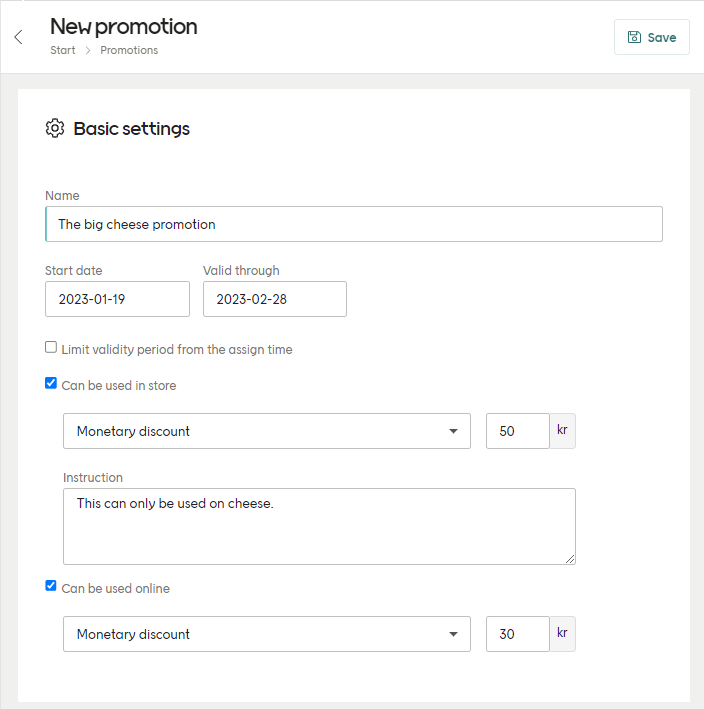
- Monetary discount
- Discount in percent
- Manual instruction (only for in-store POS)
- External promotion code
Learn about setting up multichannel promotions
Promotions via XML file import
Promotions via XML file import
Assigning promotions by XML file import are covered in this article:

Assigning promotions by XML file
Get promotions for contact
The API endpoint used to fetch all available promotions assigned to a contact is:-
contactId - The contact’s unique ID. If you have some other contact identifier, use this endpoint to get the
contactIdyou will need for this request. - redemptionChannelType - “ECOM”, “POS” or “OTHER”. If left out, all promotions are returned.
See example request
See example request
See example response
See example response
string
This identifies a specific “instance” of the promotion that was created from the “template” that was identified by
promotionId. The id value is unique to that contact and is the one used when redeeming this promotion.string
This is the ID of the main promotion (the “template” this particular promotion was created from). Many customers can have the same value for this, since it just refers to the main promotion. This CAN’T be used to redeem a promotion.
string
This value exists when the promotion has been created over the API. If the promotion was created manually in the Customer Engagement UI, this is null. It is not important when redeeming the promotion.
Redemption channels
When getting a contact’s promotion data, you’ll get back something like this:redemptionChannels object in the response specifies if a promotion is a percentage, a monetary amount to be withdrawn from the total amount of the transaction, or an external discount code that refers to a price rule in your platform.
See redemption channels object
See redemption channels object
redemptionChannels object:
- type - Which channel the promotion applies to.
- valueType - Which type of discount we want to assign (percentage, monetary or external code).
- value - The percentage, monetary amount or external code referring to the external price rule. With a monetary discount we also expose the group currency set in Customer Engagement for that client.
- instruction - An instruction that can be used, for example, to give some information to store staff regarding the promotion.
redemptionChannels examples:
Example: POS promotion with percentage discount
Example: POS promotion with percentage discount
Example: E-com promotion with external discount code
Example: E-com promotion with external discount code
Example: POS promotion with monetary discount
Example: POS promotion with monetary discount
Create a promotion
Create a promotion using the following endpoint:- A start date and a validity time
- A start date and an end date
Creation request - start date and validity time
Creation request - start date and validity time
Creation response - start date and validity time
Creation response - start date and validity time
Here is a successful response, containing the promotion’s ID:
Creation request - start date and end date
Creation request - start date and end date
Here is what such a request looks like:
Creation response - start date and end date
Creation response - start date and end date
Here is a successful response, containing the promotion’s ID:The maximum value for end date is “9999-12-30”.
- 400: BadRequest
- 500: Error
Update a promotion
You can update (alter) a multichannel promotions over the Customer Engagement API. You can update the entire promotion or only its validity. Each method uses a different API endpoint:Updating the entire promotion
Updating the entire promotion
To update the entire multichannel promotion, used this endpoint:Send a payload in the same format as when you created the promotion, including your updates:
Updating the promotion's validity
Updating the promotion's validity
To update just the duration of an existing multichannel promotion, send a PUT to this endpoint:With a payload formatted like this:
Assign a promotion
A promotion is of no use unless it is assigned to contacts. Multichannel promotions are assigned to contacts via the API like this:- 400: InvalidContactId, InvalidPromotionId
- 404: ContactNotFound, PromotionNotFound
Redeem a promotion
As soon as a promotion is used in a purchase, it must be redeemed in Customer Engagement so it can’t be used again. To do this you’ll need to know:- the promotion’s unique assignment ID
- the redemption channel, either “POS” or “ECOM”
1
Call the /redeem endpoint
Redeem the promotion with a call to this endpoint, adding the assignment ID in the path:In the request body, add the redemption channel:
2
Add promotion ID to /receipts call
As with every purchase, you will also call this endpoint with the full receipt information:Here you will add the assignment ID of the promotion used to the
usedPromotions block in the body of the query:/receipts endpoint but not /redeem, the promotion will still be redeemed, but often after a delay, bringing the risk that it could be used again.
If you call /redeem but miss to add the promotion assignment ID to the /receipts call, the system will not know which transaction to connect the redeemed promotion to. It will try to work it out based on the timestamp, checking for transactions within ±5 minutes of the redemption.
So you should always do both of these things whenever a promotion is used in a purchase.
Redemption response codes
If the request has been successful, you’ll get a HTTP 200 OK response. Otherwise you’ll get one of these:- 400: NotAValidRedemptionChannel, InvalidPromotionIdNoData
- 404: PromotionNotFound, PromotionNotAssociatedWithContact
- 409: PromotionNotValidForRedemptionChannel, PromotionAlreadyRedeemed, PromotionAlreadyRedeemed
- 504: GatewayTimeout
Delete a promotion
You can delete a promotion using its Customer Engagement ID or its external ID (assuming an external ID was used when creating the promotion).Delete a promotion using its Customer Engagement ID
Delete a promotion using its Customer Engagement ID
To delete a multichannel promotion using the ID, use this endpoint:The
id value here is the Customer Engagement ID (“31bc4f89-6e71-4086-8627-af8f01073331” or similar).Delete a promotion using its external ID
Delete a promotion using its external ID
To delete a multichannel promotion using the external ID, use this endpoint with
externalId as the query parameter: